Smart Home Privacy
Alexa vs Google Home vs Apple Home: Privacy 2026
Alexa vs Google Home vs Apple Home vs Home Assistant for privacy in 2026: where voice hits the cloud, hub requirements, Matter support, and local-first control trade-offs.
Quick answer: Which smart home ecosystem is most private in 2026?
Home Assistant is the only stack fully local by default. Apple Home and HomeKit lean local with a hub but still tie to Apple accounts. Google Home and Alexa optimize for cloud voice and skills—use them as thin remotes into Home Assistant if you need vendor assistants without full cloud control.
Source: Home Assistant
Executive Summary
In 2026, choosing the right smart home ecosystem involves balancing privacy, local control, and cost. Apple Home, Google Home, Alexa, and Home Assistant each offer unique advantages and trade-offs. Pair this decision with Matter vs Zigbee vs Z-Wave vs Thread, smart speakers without cloud, and local voice assistant.
The bottom line: If privacy and local control are your top priorities, Home Assistant is unmatched. For Apple users, Apple Home provides excellent privacy with seamless integration. Google Home and Alexa offer broader device compatibility but at the cost of increased cloud reliance.
| Goal | Lean toward |
|---|---|
| Local automations + APIs | Home Assistant |
| Apple-only household | Apple Home |
| Widest voice skills | Alexa or Google |
Privacy: Local vs Cloud Processing
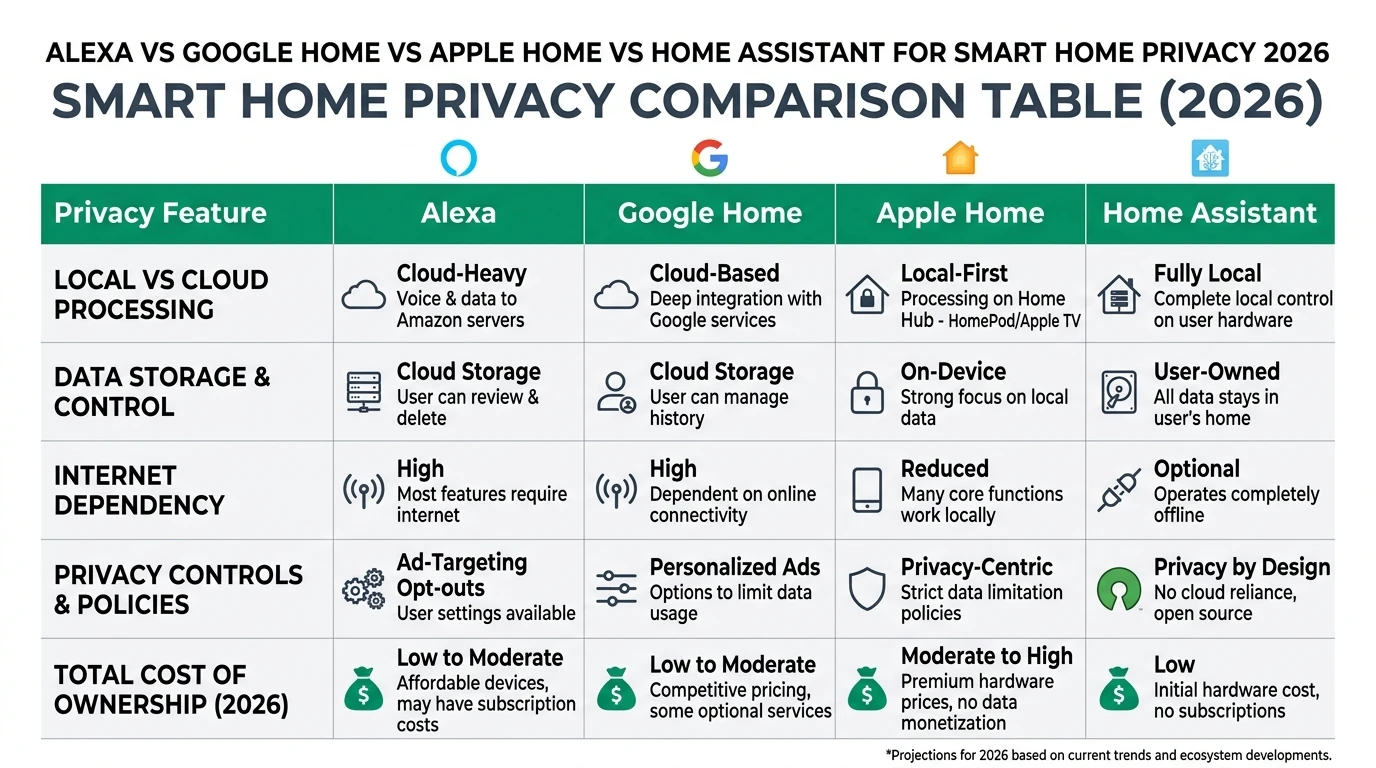
Privacy is a critical concern for smart home users in 2026. Each ecosystem handles data differently, impacting your privacy.
Apple Home stands out with its commitment to privacy. It processes most commands locally on your devices, such as the HomePod or Apple TV, ensuring that your data doesn’t leave your home. This local processing is complemented by end-to-end encryption, making it a top choice for privacy-conscious users1.
Google Home offers a hybrid approach, using cloud processing with some local assistance. While this setup allows for advanced AI features, it means that some of your data is processed on Google’s servers, which might be a concern if you prioritize privacy over functionality1.
Alexa relies heavily on cloud processing, which provides robust AI capabilities and compatibility with a wide range of devices. However, this reliance on the cloud means that your data is often processed on Amazon’s servers, which may not align with strict privacy preferences1.
Home Assistant is the gold standard for privacy, offering 100% local control. All processing occurs on your local network, ensuring that no data is sent to external servers. This makes it ideal for users who want complete control over their smart home data2.
Local Control and Offline Reliability
Local control and offline reliability are crucial for maintaining a functional smart home, even during internet outages.
Apple Home excels in this area with its Home Hub, which allows for local execution of commands. This means that even if your internet goes down, your smart home devices will continue to function seamlessly1.
Google Home provides moderate local control. While some functions can operate offline, many features still depend on cloud connectivity. This can be a limitation if you experience frequent internet disruptions1.
Alexa offers the least offline reliability among the major ecosystems. Its heavy reliance on cloud processing means that many features become unavailable without an internet connection1.
Home Assistant again leads the pack with its full local control. Designed to operate independently of the cloud, it ensures that all your devices remain functional even when offline. This makes it a robust choice for those who prioritize reliability2.
Total Cost of Ownership (TCO)
Understanding the total cost of ownership is essential when planning a smart home setup. This includes hardware costs, potential subscriptions, and any additional expenses.
Apple Home requires an initial investment in a HomePod or Apple TV to serve as a hub. While there are no mandatory subscriptions, the cost of Apple devices can add up, especially if you expand your setup1.
Google Home offers a more budget-friendly entry point with devices like the Nest Hub. However, advanced features may require a subscription to premium services, adding to the long-term cost3.
Alexa provides the lowest initial cost with affordable Echo devices. While basic functionality is free, subscribing to Alexa+ for advanced AI features can increase the overall expense4.
Home Assistant has a unique cost structure. The software itself is free, but you’ll need compatible hardware like a Raspberry Pi and possibly additional components like Zigbee sticks. While the upfront cost can be higher, there are no ongoing subscription fees, making it cost-effective in the long run5.
| Ecosystem | Privacy Strength | Local Control | Offline Reliability | Est. TCO (1st Year, 5 Devices) |
|---|---|---|---|---|
| Apple Home | Excellent (local/on-device)14 | High (Home Hub) | High | $200–500 (hub req.)1 |
| Google Home | Moderate (cloud w/ local assist)1 | Medium | Medium | $100–300 (Nest Hub ~$70)3 |
| Alexa | Fair (cloud)1 | Low | Low | $50–200 (Echo free tier)4 |
| Home Assistant | Excellent (100% local)2 | Highest | Highest | $150–400 (hardware + time)5 |
Ecosystem Compatibility and Future-Proofing
As smart home technology evolves, compatibility and future-proofing become increasingly important.
Apple Home integrates deeply with the Apple ecosystem, providing seamless operation with iPhones, iPads, and Macs. It supports the Matter and Thread standards, ensuring compatibility with a growing range of devices1.
Google Home is known for its broad compatibility, working well with both Android and iOS devices. Its support for Matter ensures that it will remain relevant as new devices enter the market1.
Alexa boasts the widest range of compatible devices, thanks to Amazon’s extensive ecosystem partnerships. It also supports Matter, which helps future-proof your setup6.
Home Assistant is unmatched in flexibility, supporting a wide array of protocols including Zigbee, Thread, and Matter. Its open-source nature allows for extensive customization and integration with various devices, making it a versatile choice for tech-savvy users5.
Checklist
- Ensure your chosen ecosystem supports Matter for future compatibility.
- Consider the range of compatible devices when selecting a platform.
- Evaluate the ease of integration with existing devices.
Security and Privacy Implications
Security and privacy are paramount in any smart home setup. Each ecosystem offers different levels of protection.
Apple Home leads with robust security features, including end-to-end encryption and two-factor authentication. Its privacy-by-design approach ensures that your data remains secure and private1.
Google Home provides reasonable security measures, but its reliance on cloud processing means that some data is stored on Google’s servers. While Google claims not to share data without consent, the potential for data usage in targeted advertising remains a concern1.
Alexa offers standard security features, but its cloud-based nature means that data is processed on Amazon’s servers. This could be a drawback for users who prioritize data privacy1.
Home Assistant offers unparalleled security by keeping all data local. This eliminates the risk of data breaches associated with cloud storage, making it the most secure option for privacy-conscious users2.
Setup Complexity and Support Burden
The ease of setup and ongoing support requirements can significantly impact your smart home experience.
Apple Home, Google Home, and Alexa offer straightforward, plug-and-play setups. Their polished apps and intuitive interfaces make them accessible to non-tech users, with device pairing typically taking 5 to 10 minutes5.
Home Assistant requires a more involved setup process, often taking 1 to 2 hours initially. While it offers extensive customization, this can also mean a steeper learning curve and ongoing tweaks to maintain and expand your setup5.
Support for Apple, Google, and Alexa is typically vendor-driven, providing reliable assistance. In contrast, Home Assistant relies on community support, which is free but can be time-intensive2.
Primary Sources Table
| Index | Title/Description | Direct URL |
|---|---|---|
| 1 | Apple HomeKit vs Google Home vs Alexa: Comparison 2026 | Link |
| 2 | Apple HomeKit vs Google Home vs Alexa vs SmartThings in 2026 | Link |
| 3 | Apple Home vs Google vs Home Assistant—Which Should You… (YouTube) | Link |
| 4 | The Best Home AI Assistant of 2026 | Link |
| 5 | Which Smart Home Platform Should People Choose in 2026? (YouTube) | Link |
| 6 | Home Assistant vs Google Home: Comparison 2026 | Link |
| 7 | The Battle of Smart Home Assistants | Link |
| 8 | Apple Home vs Alexa vs Google: how to choose… | Link |
FAQ
Frequently Asked Questions
Which smart home ecosystem offers the best privacy in 2026?
Home Assistant offers the best privacy with 100% local control, ensuring no data leaves your home.
Is Apple HomeKit secure?
Yes, Apple HomeKit is highly secure, featuring end-to-end encryption and local processing for most commands.
Can Google Home function offline?
Google Home offers moderate offline functionality, but many features still rely on cloud connectivity.
What is the total cost of ownership for Alexa?
Alexa’s TCO is low initially, but advanced features may require a subscription, increasing long-term costs.
How complex is setting up Home Assistant?
Setting up Home Assistant can be complex, requiring 1-2 hours initially, but it offers extensive customization.
Conclusion
Choosing the right smart home ecosystem in 2026 requires careful consideration of privacy, local control, and cost. Each platform offers distinct advantages, making it essential to align your choice with your specific needs and priorities.
For further insights, explore our guides on Apple HomeKit Secure Video vs Local NVR for Privacy, Aqara vs Shelly vs Tuya Privacy 2026, Best Hardware for Local AI Smart Home 2026, Home Assistant vs openHAB vs Homebridge, and CCPA and state privacy laws.