Comparisons
Apple HomeKit Secure Video vs Local NVR: Privacy Comparison
Explore the privacy, reliability, and cost differences between Apple HomeKit Secure Video and local NVR systems.
Quick answer: HomeKit Secure Video or local NVR for privacy?
HomeKit offers end-to-end encryption and Apple integration but requires iCloud+ and is event-only. Local NVR gives full control, continuous recording, and no subscription—better for privacy purists.
Source: Apple iCloud Support
Executive Summary
In the realm of home security, choosing between Apple HomeKit Secure Video (HSV) and local Network Video Recorder (NVR) systems involves a careful evaluation of privacy, reliability, and cost. HomeKit Secure Video offers a cloud-based solution with end-to-end encryption and integration with Apple’s ecosystem, making it a convenient choice for users already invested in Apple products. However, it requires an iCloud+ subscription and is limited to event-based recording. On the other hand, local NVR systems provide continuous recording, offline access, and complete control over data storage, appealing to users who prioritize privacy and autonomy.
The bottom line: If you value seamless integration with Apple devices and don’t mind a subscription, HomeKit Secure Video is a solid choice. For those who prioritize privacy and control without recurring costs, a local NVR system is more suitable.
Privacy and Security Considerations
Privacy is a paramount concern for users choosing between HomeKit Secure Video and local NVR systems. HomeKit Secure Video is designed with privacy in mind, offering end-to-end encryption and on-device analysis of video footage before it is uploaded to iCloud1. This ensures that video content is secure and only accessible to authorized users. However, the reliance on cloud services means that an internet connection is necessary for accessing video footage remotely, which could be a drawback for those who prefer offline access.
Local NVR systems, in contrast, offer complete control over video data, as all recordings are stored locally on the device. Compare options in our subscription-free camera guide. This eliminates the need for cloud storage and ensures that video footage is not transmitted over the internet, reducing the risk of unauthorized access. Users can configure their NVR systems to suit their privacy needs, including setting up secure access permissions and choosing where and how data is stored.
HomeKit Secure Video vs local NVR privacy
| Product | Cloud required | Local storage | Mandatory account | Offline control | Score / 10 |
|---|---|---|---|---|---|
| HomeKit Secure Video | Yes (iCloud) | Event clips only | iCloud+ | Limited | 7.0 |
| Local NVR (Reolink, Ubiquiti) | No | Full control | No | Excellent | 9.0 |
While both systems offer robust privacy features, the choice ultimately depends on the user’s comfort level with cloud storage and their preference for data control. Users concerned about potential vulnerabilities in cloud services may lean towards local NVR systems, while those who appreciate the convenience of remote access might prefer HomeKit Secure Video.
Recording Capabilities and Storage
When it comes to recording capabilities, HomeKit Secure Video and local NVR systems offer distinct advantages. HomeKit Secure Video provides up to 10 days of cloud-based video history, which is sufficient for users who primarily need short-term access to footage2. However, this event-based recording approach means that continuous monitoring is not possible, which could be a limitation for users who require 24/7 surveillance.
Local NVR systems, on the other hand, excel in providing continuous recording capabilities. With storage options that can be configured up to 6 TB, users can maintain extensive video archives without worrying about subscription fees3. This is particularly beneficial for businesses or individuals who need to retain footage for extended periods. The ability to customize storage settings and manage data locally offers a level of flexibility that cloud-based solutions cannot match.
| Criterion | HomeKit Secure Video | Local NVR |
|---|---|---|
| Recording capability | 10 days cloud history2 | Up to 6 TB local storage, no subscription3 |
| Video resolution | 1080p in Home app; 4K local option (eufy)1 | Full configuration control; up to 4K native3 |
| 24/7 recording | Event-based only4 | Continuous recording available3 |
For users who prioritize long-term storage and continuous monitoring, local NVR systems are the clear choice. However, those who are comfortable with event-based recording and value the convenience of cloud storage may find HomeKit Secure Video to be adequate for their needs.
Ecosystem Integration and User Experience
The integration of security systems with existing smart home infrastructure is a crucial factor for many users. HomeKit Secure Video offers seamless integration with Apple’s ecosystem, allowing users to manage their security cameras through the Home app on their iOS devices2. This integration extends to other Apple devices, such as the Apple TV and HomePod, which can serve as home hubs for managing video footage.
Local NVR systems, while not tied to a specific ecosystem, offer flexibility in terms of hardware and software compatibility. See our Reolink vs Ubiquiti comparison for NVR options. Users can choose from a variety of cameras and NVR models, tailoring their setup to fit their specific needs. This independence from a single ecosystem can be advantageous for users who prefer to mix and match devices from different manufacturers.
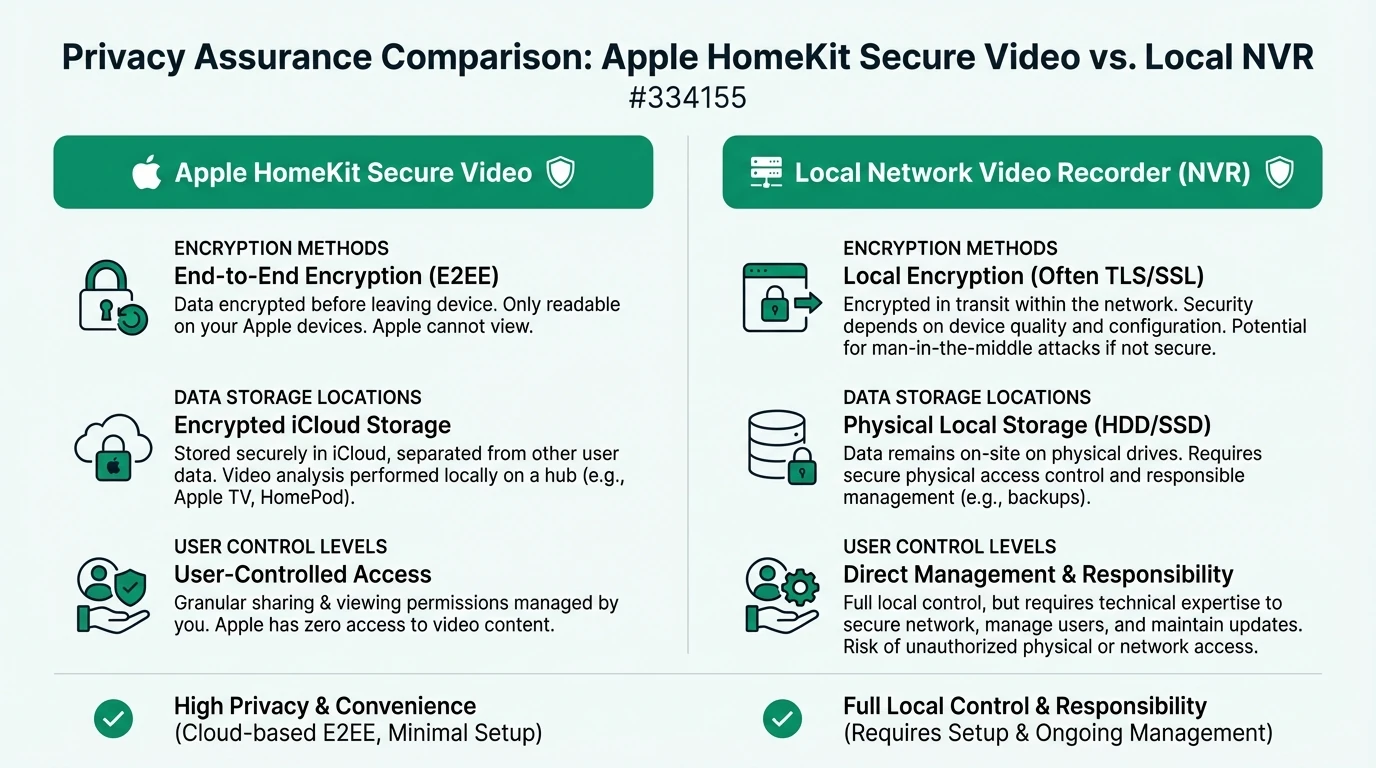
While HomeKit Secure Video offers a streamlined user experience for Apple users, local NVR systems provide greater flexibility and customization options. The choice between the two depends on the user’s preference for ecosystem integration versus hardware independence.
Cost Analysis and Financial Transparency
The financial aspect of choosing a security system is a significant consideration for many users. HomeKit Secure Video requires an iCloud+ subscription, with costs ranging from $2.99 to $9.99 per month, depending on the storage plan2. This subscription model provides a predictable monthly expense but can add up over time, especially for users with multiple cameras.
Local NVR systems, in contrast, involve a higher upfront investment in hardware but do not incur recurring subscription fees. This can be more cost-effective in the long run, particularly for users who require extensive storage and multiple cameras. The absence of subscription fees also means that users have full control over their budget and can avoid unexpected costs.
| Cost Component | HomeKit Secure Video | Local NVR |
|---|---|---|
| Subscription | $2.99–$9.99/month2 | None |
| Hardware | $99–$349 for home hub2 | Higher initial investment3 |
| Annual Cost | $36–$120 minimum | $0 |
For users who prefer a predictable monthly expense and are already invested in the Apple ecosystem, HomeKit Secure Video may be the more appealing option. However, those who prioritize long-term savings and complete financial control may find local NVR systems to be a better fit.
Setup Complexity and Technical Support
The complexity of setting up a security system can vary significantly between HomeKit Secure Video and local NVR systems. HomeKit Secure Video is designed to be user-friendly, with a straightforward setup process that involves configuring a home hub and subscribing to iCloud+2. The Home app provides a simple interface for managing cameras and accessing video footage, making it accessible to users with limited technical expertise.
Local NVR systems, on the other hand, require a more hands-on approach. Users must physically install cameras and manage cable connections, particularly for wired systems3. The setup process can be more complex, requiring a higher level of technical knowledge and familiarity with network configurations. However, this complexity is offset by the greater control and customization options available to users.
Decision checklist
- Evaluate your technical expertise before choosing a system.
- Consider the ease of setup and ongoing maintenance.
- Assess the availability of technical support and resources.
While HomeKit Secure Video offers a more streamlined setup experience, local NVR systems provide the opportunity for deeper customization and control. Users should consider their technical skills and willingness to manage a more complex system when making their decision.
FAQ
Frequently Asked Questions
What is the main privacy advantage of HomeKit Secure Video?
HomeKit Secure Video offers end-to-end encryption and on-device analysis, ensuring that video content is secure and only accessible to authorized users.
Can local NVR systems work without an internet connection?
Yes, local NVR systems can operate entirely offline, providing continuous recording and access without relying on cloud services.
What are the storage limitations of HomeKit Secure Video?
HomeKit Secure Video provides up to 10 days of cloud-based video history, with storage limits depending on the iCloud+ subscription plan.
How does the cost of HomeKit Secure Video compare to local NVR systems?
HomeKit Secure Video involves a monthly subscription cost, while local NVR systems require a higher upfront investment but have no recurring fees.
Is technical support available for both systems?
Yes, both systems offer technical support, but the complexity of setup and maintenance may vary, with HomeKit Secure Video being more user-friendly.
Primary Sources Table
| Source | URL | Type | Relevance |
|---|---|---|---|
| Apple iCloud Support | Apple iCloud Support | Official documentation | HSV features, encryption, storage limits |
| Apple iPhone Setup Guide | Apple iPhone Setup Guide | Official documentation | HSV setup, Activity Zones, notifications |
| Eufy Security Blog | Eufy Security Blog | Product guide | HSV camera compatibility, local storage options |
| Reolink Comparison Video | Reolink Comparison Video | Video analysis | NVR vs Home Hub connectivity, storage, configuration |
| HomeKit Critique Video | HomeKit Critique Video | User analysis | HSV limitations: 1080p, 24/7 recording gaps, offline issues |
| Ubiquiti Community | Ubiquiti Community | Community discussion | HomeKit support ecosystem questions |
Conclusion
In conclusion, the decision between Apple HomeKit Secure Video and local NVR systems hinges on individual priorities regarding privacy, cost, and ecosystem integration. HomeKit Secure Video offers a seamless experience for Apple users, with the convenience of cloud storage and integration with other Apple devices. However, it comes with a subscription cost and limitations in recording capabilities. Local NVR systems, while requiring a higher upfront investment and technical expertise, provide greater control over data and eliminate recurring fees.
For further exploration, consider reading our guides on best local storage security cameras without subscription, running a smart home entirely on a local network, and comparison of smart home hubs with no mandatory cloud account.