Smart Home Privacy
Best Local Storage Security Cameras 2026
Compare subscription-free security camera systems with local storage, offline behavior, privacy controls, and total 3-year ownership costs.
Quick answer: Which camera setup gives the best privacy in 2026?
For most homes, PoE cameras paired with local NVR storage and no mandatory vendor account provide the strongest privacy, reliability, and long-term cost control.
Executive summary
The phrase “no subscription camera” is often misleading. Some products skip monthly storage fees but still require permanent cloud accounts, outbound telemetry, or vendor-only mobile workflows. For privacy-focused buyers, those hidden dependencies matter more than monthly pricing.
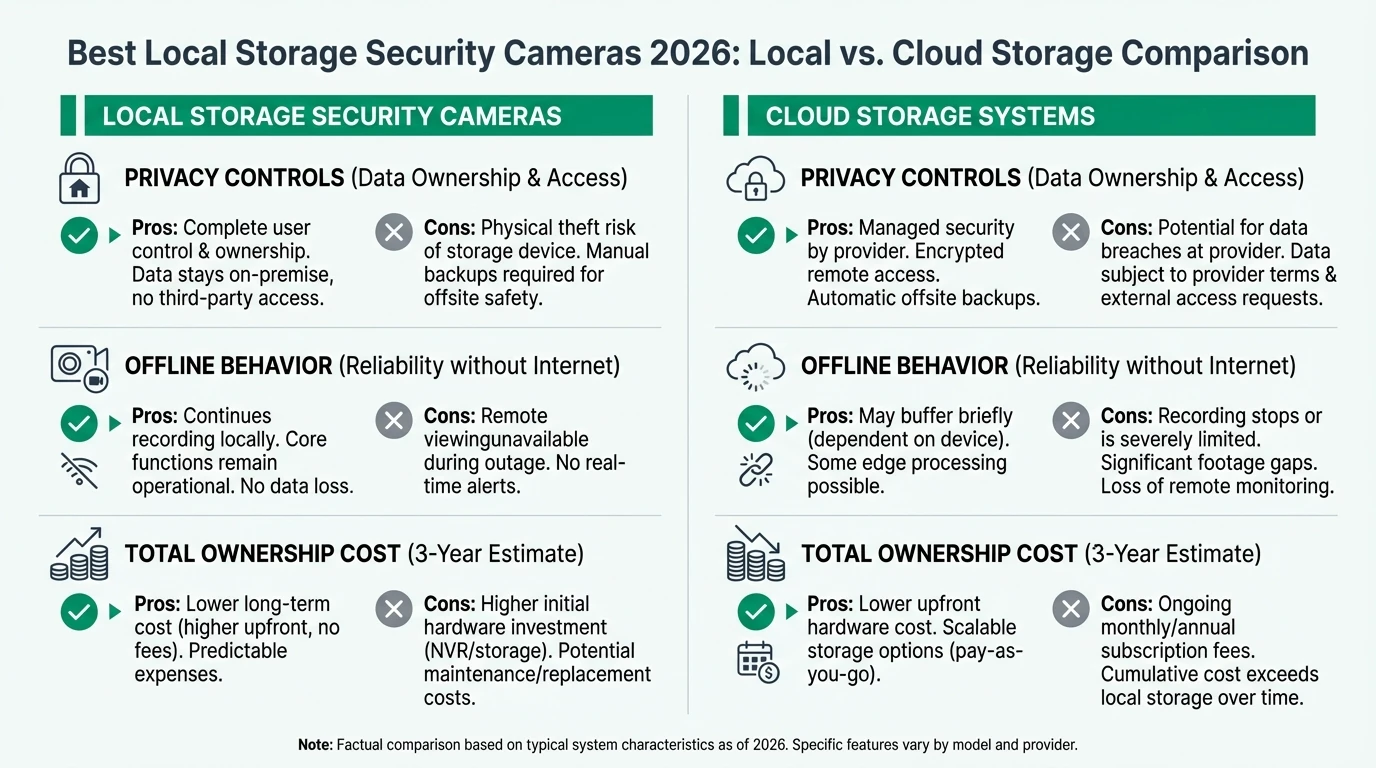
A good local-first camera stack has three properties: predictable recording when offline, exportable evidence data, and transparent account requirements. The best systems may have higher upfront cost, but they reduce policy and availability risk over time.
Bottom line: prioritize local recording architecture and account independence before image quality extras.
Warning: marketing claims like “supports local storage” may still rely on cloud activation or app lock-in for core camera configuration.
1) Buying criteria that actually predict privacy outcomes
Most “best camera” lists rank sensor specs, night vision, and app polish. Those are useful, but they do not tell you whether your data remains under your control after firmware changes or product lifecycle shifts.
Use a weighted framework where privacy controls and offline reliability are first-order criteria. If a product cannot maintain local recording after internet loss, it should be downgraded regardless of image quality.
| Criterion | Why it matters | Weight (privacy-first) |
|---|---|---|
| Mandatory cloud account | Determines baseline lock-in risk | 25% |
| Local storage quality | Controls retention ownership | 20% |
| Offline recording behavior | Tests outage resilience | 20% |
| Local API availability | Enables independent automation | 15% |
| Long-term operating cost | Protects against subscription drift | 10% |
| Setup/maintenance complexity | Affects real-world sustainability | 10% |
See the architecture baseline in the cloud-free pillar guide before selecting individual camera SKUs.
2) Local storage architectures: NVR, NAS, or onboard card
Not all local storage strategies are equivalent. MicroSD-only camera deployments are easy to start but weak for event correlation, retention policy control, and long-range forensic review.
NVR-centered designs provide better consistency and multi-camera timeline analysis. NAS integration can add long-term retention and encrypted off-device backup without forcing external cloud storage.
| Storage path | Typical use case | Main strength | Main limitation |
|---|---|---|---|
| Camera microSD | Small installs, low complexity | Lowest entry cost | Fragile retention and limited audit workflow |
| Dedicated NVR | Multi-camera home security | Reliable continuous recording | Higher upfront spend |
| NVR + NAS tiering | Evidence retention and analytics | Best control and continuity | Higher operational complexity |
3) Privacy score comparison (example ecosystems)
No consumer ecosystem is perfect, but there are clear tiers. Systems with local-first defaults and documented local workflows provide materially better long-term control than cloud-dependent alternatives.
Subscription-free camera ecosystem privacy scores
| Product | Cloud required | Local storage | Mandatory account | Offline control | Score / 10 |
|---|---|---|---|---|---|
| Reolink PoE + local NVR | No | Strong | No | Strong | 8.9 |
| Ubiquiti Protect stack | No (core recording) | Strong | Optional for remote workflows | Strong | 8.5 |
| Cloud-native Wi-Fi bundle | Yes (usually) | Weak | Yes | Weak | 4.0 |
Pair this with hub compatibility analysis if you need local automations to trigger camera actions.
4) Hidden costs and false economies
A cheaper camera can become expensive when retention and remote viewing are separated into add-ons. The decision should be evaluated over at least three years, not at checkout.
Consider labor and reliability costs too. Manual export workflows, unstable app updates, and poor evidence retrieval quality all impose real operational burden even if they do not appear on an invoice.
| Cost dimension (3 years) | Subscription bundle | Local-first NVR bundle |
|---|---|---|
| Upfront hardware | Lower | Higher |
| Recurring fees | Higher | Lower |
| Migration flexibility | Low | Medium/High |
| Evidence ownership | Vendor mediated | User controlled |
5) Offline behavior test plan before final purchase
Do not trust spec sheets alone. Run an offline validation test inside your own network before committing to expansion. This reduces replacement risk and reveals hidden dependencies.
A short acceptance test should include: internet cut simulation, local timeline review, export validation, and restart recovery checks.
48-hour camera acceptance test
- Disconnect WAN and verify continuous local recording for every camera.
- Confirm timeline and event metadata are available on local network only.
- Export a representative clip and verify codec and timestamp integrity.
- Reboot camera and NVR once to validate recovery without cloud assistance.
- Document every operation that still requires vendor cloud login.
Use segmented network rules from this network control guide while testing.
6) Recommended buyer profiles
Different households need different trade-offs. A one-size recommendation is usually wrong.
| Buyer profile | Recommended direction | Why |
|---|---|---|
| Privacy-first beginner | Local NVR starter kit + staged expansion | Fast privacy gains with manageable complexity |
| Home office risk-sensitive | PoE camera network + strict VLAN isolation | Better control against lateral movement1 |
| Budget constrained | Start with fewer better cameras | Better evidence quality and lower replacement churn |
Frequently Asked Questions
Frequently Asked Questions
Are PoE cameras always better for privacy than Wi-Fi cameras?
Not always, but PoE systems are often easier to isolate, monitor, and maintain at scale. They also reduce dependence on consumer cloud onboarding flows.
Can I avoid all subscriptions with local NVR systems?
In many setups, yes. You may still pay for optional remote services, but local recording and playback can usually run subscription-free.
How many days of retention should a home setup target?
That depends on your risk model, but 14-30 days is common for household incidents. High-risk environments often target longer retention with NAS tiering.
What if a vendor removes local API support later?
This is why exit strategy matters. Favor ecosystems with strong local defaults and documented migration paths before scaling deployment.
Is local storage enough without network controls?
No. Storage ownership helps, but segmentation and outbound policy controls are required to reduce exposure from vulnerable endpoints.
Primary sources
| Source | Type | URL |
|---|---|---|
| CISA Secure by Design | Security guidance | cisa.gov |
| NIST IoT cybersecurity references | Security framework | nist.gov |
| ENISA IoT good practices | EU guidance | enisa.europa.eu |
Conclusion
The best local storage camera setup in 2026 is the one that keeps recording and recoverability under your control when cloud dependencies fail. For most buyers, that means local NVR architecture with explicit network controls and staged deployment.
Avoid over-optimizing for feature checklists. Optimize for verifiable control paths, sustainable maintenance, and data ownership.
Footnotes
-
Lateral movement risk is reduced when camera devices cannot initiate unrestricted access to trusted workstation segments. ↩