Smart Home Privacy
Caddy vs Traefik vs NGINX Proxy Manager for HA 2026
Compare Caddy, Traefik, and NGINX Proxy Manager for Home Assistant reverse proxy in 2026: TLS automation, telemetry, Docker workflows, and how each pairs with local HTTPS strategy.
Quick answer: Which reverse proxy fits a privacy-first Home Assistant setup?
Caddy is the fastest path to automatic HTTPS with minimal config. Traefik shines when everything is Docker-native and labels drive routing. NGINX Proxy Manager helps GUI-first operators—but still protect the admin DB and patch the stack.
Source: Caddy server documentation
Executive Summary
In 2026, choosing the right reverse proxy for Home Assistant (HA) is crucial for ensuring privacy, local control, and offline reliability. Reference upstream docs: Caddy, Traefik, Nginx Proxy Manager. Pair this layer with Let’s Encrypt vs self-signed for local HTTPS, Tailscale vs WireGuard vs ZeroTier for remote access patterns, and securing your NAS if certificates or configs live on shared storage.
Bottom line: For most users prioritizing privacy and ease of use, Caddy is the top choice for Home Assistant in 2026.
| Need | Lean toward |
|---|---|
| Fewest moving parts + ACME | Caddyfile on one host |
| Swarm/K8s style discovery | Traefik |
| Web UI + quick host records | NPM (lock down admin) |
Privacy and Security Considerations
Privacy is a paramount concern for Home Assistant users, especially when exposing services to the internet. Caddy stands out with its native automatic HTTPS and zero-logging policy, ensuring that no data is inadvertently shared or logged. This makes it an excellent choice for users who want to avoid potential data leaks associated with cloud services. Caddy’s approach to security is proactive, with features like automatic TLS that require minimal configuration, reducing the risk of human error1.
Traefik, while also offering robust security features, includes optional telemetry that could be a concern for privacy-focused users. However, its dynamic configuration capabilities through Docker labels make it highly adaptable for environments where services frequently change. This flexibility can be a double-edged sword, as it requires careful management to ensure that all configurations are secure2.
NGINX Proxy Manager, on the other hand, uses a SQLite database to store configurations, which poses a local privacy risk if the database is exposed. While the GUI simplifies management, it also introduces potential vulnerabilities if not properly secured. Users must ensure that the database is protected and that regular backups are performed to prevent data loss3.
Local Control and Offline Reliability
For many Home Assistant users, the ability to maintain local control and operate offline is crucial. Caddy excels in this area, as it can function entirely offline after the initial certificate acquisition. This is particularly beneficial for environments where internet connectivity is unreliable or where users prefer to minimize external dependencies4.
Traefik requires an internet connection for initial TLS setup and service discovery, which can be a limitation in offline scenarios. However, once configured, it can operate locally, making it suitable for users who need dynamic service management but can ensure initial connectivity5.
NGINX Proxy Manager also supports offline operation post-setup, but its reliance on a database means that users must be diligent about database management. The GUI simplifies configuration but adds a layer of complexity that could impact offline reliability if not properly maintained6.
Total Cost of Ownership (TCO)
When considering the total cost of ownership, it’s important to factor in both time and resources. Caddy offers the lowest TCO, with minimal setup and maintenance requirements. Its straightforward configuration and automatic updates reduce the time spent on management, making it an attractive option for users who want to minimize their investment in time and effort7.
Traefik, while free, requires more time for setup and ongoing management, especially in dynamic environments. Its flexibility comes at the cost of complexity, which can increase the time required for troubleshooting and updates8.
NGINX Proxy Manager, with its GUI, offers a low barrier to entry but requires regular updates and database maintenance. This can lead to higher ongoing costs, particularly if issues arise that require manual intervention9.
| Criterion | Caddy | Traefik | NGINX Proxy Manager (NPM) |
|---|---|---|---|
| Privacy | High | Moderate | Moderate |
| Local Control/Offline | High | Moderate | Moderate |
| TCO | Low | Moderate | Moderate |
| HA Integration | High | High | Moderate |
| Performance | High | Moderate | High |
Integration with Home Assistant
Integration with Home Assistant is a key consideration for users seeking a seamless experience. Caddy’s simple configuration file, known as the Caddyfile, allows for easy integration with Home Assistant’s Docker setup. This simplicity makes it an ideal choice for users who want a hassle-free setup process10.
Traefik’s use of Docker labels for configuration provides a powerful way to manage dynamic environments. This makes it particularly well-suited for users who frequently add or remove services and need a proxy that can adapt quickly11.
NGINX Proxy Manager offers a GUI-based approach, which can be appealing for users who prefer visual management tools. However, this can also limit flexibility compared to the more scriptable options provided by Caddy and Traefik12.
Checklist
- Caddyfile simplicity for Docker
- Traefik's dynamic label configuration
- NPM's GUI for ease of use
Performance and Resource Utilization
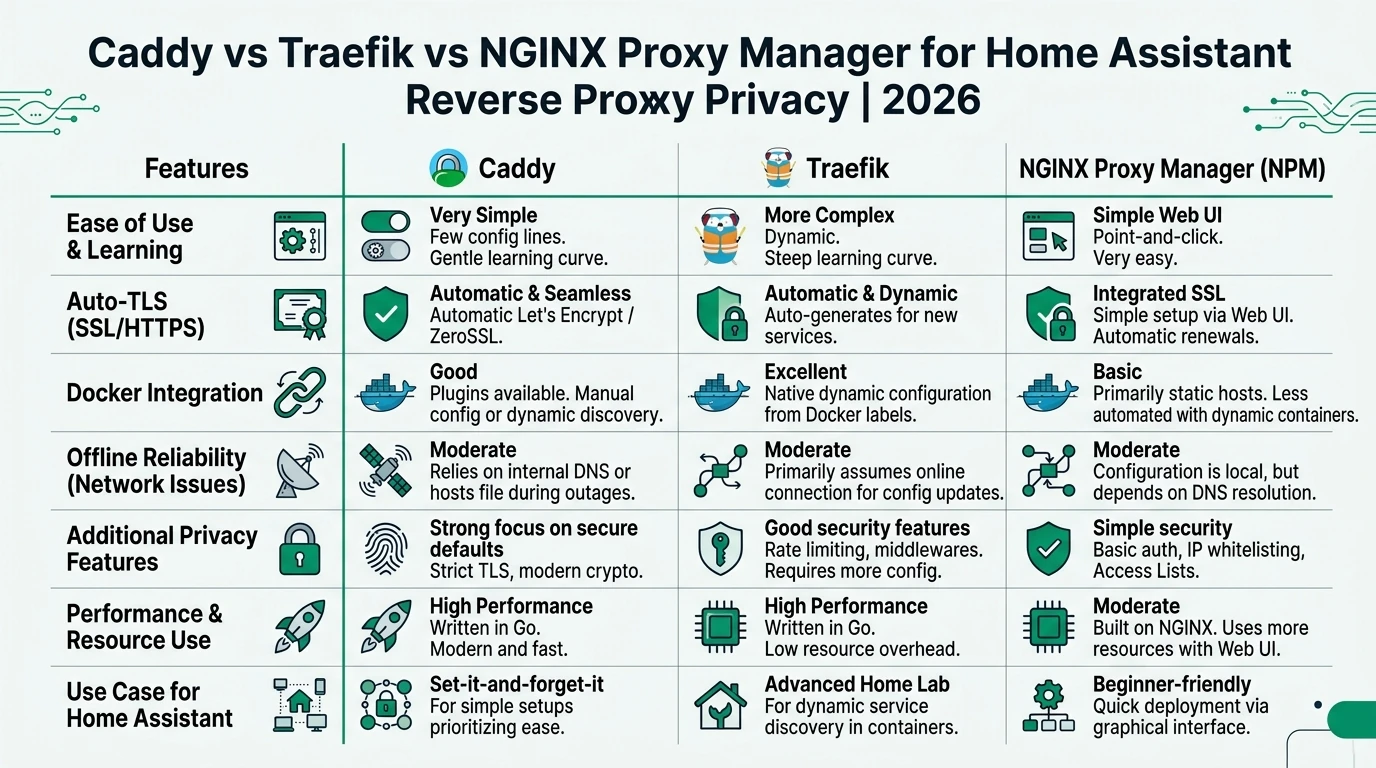
Performance is another critical factor, especially for users running Home Assistant on limited hardware like a Raspberry Pi. Caddy is known for its efficient resource usage, making it an excellent choice for low-power devices. It can handle a high number of requests per second with minimal CPU usage, which is ideal for home environments13.
Traefik, while slightly more resource-intensive, offers good performance, especially in environments with many dynamic services. Its Go-based architecture provides a balance between performance and flexibility, allowing it to handle a variety of workloads14.
NGINX Proxy Manager, leveraging the NGINX core, offers top throughput but may require more resources due to its GUI and database components. This can be a consideration for users with limited hardware resources15.
Setup Complexity and Support Burden
The complexity of setup and the ongoing support burden are important considerations for users who may not have extensive technical expertise. Caddy is renowned for its ease of setup, with a minimal learning curve and straightforward configuration process. This makes it accessible for users who want to get up and running quickly without delving into complex configurations16.
Traefik requires a moderate level of expertise, particularly for users unfamiliar with Docker labels and dynamic configuration. While it offers powerful features, the initial setup can be more involved, requiring a deeper understanding of its configuration options17.
NGINX Proxy Manager’s GUI simplifies the setup process, making it the fastest option for beginners. However, this ease of use comes with the trade-off of needing to manage the underlying database and perform regular updates to ensure security and reliability18.
FAQ
Frequently Asked Questions
Which reverse proxy is best for privacy?
Caddy is the best choice for privacy due to its zero-logging policy and automatic HTTPS features.
Can I use these proxies offline?
Yes, Caddy and NGINX Proxy Manager can operate offline after initial setup. Traefik requires internet for initial TLS setup.
Is there a GUI option for managing proxies?
NGINX Proxy Manager offers a GUI, making it user-friendly for those who prefer visual management tools.
How does Traefik handle dynamic environments?
Traefik excels in dynamic environments with its Docker label-based configuration, allowing for automatic service discovery.
What is the TCO for these proxies?
Caddy has the lowest TCO due to its minimal setup and maintenance requirements, while Traefik and NGINX Proxy Manager require more ongoing management.
Primary Sources Table
| # | Source | Direct URL |
|---|---|---|
| 1 | YouTube: Caddy vs Traefik vs Nginx (2026) | Watch |
| 2 | Blog: NPM vs Traefik vs Caddy | Stackademic |
| 3 | Jellyfin Proxy Guide (NPM/Traefik/Caddy 2026) | Jellywatch |
| 4 | Zeonedge: Nginx vs Caddy vs Traefik 2026 | Zeonedge |
| 5 | YouTube: Caddy vs NPM vs Traefik Homelab | Watch |
| 6 | GitHub NPM Discussion vs Traefik | GitHub |
| 7 | Oneuptime: Envoy/Traefik/Caddy Compare | Oneuptime |
| 8 | Homelabaddiction: NPM vs Caddy vs Traefik | Homelabaddiction |
| 9 | Tyblog: Caddy vs Nginx Benchmarks | Tyblog |
Conclusion
In conclusion, selecting the right reverse proxy for Home Assistant in 2026 depends on your specific needs and priorities. Caddy emerges as the top choice for users who value privacy, simplicity, and offline reliability. Traefik is ideal for dynamic Docker environments, while NGINX Proxy Manager offers a user-friendly GUI for those who prefer visual management tools. Each solution has its strengths and trade-offs, so consider your environment and requirements carefully.
Footnotes
-
Caddy’s zero-logging policy and automatic HTTPS features. ↩
-
Traefik’s optional telemetry and dynamic configuration capabilities. ↩
-
NGINX Proxy Manager’s use of SQLite and GUI management. ↩
-
Caddy’s offline capabilities post-certificate acquisition. ↩
-
Traefik’s requirement for internet during initial setup. ↩
-
NGINX Proxy Manager’s database management requirements. ↩
-
Caddy’s minimal setup and maintenance requirements. ↩
-
Traefik’s complexity in dynamic environments. ↩
-
NGINX Proxy Manager’s ongoing management needs. ↩
-
Caddy’s simple configuration for Home Assistant. ↩
-
Traefik’s Docker label-based configuration. ↩
-
NGINX Proxy Manager’s GUI limitations. ↩
-
Caddy’s efficient resource usage. ↩
-
Traefik’s performance in dynamic environments. ↩
-
NGINX Proxy Manager’s resource requirements. ↩
-
Caddy’s ease of setup. ↩
-
Traefik’s setup complexity. ↩
-
NGINX Proxy Manager’s GUI setup process. ↩