Smart Home Privacy
Smart Home Hubs Without Mandatory Cloud Accounts
A practical comparison of local-control smart home hubs in 2026, including account requirements, offline automation quality, integration depth, and migration risk.
Quick answer: What is the best privacy-first hub approach in 2026?
For users prioritizing local control, hubs that run automations locally and avoid mandatory cloud accounts provide the strongest long-term privacy and resilience profile.
Source: NIST and ENISA IoT guidance
Executive summary
In local-first smart homes, the hub is the control plane. If it depends on cloud execution, every automation becomes an external dependency. If it executes locally, outage tolerance and privacy both improve.
The challenge for buyers is that “cloud optional” is marketed inconsistently. Some ecosystems allow local control but require remote account onboarding. Others permit local operation but quietly degrade advanced features when internet access is removed.
Bottom line: compare hubs by local execution depth and account independence, not by app polish alone.
Warning: some hubs technically support local automations, but default templates and vendor docs push users toward cloud-linked scenes.
1) Evaluation framework for local-only hub comparisons
A robust comparison model should include at least five dimensions: account requirements, local automation reliability, protocol reach, integration maintainability, and migration resilience. Ignoring any one of these creates blind spots that appear months later.
Scoring should be weighted toward controls that preserve independence under policy or platform change. A beginner-friendly app can be useful, but not if critical automations stop without a cloud callback.
| Dimension | What to verify | Why it matters |
|---|---|---|
| Account model | Is account mandatory for setup/ongoing use? | Determines baseline lock-in |
| Local execution | Do critical automations run fully local? | Ensures offline continuity |
| Protocol support | Zigbee, Z-Wave, LAN APIs, Matter | Reduces vendor dependence |
| Integration stability | Quality of local integrations and update cadence | Affects maintenance burden |
| Exit path | Data export and migration options | Controls future replacement cost |
For architecture context, see the cloud-free foundation guide.
2) Hub comparison snapshot
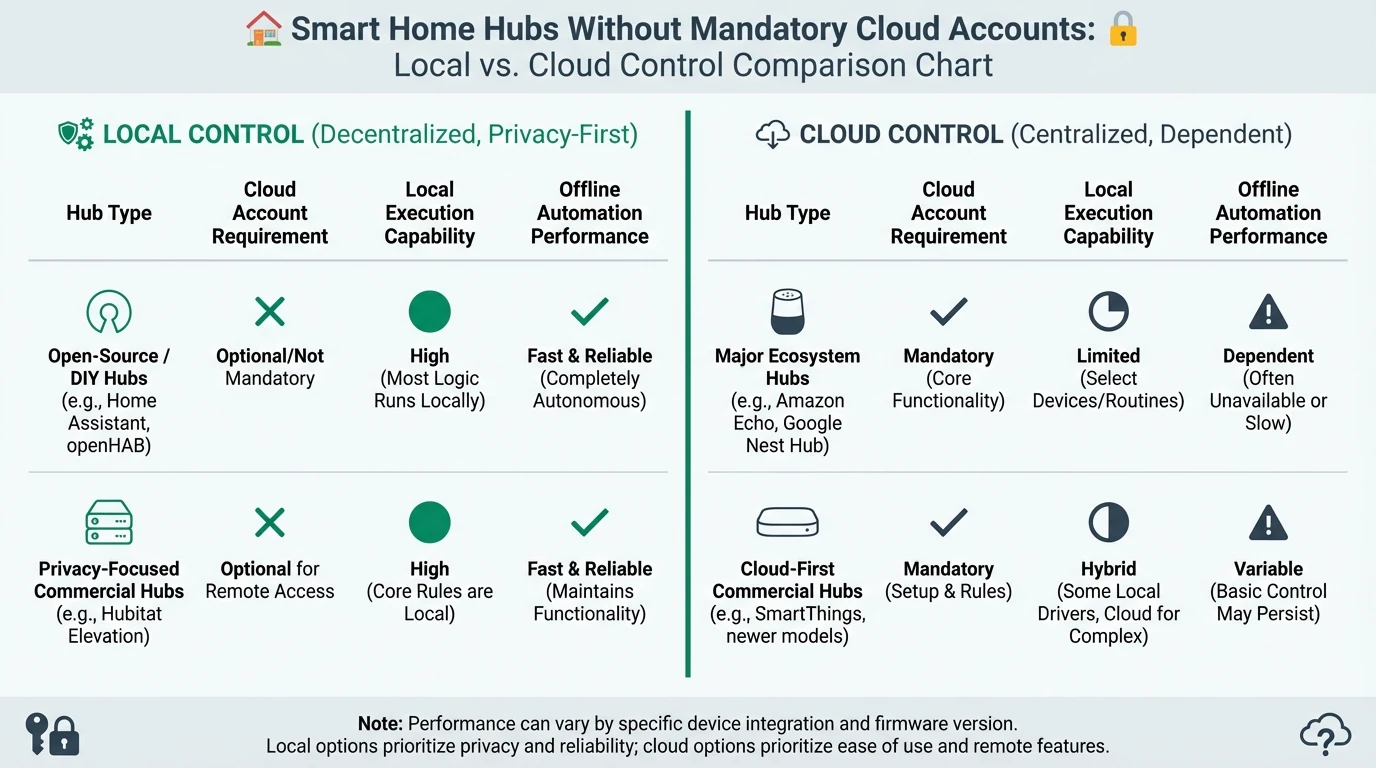
There is no universal winner because deployment context matters. However, local-first users generally converge on ecosystems with transparent local API behavior and broad community support.
Example privacy score comparison for major hub patterns
| Product | Cloud required | Local storage | Mandatory account | Offline control | Score / 10 |
|---|---|---|---|---|---|
| Home Assistant (self-hosted) | No | User managed | No | Excellent | 9.2 |
| Local-capable commercial hub | Usually optional | Partial | Varies | Good | 7.8 |
| Cloud-native app hub | Yes | Limited | Yes | Weak | 4.3 |
Use this matrix together with the camera buyer guide so your control plane and video stack align.
3) Local automation reliability under outage conditions
The most practical test for any hub is a controlled internet outage simulation. If automations for lighting, presence, locks, and safety sensors continue to function, your architecture is likely healthy.
Run this test before adding complexity. Integrations that degrade under WAN loss are easier to replace when your deployment is still small.
| Outage test | Expected local-first behavior | Red flag behavior |
|---|---|---|
| WAN cut for 2 hours | Core automations still execute | Rules fail or queue indefinitely |
| Hub restart | Automations resume from local state | Requires cloud re-auth to recover |
| Mobile app unavailable | Local dashboard/control still available | No local control fallback |
4) Integration depth and maintenance burden
Hub quality is not only about how many integrations exist. It is about integration depth and durability. Shallow integrations often expose status but not full control, forcing cloud apps for advanced workflows.
Maintenance burden grows when integrations require fragile workarounds after every firmware change. A smaller number of stable local integrations is often better than a large but brittle catalog.
| Integration profile | Typical pattern | Maintenance risk |
|---|---|---|
| Official local API integration | Stable + documented | Low to medium |
| Community reverse-engineered cloud bridge | Functional but fragile | Medium to high |
| Vendor cloud-only integration | Easy onboarding, low control | High lock-in risk |
5) Security posture: segmentation and least privilege
Even with the best hub, network architecture still matters. A local controller with unrestricted access to all network segments can become a high-value target if compromised.
Apply least privilege rules between hub, IoT devices, and trusted endpoints. Permit only required flows and monitor changes during integration onboarding.
Hub security baseline
- Place hub management interface behind strong local authentication and MFA for remote paths.
- Restrict hub-to-device communication to required ports/protocols only.
- Segment IoT devices from trusted user endpoints.
- Create rollback snapshots before major integration changes.
- Audit webhook and token permissions quarterly.
For practical enforcement patterns, use this internet-blocking implementation guide.
6) Migration strategy and lock-in reduction
The safest migration path is incremental. Keep legacy automations running while reproducing critical flows in the new local hub. Validate parity before cutover.
Avoid one-step migrations where all devices move simultaneously. Staged migration preserves household reliability and makes troubleshooting manageable.
| Migration stage | Goal | Success condition |
|---|---|---|
| Stage 1 | Mirror critical automations locally | Offline test passes |
| Stage 2 | Shift cameras and entry sensors | Event fidelity preserved1 |
| Stage 3 | Move convenience automations | User acceptance maintained |
Frequently Asked Questions
Frequently Asked Questions
Does no mandatory account mean no cloud features at all?
Not necessarily. Many local-first hubs still offer optional cloud services for remote access or notifications. The key is that local operation remains functional without them.
Is Home Assistant always the right answer?
It is strong for control and extensibility, but it is not automatically the best fit for every household. Operational complexity tolerance matters.
How can I verify local execution claims from vendors?
Run controlled WAN outage tests, inspect local logs, and validate automation execution paths independently of mobile cloud apps.
Should I prioritize protocol support or UI simplicity?
For long-term privacy resilience, protocol flexibility usually has higher strategic value. UI ergonomics can often be improved later.
What is the most common mistake in hub selection?
Choosing based on onboarding convenience while ignoring account lock-in and offline behavior.
Primary sources
| Source | Type | URL |
|---|---|---|
| NIST IoT baseline references | Security framework | nist.gov |
| ENISA IoT security good practices | EU guidance | enisa.europa.eu |
| CISA secure-by-design initiative | Security guidance | cisa.gov |
Conclusion
Choosing a hub without mandatory cloud lock-in is the single decision that most improves smart home privacy over time. It preserves your ability to adapt hardware choices, change integrations, and keep essential automations working during disruptions.
Anchor your decision on local execution, integration durability, and migration flexibility, then optimize usability after your control plane is sound.
Footnotes
-
Event fidelity means motion/person/door events remain coherent across timeline, automations, and notifications after migration. ↩