Comparisons
Complete Homelab for Smart Home Costs 2026
Explore the true costs and benefits of building a complete homelab for smart home automation in 2026, focusing on privacy, local control, and total cost of ownership.
Quick answer: What are the key benefits of a homelab smart home setup?
A homelab smart home setup offers enhanced privacy, local control, offline reliability, and cost savings compared to cloud-dependent systems.
Executive Summary
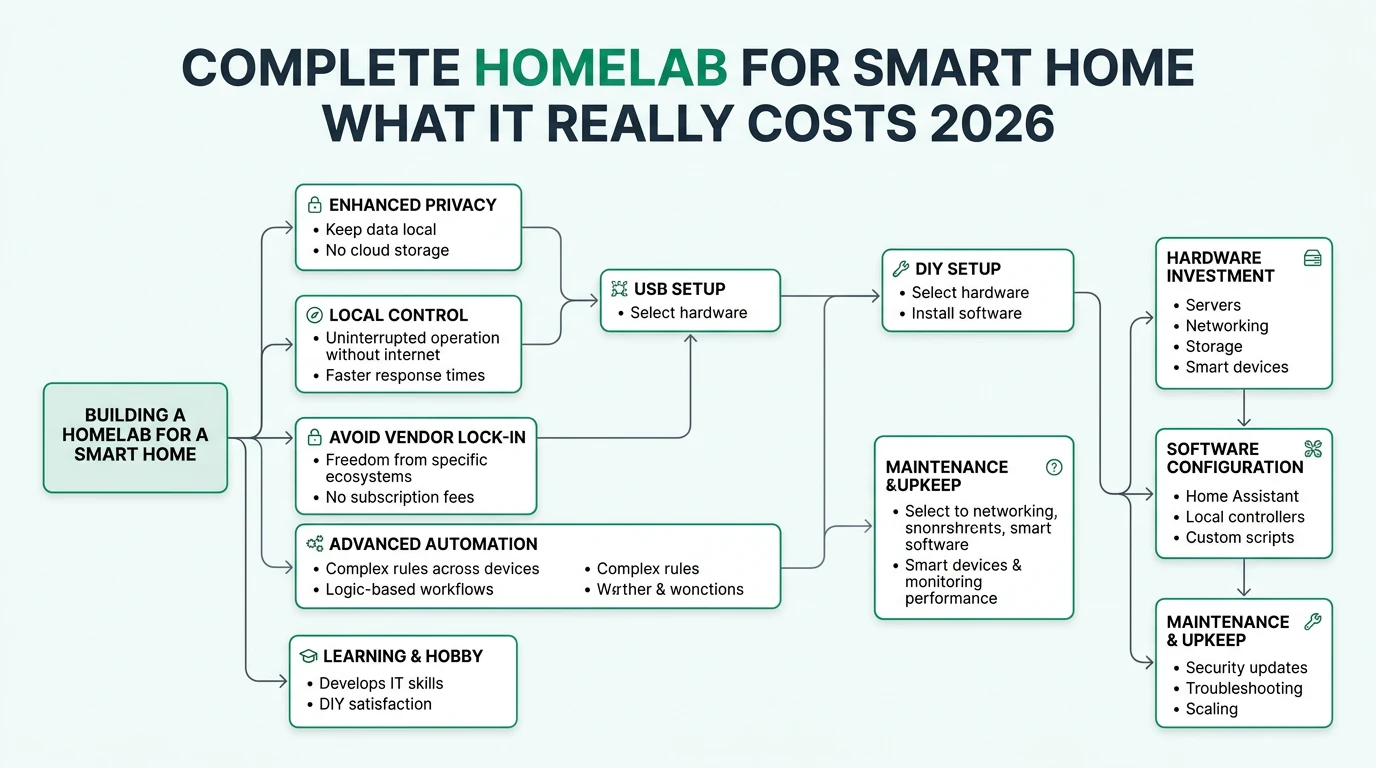
In 2026, building a complete homelab for a smart home is a compelling option for those prioritizing privacy, local control, and cost efficiency. Unlike cloud-based systems, a homelab setup allows users to maintain full ownership of their data and ensure that their smart home operates reliably even without an internet connection. This guide explores the costs, benefits, and considerations involved in setting up a homelab smart home, providing a comprehensive comparison with traditional cloud-based alternatives.
The bottom line is that while a homelab smart home requires a higher initial investment in terms of time and technical expertise, it offers significant long-term benefits in privacy, control, and cost savings.
Privacy and Local Control
Privacy is a primary concern for many smart home users, and a homelab setup excels in this area by processing data locally rather than relying on cloud services. This approach ensures that sensitive information remains within the confines of your home, reducing the risk of data breaches and unauthorized access. Open protocols like Matter, Zigbee, and Z-Wave further enhance privacy by enabling secure, encrypted communication between devices1.
In contrast, cloud-based smart home systems often involve sharing data with vendors, which can lead to privacy concerns. These systems typically require an internet connection to function, meaning that user data is constantly being transmitted to and from the cloud. This not only increases the risk of data interception but also places users at the mercy of the vendor’s privacy policies and data handling practices.
A homelab setup, utilizing platforms like Home Assistant on Proxmox, allows for complete data ownership and control. Users can customize their systems to meet specific privacy requirements and ensure that their smart home operates independently of external servers. This level of control is particularly appealing to those who wish to avoid vendor lock-in and maintain flexibility in their smart home ecosystem1.
Offline Reliability
One of the standout advantages of a homelab smart home is its ability to function offline. By using local hubs such as Homey Pro or Home Assistant, users can ensure that their smart home continues to operate even in the event of an internet outage. This is particularly important for critical systems like security cameras and smart locks, which need to remain operational at all times1.
Cloud-based systems, on the other hand, are heavily reliant on a stable internet connection. Any disruption in connectivity can render these systems ineffective, leaving users without access to their smart home controls. This dependency not only affects reliability but also raises concerns about potential remote exploits via the internet.
The use of virtualization platforms like Proxmox further enhances offline reliability by providing failover capabilities. This means that even if one component of the system fails, the overall functionality of the smart home can be maintained. Such resilience is crucial for users who prioritize uninterrupted service and peace of mind1.
Total Cost of Ownership (TCO)
When considering the total cost of ownership for a smart home, a homelab setup often proves to be more cost-effective in the long run. Although the initial capital expenditure (CapEx) for hardware and setup can range from $2,000 to $7,000, this is typically lower than the $10,000+ required for professional installations234. Moreover, the operational expenditure (OpEx) associated with a homelab is minimized through the use of energy-efficient devices and automation.
Smart thermostats, for example, can lead to significant energy savings, reducing utility bills by $70 to $280 annually23. These savings, combined with the absence of subscription fees commonly associated with cloud-based systems, contribute to a lower overall TCO over a five-year period.
It’s important to note that while DIY setups can offer cost savings, they also require a certain level of technical expertise and time investment. Users must be prepared to handle maintenance and updates themselves, which can incur additional costs if professional assistance is needed5. However, for those willing to invest the effort, the financial benefits of a homelab smart home are substantial.
Scalability and Standards Compliance
Scalability is a key consideration for any smart home setup, and a homelab system offers significant advantages in this regard. With the ability to manage up to 187 devices and 190 automations, a homelab can accommodate growth without the need for additional subscriptions or vendor-specific upgrades1. This flexibility is crucial for users who anticipate expanding their smart home over time.
Compliance with industry standards such as Matter, Thread, Z-Wave Plus, and Zigbee ensures interoperability between devices from different manufacturers. This not only enhances the user experience by allowing seamless integration but also protects against obsolescence as new technologies emerge3.
While cloud-based systems may offer some level of scalability, they often come with limitations imposed by the vendor. These can include restrictions on the number of devices supported or the types of integrations available. By contrast, a homelab setup provides the freedom to choose and integrate devices based on personal preference and specific needs.
Checklist
- Assess home size and device needs
- Choose a hub: Homey Pro or Home Assistant
- Ensure Matter compliance for devices
- Plan for future scalability
- Consider energy-efficient devices for cost savings
Security and Privacy Implications
Security is a paramount concern for any smart home, and a homelab setup offers robust protection through local data processing and encrypted communication. By avoiding cloud dependencies, users mitigate the risk of remote exploits and unauthorized access to their systems1. Protocols like Z-Wave and Zigbee provide additional security through encrypted, mesh network communication, ensuring reliable and secure device interactions.
However, the responsibility for maintaining security in a homelab setup falls squarely on the user. Regular updates and patches are essential to protect against vulnerabilities, and failure to do so can expose the system to potential threats5. While professional installations may offer support and maintenance services, they often lack the level of local control and privacy that a homelab provides.
It’s important for users to stay informed about the latest security practices and to implement them diligently. This includes setting strong passwords, enabling two-factor authentication, and regularly reviewing device permissions. By taking these precautions, users can enjoy the benefits of a secure and private smart home environment.
Setup Complexity and Support Burden
Setting up a homelab smart home requires a certain level of technical expertise and a willingness to invest time in the initial configuration. Platforms like Proxmox and Home Assistant offer powerful capabilities but can be complex to set up, especially for users with limited technical experience1. The process involves configuring virtualization environments, integrating devices, and setting up automations, which can take several days to complete.
The support burden for a homelab setup is also higher compared to cloud-based systems, as users are responsible for troubleshooting and maintaining their systems. This includes performing regular updates, managing device integrations, and addressing any issues that arise. While this self-support approach offers greater control, it can be challenging for those without a technical background5.
For users who prefer a more hands-off approach, professional installations may be a more suitable option. These services typically include setup, support, and maintenance, but they come at the cost of reduced local control and higher ongoing expenses. Ultimately, the decision between a DIY homelab and a professional installation depends on the user’s technical skills, budget, and privacy priorities.
Price Model and Hidden Costs
The total cost of ownership for a complete homelab smart home setup varies depending on the size of the home and the number of devices. For a small home with basic automation, the upfront cost can range from $2,000 to $4,000, while a larger setup with 187 devices may cost $5,000 to $10,000231. These costs include hardware, installation, and initial configuration.
Hidden costs associated with a homelab setup include power consumption, maintenance, and potential upgrades. While energy-efficient devices can reduce utility bills, the installation of smart thermostats and other components may incur additional expenses5. It’s also important to factor in the time and effort required for ongoing maintenance and updates, which can add to the overall cost.
Despite these hidden costs, a homelab setup remains a cost-effective option compared to cloud-based systems, which often involve subscription fees and higher long-term expenses. By carefully planning and budgeting for these costs, users can enjoy the benefits of a smart home without breaking the bank.
Frequently Asked Questions
What is the main advantage of a homelab smart home setup?
The main advantage is enhanced privacy and local control, as data is processed on-site without relying on cloud services.
How does a homelab setup ensure offline reliability?
By using local hubs and virtualization platforms like Proxmox, a homelab setup can operate independently of the internet.
What are the hidden costs of a homelab smart home?
Hidden costs include power consumption, maintenance, and potential upgrades, as well as the time investment for setup and support.
Is a homelab setup suitable for non-technical users?
While it offers significant benefits, a homelab setup requires technical expertise and may not be suitable for non-technical users.
How does a homelab setup compare to professional installations in terms of cost?
A homelab setup typically has a lower total cost of ownership over time, despite higher initial setup costs and support burden.
Primary Sources Table
| Index | Title/Description | Direct URL |
|---|---|---|
| 1 | How Expensive Are Smart Homes? (2025) - Costs for DIY/brand installs, device breakdowns (2023 prices) | https://todayshomeowner.com/smart-home/ |
| 2 | How Much Does a Smart Home Really Cost in 2026 - Gearbrain - Hubs, HVAC, install ranges | https://www.gearbrain.com/smart-home-cost-2026-guide-2674294039.html |
| 3 | How Much Does Home Automation Cost? A Complete 2026 Pricing - Vivint - DIY vs pro, fixes | https://www.vivint.com/resources/article/how-much-does-home-automation-cost |
| 4 | Smart Home Installation Running Costs - Payroll/ops for services | http://financialmodelslab.com/blogs/operating-costs/smart-home-installation-service |
| 5 | The State Of My Smart Home (2026) - HomeTechHacker - Homelab device counts, Proxmox | https://hometechhacker.com/the-state-of-my-smart-home-2026/ |
| 6 | Smart Home Costs 2026: Detailed Price Analysis - Luxury home $50K+ | https://homerenovationoh.com/smart-home-costs-2026-detailed-price-analysis-of-a-fully-automated-luxury-home/ |
| 7 | Smart Home Installation Startup Costs - Business funding/breakeven | https://financialmodelslab.com/blogs/startup-costs/smart-home-installation-service |
| 8 | IoT Total Cost of Ownership (TCO) Models - CapEx/OpEx frameworks | https://iotbusinessnews.com/2026/03/02/iot-total-cost-of-ownership-tco-models-from-capex-to-opex-in-2026/ |
Conclusion
In conclusion, a complete homelab smart home setup offers numerous benefits, including enhanced privacy, local control, and cost savings. While the initial setup requires a significant investment of time and technical expertise, the long-term advantages make it a worthwhile endeavor for those who prioritize privacy and control over convenience. By carefully considering the costs, benefits, and potential challenges, users can create a smart home that meets their needs and provides peace of mind.
For further insights into smart home technology, explore our guides on best hardware for local AI smart home 2026 and best local LLMs for home automation 2026.
Footnotes
-
The State Of My Smart Home (2026) - HomeTechHacker - Homelab device counts, Proxmox ↩ ↩2 ↩3 ↩4 ↩5 ↩6 ↩7 ↩8
-
How Expensive Are Smart Homes? (2025) - Costs for DIY/brand installs, device breakdowns (2023 prices) ↩ ↩2 ↩3
-
How Much Does a Smart Home Really Cost in 2026 - Gearbrain - Hubs, HVAC, install ranges ↩ ↩2 ↩3 ↩4
-
IoT Total Cost of Ownership (TCO) Models - CapEx/OpEx frameworks ↩
-
How Much Does Home Automation Cost? A Complete 2026 Pricing - Vivint - DIY vs pro, fixes ↩ ↩2 ↩3 ↩4