Comparisons
Coral TPU vs Hailo-8 vs GPU for Home AI 2026
Compare Coral TPU, Hailo-8, and GPU for home AI in 2026, focusing on performance, privacy, and cost.
Quick answer:
Executive Summary
In 2026, selecting the right hardware for home AI applications involves balancing performance, power consumption, and privacy. The Coral TPU, Hailo-8, and GPU each offer distinct advantages and challenges for local AI processing. This guide provides a comprehensive comparison to help you make an informed decision based on your specific needs.
The Coral TPU is a cost-effective option for those starting with AI projects, offering compatibility with TensorFlow Lite but facing challenges with software updates and compatibility. Hailo-8 stands out for its efficiency and ease of use, particularly in low-power environments, making it ideal for applications like smart cameras and Frigate NVR systems. GPUs, while more power-hungry, provide unmatched flexibility and are better suited for complex tasks like training large language models (LLMs).
Bottom line: Choose Hailo-8 for efficient, low-power AI tasks, Coral TPU for budget-friendly projects, and GPU for high-performance needs.
Performance and Power Efficiency
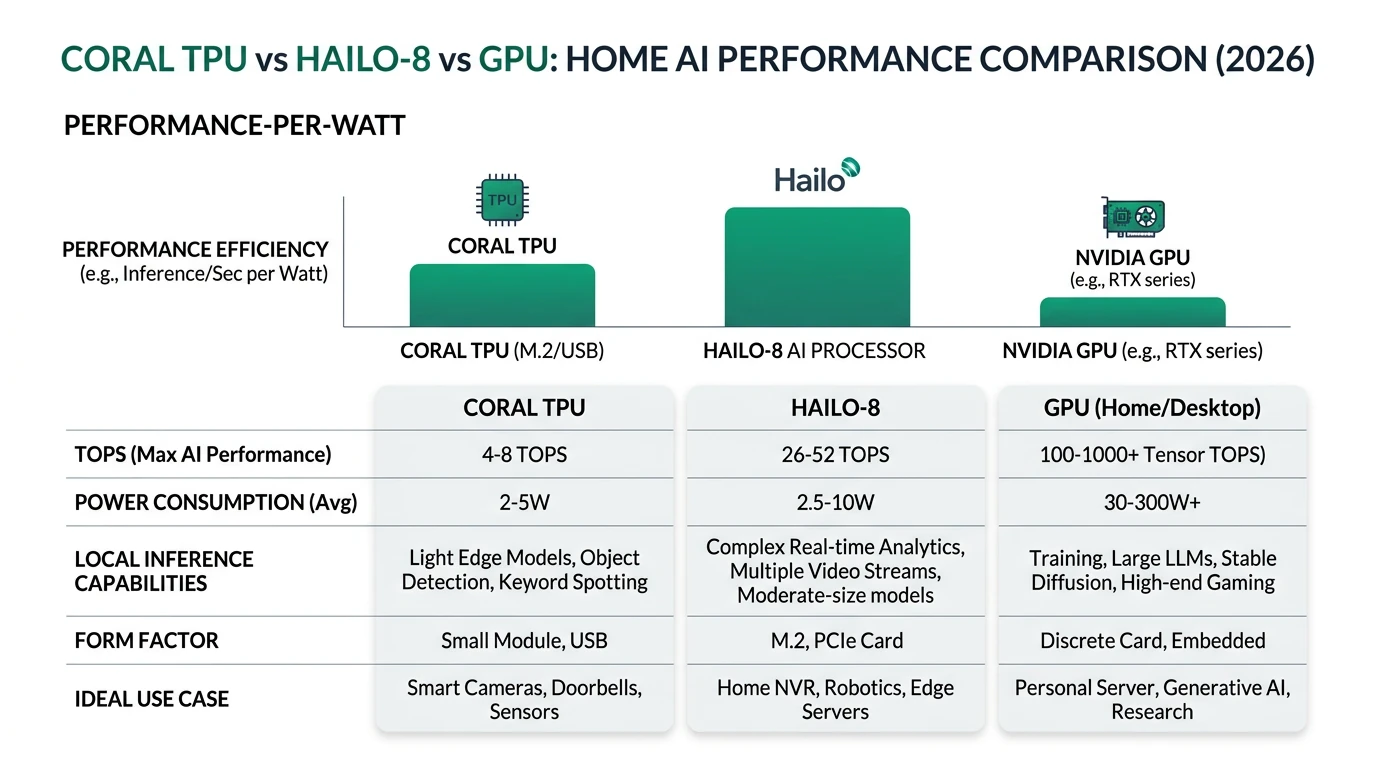
When evaluating AI hardware for home use, performance and power efficiency are critical factors. The Coral TPU, Hailo-8, and GPU each offer different capabilities in terms of processing power and energy consumption, which can significantly impact your choice depending on your specific application needs.
The Coral TPU, available in USB and M.2 formats, provides a modest 4 to 8 TOPS (Tera Operations Per Second) with a power consumption of approximately 2 watts. This makes it a suitable option for basic AI tasks where energy efficiency is a priority. However, its aging ecosystem and compatibility issues with newer software versions can pose challenges for long-term use12.
Hailo-8, on the other hand, offers a more robust performance with 13 to 26 TOPS while maintaining a similar power consumption range of 2 to 3 watts. This efficiency makes it particularly appealing for applications requiring sustained performance over extended periods, such as continuous video processing in smart home security systems34. Its plug-and-play nature further simplifies integration into existing setups, reducing the technical burden on users.
In contrast, GPUs like the NVIDIA Jetson series provide higher performance capabilities, often exceeding 20 TOPS, but at the cost of increased power consumption, typically ranging from 10 to 15 watts. This makes them less ideal for energy-conscious applications but highly effective for tasks requiring substantial computational power, such as real-time image recognition or LLM processing45.
| Hardware | TOPS | Power | Form Factor | Privacy/Offline Notes |
|---|---|---|---|---|
| Coral USB TPU | 4 | ~2W | USB | Supports TensorFlow Lite; offline but dated, compatibility issues with new Python12 |
| Coral Dual M.2 | 8 | ~2W | M.2 2230 | Dual Edge TPU; local inference, but limited to SSD/MobileNet; aging ecosystem16 |
| Hailo-8(26 TOPS)/8L(13 TOPS) | 13-26 | 2-3W | M.2 2242 | High efficiency; YOLOv6n default, broad models; plug-and-play347 |
| GPU (e.g., Jetson Nano/Xavier NX equiv.) | Varied (e.g., 20-30+ TOPS) | 10-15W | PCIe/Module | Flexible training/inference; higher heat/power; Frigate+ requires GPU45 |
In summary, if power efficiency and ease of use are your primary concerns, Hailo-8 is a compelling choice. For those on a budget or starting with AI, Coral TPU offers a cost-effective entry point, albeit with some limitations. GPUs remain the go-to for high-performance needs, provided you can accommodate their power requirements.
Privacy and Local Control
Privacy is a paramount concern for many users implementing AI in their homes. The ability to process data locally without relying on cloud services not only enhances privacy but also reduces latency and dependency on external networks. Each of the hardware options discussed—Coral TPU, Hailo-8, and GPU—offers varying degrees of local control and privacy.
Coral TPU, developed by Google, supports local inference with TensorFlow Lite, ensuring that data processing occurs on the device itself. This minimizes the risk of data exfiltration and enhances privacy. However, the lack of recent updates and potential compatibility issues with newer software versions could limit its effectiveness in the long term12.
Hailo-8 excels in providing robust local control with zero telemetry in edge mode, meaning no data is sent back to the manufacturer or any cloud service. This makes it an excellent choice for privacy-focused applications, such as smart home security systems, where data sensitivity is a concern. Its broad model support also reduces the risk of vendor lock-in, offering flexibility in choosing and deploying AI models36.
GPUs, particularly those from NVIDIA, offer extensive flexibility and support for a wide range of AI models. While they provide local processing capabilities, users should be aware of potential telemetry concerns, as some NVIDIA products may include features that send usage data back to the company. This could be a consideration for those with stringent privacy requirements85.
Ultimately, for users prioritizing privacy and local control, Hailo-8 is the most secure option, followed by Coral TPU for those willing to navigate its ecosystem challenges. GPUs offer flexibility but may require additional measures to ensure complete privacy.
Setup Complexity and Support
The ease of setting up and maintaining AI hardware can significantly influence your choice, especially if you prefer a straightforward, hassle-free experience. Coral TPU, Hailo-8, and GPU each present different levels of complexity and support requirements.
Setting up the Coral TPU can be challenging due to its need for adapters and potential compatibility issues with newer software environments. Users may encounter difficulties with Python compatibility and may need to compile code manually, which can be daunting for those without technical expertise15. Despite these challenges, its affordability makes it an attractive option for budget-conscious users willing to invest time in setup.
Hailo-8, in contrast, offers a much simpler setup process. Its plug-and-play nature allows for easy integration with devices like the Raspberry Pi 5 and x86 systems, making it accessible even for users with limited technical knowledge. The availability of pre-configured models for applications like Frigate further reduces the setup burden, allowing users to focus on deploying their AI solutions865.
GPUs require a moderate to high level of setup complexity, primarily due to the need for driver installations and CUDA configurations. While they offer significant flexibility and performance, users must be prepared to invest time in configuring and maintaining these systems. This can be a worthwhile trade-off for those needing the high computational power GPUs provide5.
Checklist
- Coral TPU: Requires adapters and manual code compilation
- Hailo-8: Plug-and-play, easy integration
- GPU: Requires driver and CUDA setup
For users seeking a balance between ease of setup and performance, Hailo-8 is the most user-friendly option. Coral TPU is suitable for those on a budget but requires a willingness to tackle setup challenges. GPUs are best for users who need high performance and are comfortable with more complex configurations.
Cost and Total Cost of Ownership (TCO)
Understanding the cost implications of each hardware option is crucial for making an informed decision. The initial purchase price, ongoing power consumption, and potential hidden costs all contribute to the total cost of ownership (TCO) over the lifespan of the device.
Coral TPU is generally the most affordable option, with prices ranging from $60 to $150 depending on the model. However, users should be aware of potential additional costs related to compatibility fixes and software updates, which could add $50 to $200 in labor costs over time12.
Hailo-8, while more expensive upfront, offers a lower TCO due to its energy efficiency and ease of use. With prices starting at €195 for the M.2 model, its low power consumption (approximately $0.05 to $0.10 per day) makes it a cost-effective choice for continuous operation347.
GPUs, such as those in the NVIDIA Jetson series, have a higher initial cost, ranging from $100 to $500. Their power consumption is also significantly higher, potentially leading to daily costs of $1 to $3 for energy, plus additional cooling expenses. This makes them less ideal for budget-conscious users but suitable for those needing high performance4.
| Model | Price | TOPS | Price/TOPS |
|---|---|---|---|
| Hailo-8 M.2 | €195 | 26 | €7.503 |
| Hailo-8 Century | €739 | 104 | €7.113 |
| Coral USB | ~$60-80 (est.) | 4 | ~$15-2012 |
| Coral Dual M.2 | ~$100-150 (est.) | 8 | ~$12-191 |
| GPU (Jetson Nano equiv.) | ~$100-500 | Varied | Higher TCO4 |
In conclusion, if minimizing TCO is your priority, Hailo-8 offers the best balance of upfront cost and ongoing expenses. Coral TPU is a viable option for those on a tight budget, while GPUs are best suited for users who can accommodate their higher operational costs.
Long-Term Viability and Ecosystem Support
Choosing hardware that will remain viable and supported in the long term is essential for ensuring the sustainability of your AI projects. The Coral TPU, Hailo-8, and GPU each have different prospects in terms of ecosystem support and future-proofing.
Coral TPU, while initially popular, has seen a decline in updates and support, with the last significant update occurring in 2021. This stagnation raises concerns about its long-term viability, particularly as software environments continue to evolve12. Users may find themselves facing increasing compatibility issues over time, which could limit the device’s usefulness.
Hailo-8, in contrast, benefits from active development and support, with regular updates and a growing ecosystem of compatible models. Its robust performance and energy efficiency make it a future-proof choice for home AI applications, particularly for those prioritizing privacy and local processing36.
GPUs, especially those from NVIDIA, offer extensive support and flexibility, making them a reliable choice for long-term projects. Their ability to handle a wide range of AI models and tasks ensures they remain relevant as AI technology advances. However, their higher power consumption and potential telemetry concerns may be drawbacks for some users5.
For those seeking a long-term solution, Hailo-8 offers the best combination of performance, support, and energy efficiency. Coral TPU may be suitable for short-term projects or those with limited budgets, while GPUs provide the flexibility needed for more complex and evolving AI tasks.
FAQ
Frequently Asked Questions
What is the best hardware for low-power AI tasks?
Hailo-8 is the best choice for low-power AI tasks due to its high efficiency and ease of use, making it ideal for applications like smart cameras and Frigate NVR systems.
Is Coral TPU still a viable option in 2026?
While Coral TPU remains a budget-friendly option, its aging ecosystem and compatibility issues may limit its long-term viability compared to newer alternatives like Hailo-8.
How does GPU performance compare to Coral TPU and Hailo-8?
GPUs offer higher performance capabilities than Coral TPU and Hailo-8, making them suitable for complex tasks, but they consume more power and may have higher operational costs.
What are the privacy implications of using these devices?
Hailo-8 and Coral TPU provide strong privacy by enabling local processing without cloud dependency. GPUs offer flexibility but may include telemetry features that require additional privacy measures.
Which hardware is easiest to set up for beginners?
Hailo-8 is the easiest to set up due to its plug-and-play nature, making it accessible for users with limited technical knowledge.
Primary Sources Table
| Index | Title/Description | Direct URL |
|---|---|---|
| 1 | Edge AI Showdown: Hailo vs Coral | Link |
| 2 | Raspberry Pi AI Kit vs Coral USB/M.2 | Link |
| 3 | Hailo-8 vs NVIDIA Jetson Benchmarks | Link |
| 4 | Frigate GitHub: Hailo 8L vs Coral | Link |
| 5 | Alternatives to RPi AI Kit (Coral) | Link |
| 6 | Top Edge AI Chips 2026 | Link |
| 7 | Frigate Hardware Docs | Link |
| 8 | Frigate GitHub: Hailo vs Coral vs GPU | Link |
| 9 | CPU vs GPU vs TPU 2026 Guide (YouTube) | Link |
Conclusion
In the evolving landscape of home AI hardware, choosing the right device depends on your specific needs and priorities. Hailo-8 stands out for its efficiency and ease of use, making it an excellent choice for privacy-focused applications. Coral TPU offers a budget-friendly entry point, though with some limitations, while GPUs provide the flexibility needed for high-performance tasks.
For more insights on smart home privacy and hardware options, explore our guides on Apple HomeKit Secure Video vs Local NVR for Privacy, Best Hardware for Local AI Smart Home 2026, and Best Local LLMs for Home Automation 2026.