Smart Home Privacy
Guest Wi-Fi vs IoT VLAN: Smart Home Privacy 2026
Guest Wi-Fi vs IoT VLAN vs strict firewall rules in 2026: isolation strength, mDNS/HA caveats, and how to segment cameras without breaking local hubs.
Quick answer: Guest Wi-Fi, IoT VLAN, or firewall rules for isolating IoT?
Guest SSIDs are the fastest win but often coarse. Dedicated IoT VLANs plus L3/L4 rules give repeatable policy. Fine-grained firewall rules add the most control—and the most maintenance—on top of VLANs.
Source: NIST smart home cybersecurity
Executive Summary
In 2026, ensuring the privacy and security of your smart home devices is more critical than ever. With the proliferation of IoT devices, users are increasingly concerned about data exposure and the potential for lateral attacks within their home networks. This guide compares three primary methods for isolating smart home devices: Guest Wi-Fi, IoT VLANs, and firewall rules. Extend the VLAN pillar with setting up a separate VLAN for IoT, UniFi vs Omada for managed gear, and OpenWrt vs stock when you need open firewall policy.
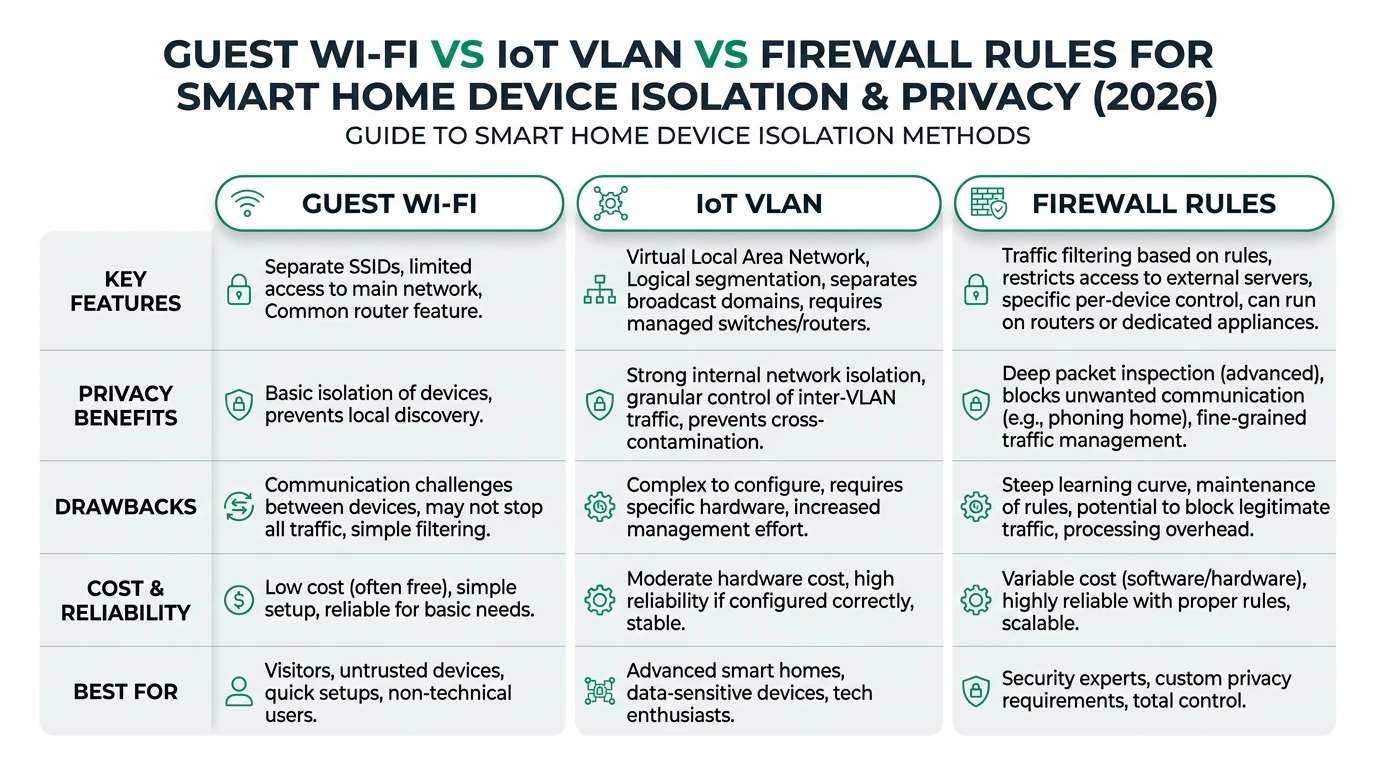
Guest Wi-Fi provides a straightforward setup for isolating devices but may not offer the highest level of privacy due to potential cloud dependencies. IoT VLANs offer robust isolation and local control, making them ideal for users with a larger number of devices or those who prioritize privacy. Firewall rules provide the highest level of privacy by allowing granular control over device communication but require more technical expertise to implement effectively.
Bottom line: For maximum privacy and control, consider using IoT VLANs or firewall rules. Guest Wi-Fi is suitable for simpler setups but may not meet all privacy needs.
| Approach | Typical strength | Caveat |
|---|---|---|
| Guest SSID | Fast rollout | May block hub-to-device paths you need |
| IoT VLAN | Repeatable policy | Needs managed switch/AP |
| Firewall rules | Fine-grained | Rule drift without documentation |
Understanding Guest Wi-Fi for Smart Home Isolation
Guest Wi-Fi networks are a popular choice for isolating smart home devices from the main network. By creating a separate SSID, you can prevent unauthorized access to your primary network and limit the exposure of your devices. This method is particularly appealing due to its ease of setup and minimal cost, often requiring only a few clicks in your router’s user interface.
However, while Guest Wi-Fi can effectively separate devices, it does not inherently provide the highest level of privacy. Many smart devices rely on cloud services for functionality, which can expose data to external servers. This dependency on cloud services can be a significant drawback for users who prioritize local control and offline reliability. Additionally, Guest Wi-Fi networks are susceptible to SSID leaks, which can compromise privacy if not properly secured with strong encryption protocols like WPA31.
In terms of offline reliability, Guest Wi-Fi networks can maintain basic functionality during internet outages, but this is contingent on the devices themselves being capable of local operation. Devices that rely heavily on cloud services may lose functionality when the internet is unavailable. Therefore, while Guest Wi-Fi is a convenient option, it may not be sufficient for users seeking comprehensive privacy and control over their smart home environment.
To enhance the effectiveness of a Guest Wi-Fi setup, consider integrating it with a local smart home hub like Hubitat or Home Assistant. These hubs can manage device communication locally, reducing cloud dependency and improving privacy. This hybrid approach can offer a balance between ease of use and enhanced security, making it a viable option for many users.
IoT VLANs: A Robust Solution for Device Isolation
IoT VLANs (Virtual Local Area Networks) offer a more sophisticated approach to isolating smart home devices. By segmenting network traffic, VLANs prevent devices from communicating with the main LAN, thereby enhancing privacy and security. This method is particularly effective for users with a large number of devices or those who require stringent privacy measures.
Implementing an IoT VLAN involves configuring your network switch or router to support IEEE 802.1Q, the standard for VLAN tagging. This setup can be more complex than enabling a Guest Wi-Fi network, often requiring 30 to 60 minutes of configuration time. However, the benefits of VLANs are significant. They provide high privacy by ensuring that device traffic is isolated from the main network, reducing the risk of lateral attacks2.
Local control is another advantage of IoT VLANs. By routing traffic through a local hub, such as Hubitat, users can maintain control over their devices without relying on cloud services. This setup not only enhances privacy but also ensures that devices remain operational during internet outages. The offline reliability of IoT VLANs is further supported by mesh networking protocols like Z-Wave Long Range, which extend device connectivity without cloud dependency3.
While the initial setup of an IoT VLAN may require technical expertise, the long-term benefits in terms of privacy and control make it a worthwhile investment. For users concerned about the complexity, professional installation services are available, though they can add to the total cost of ownership. Despite this, the overall TCO for an IoT VLAN setup remains competitive, especially when considering the enhanced security and privacy it provides.
Firewall Rules: Maximum Privacy and Control
Firewall rules offer the highest level of privacy and control for smart home device isolation. By configuring per-device IP blocks and port restrictions, users can precisely manage the communication pathways of their devices. This granular control is ideal for users who prioritize privacy and are willing to invest time in configuring their network.
Setting up firewall rules involves scripting tools like iptables or pfSense, which can be complex and time-consuming. However, the payoff is significant: firewall rules provide unparalleled privacy by blocking unwanted outbound connections, such as those to public DNS servers like 8.8.8.84. This level of control ensures that devices only communicate with approved endpoints, minimizing the risk of data exposure.
In terms of local control, firewall rules excel by allowing users to define specific communication policies for each device. This capability is particularly beneficial for users with diverse device ecosystems, as it enables tailored security measures for different device types. Additionally, firewall rules can be integrated with local smart home hubs like Home Assistant, further enhancing privacy and control.
The offline reliability of a firewall-based setup is also noteworthy. By ensuring that all device communication is managed locally, users can maintain full functionality during internet outages. This aspect is crucial for users who rely on their smart home systems for critical operations, such as security monitoring or automation routines.
While the setup complexity of firewall rules may deter some users, the long-term benefits in terms of privacy and control make it an attractive option for those willing to invest the effort. For users seeking maximum privacy, firewall rules represent the pinnacle of smart home device isolation strategies.
Comparing Methods: Privacy, Control, and Cost
When choosing between Guest Wi-Fi, IoT VLANs, and firewall rules, it’s essential to consider the specific privacy, control, and cost requirements of your smart home setup. Each method offers unique advantages and challenges, and the best choice depends on your priorities and technical expertise.
| Method | Privacy (Local Data) | Local Control | Offline Reliability | TCO (3-yr, 50 devices) |
|---|---|---|---|---|
| Guest Wi-Fi | Medium | Partial | 80% | $100-200 |
| IoT VLAN | High | Full | 95% | $150-300 |
| Firewall Rules | Highest | Full | 99% | $50-150 |
Guest Wi-Fi offers a straightforward and cost-effective solution for basic isolation needs. It’s ideal for users who prioritize ease of use and have a limited number of devices. However, for those seeking higher privacy and control, IoT VLANs and firewall rules are superior options.
IoT VLANs provide robust isolation and local control, making them suitable for users with larger device ecosystems or those who prioritize privacy. The initial setup may require more effort, but the long-term benefits in terms of security and control are significant.
Firewall rules offer the highest level of privacy and control, allowing users to define precise communication policies for each device. While the setup complexity is higher, the payoff in terms of privacy and offline reliability makes it a compelling choice for privacy-conscious users.
Ultimately, the choice between these methods depends on your specific needs and technical expertise. Consider your priorities in terms of privacy, control, and cost, and choose the method that best aligns with your smart home goals.
Implementation Checklist for Smart Home Isolation
Implementing an effective smart home isolation strategy requires careful planning and execution. Use the following checklist to guide your setup and ensure that your devices are secure and private.
Checklist
- Assess your privacy and control needs.
- Choose the appropriate isolation method (Guest Wi-Fi, IoT VLAN, or firewall rules).
- Configure your network hardware (router, switch, or firewall).
- Integrate with a local smart home hub for enhanced control.
- Test device functionality during internet outages.
- Regularly update firmware and security settings.
By following this checklist, you can create a smart home environment that prioritizes privacy and security. Remember that the effectiveness of your setup depends on regular maintenance and updates, so make it a habit to review your network settings periodically.
Frequently Asked Questions
Frequently Asked Questions
What is the best method for smart home device isolation?
The best method depends on your privacy needs and technical expertise. IoT VLANs and firewall rules offer higher privacy and control, while Guest Wi-Fi is easier to set up.
Can I use multiple isolation methods together?
Yes, combining methods like IoT VLANs and firewall rules can enhance privacy and control, especially for complex smart home setups.
How do I ensure my smart home devices work offline?
Use local smart home hubs like Hubitat or Home Assistant to manage devices without cloud dependency, ensuring functionality during internet outages.
What are the costs associated with setting up an IoT VLAN?
Costs include hardware like managed switches and potential professional installation fees. The total cost of ownership over three years is typically $150-300.
How do firewall rules enhance smart home privacy?
Firewall rules allow you to block unwanted outbound connections and define precise communication policies, minimizing data exposure and enhancing privacy.
Primary Sources Table
| Index | Title/Description | Direct URL |
|---|---|---|
| 1 | Smart Home Protocols Compared: A 2026 Guide | Syncrow |
| 2 | 11 Best Smart Home Automation Systems for 2026 Compared | Treasure Valley |
| 3 | My TOP 5 Smart Home Devices 2026 Edition - YouTube | YouTube |
| 4 | Integrating Digital Isolators in Smart Home Devices - EE Times | EE Times |
| 5 | 2026 Smart Home Guide: How to Build a Reliable, Future-Ready System | ListenUp |
Conclusion
In conclusion, choosing the right method for smart home device isolation in 2026 requires careful consideration of privacy, control, and cost. Guest Wi-Fi, IoT VLANs, and firewall rules each offer unique benefits and challenges, and the best choice depends on your specific needs and technical expertise. By understanding the strengths and limitations of each method, you can create a smart home environment that prioritizes privacy and security.
For further reading, explore our guides on Apple HomeKit Secure Video vs Local NVR for Privacy, Aqara vs Shelly vs Tuya Privacy 2026, Best Hardware for Local AI Smart Home 2026, and how to block devices from the internet.