Smart Home Privacy
Home Assistant OS vs Container: Privacy & Maintenance 2026
Home Assistant OS vs Container vs Core in 2026: add-on store vs Docker control surface, Supervised deprecation, and how each path affects privacy and updates.
Quick answer: Home Assistant OS, Container, or legacy Supervised in 2026?
Home Assistant OS remains the easiest supported path with the full Supervisor and add-on store. Container suits advanced users who already run Docker hosts. Supervised is deprecated—plan migration to OS or Container.
Executive Summary
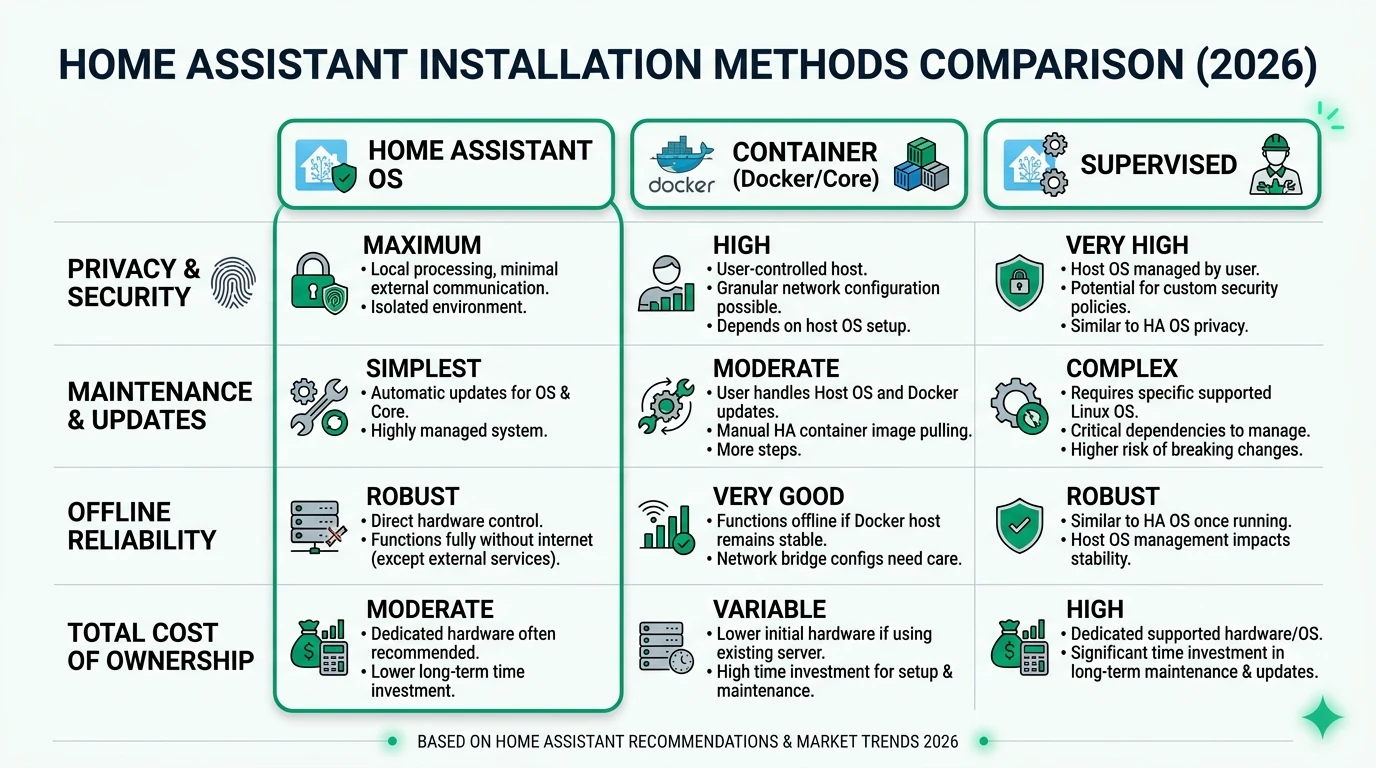
In 2026, choosing the right Home Assistant installation method is crucial for maintaining privacy, ensuring reliable offline operation, and minimizing total cost of ownership (TCO). With the deprecation of the Supervised installation method, users are primarily considering Home Assistant OS and Container installations. Cross-read Proxmox vs Docker vs bare metal, Raspberry Pi vs mini PC vs NAS, and backup and disaster recovery.
Bottom line: For most users, Home Assistant OS provides the best balance of privacy and ease of maintenance, while advanced users may prefer the flexibility of Container installations.
| Install style | Pick when |
|---|---|
| Home Assistant OS | You want add-ons and a single appliance image |
| Container | You already orchestrate Docker or LXC |
| Supervised (legacy) | Migrate only—do not start new |
Understanding Home Assistant OS
Home Assistant OS is a dedicated operating system designed to run Home Assistant in a self-contained environment. This method is particularly appealing to users who prioritize privacy and ease of use. By isolating the Home Assistant environment from the host operating system, Home Assistant OS minimizes data exposure and ensures that no telemetry data is sent without user consent. This makes it an ideal choice for those concerned about privacy.
The maintenance of Home Assistant OS is straightforward, with automatic updates ensuring that the system remains secure and up-to-date without user intervention. This reduces the complexity and time commitment typically associated with maintaining a smart home system. Additionally, Home Assistant OS is designed to operate reliably offline, making it a robust choice for users who prefer to keep their smart home systems disconnected from the internet.
However, the requirement for dedicated hardware, such as a Raspberry Pi or a virtual machine setup, can be a drawback for some users. Despite this, the low total cost of ownership, driven by minimal maintenance needs and the absence of software licensing fees, makes Home Assistant OS a cost-effective solution for many.
| Criteria | Home Assistant OS |
|---|---|
| Privacy/Local Control | Full appliance isolation; no host OS telemetry. |
| Offline Reliability | High: Self-contained OS, auto-updates work offline post-setup. |
| TCO (Est. Annual) | Low (~$0 hardware-exclusive; 77.13% adoption minimizes support needs). |
Exploring Container Installations
Container installations of Home Assistant offer a high degree of flexibility and control, making them an attractive option for advanced users. By running Home Assistant as a Docker container, users can leverage existing infrastructure and customize their environment to meet specific needs. This method provides the highest level of privacy, as users have complete control over the host system and can configure network settings to prevent unauthorized data transmission.
The maintenance of a Container installation requires more technical expertise compared to Home Assistant OS. Users must manually manage updates and dependencies, which can be time-consuming but allows for greater customization. This method is particularly well-suited for users who are comfortable with Docker and want to integrate Home Assistant into a broader ecosystem of containerized applications.
While Container installations offer significant advantages in terms of control and flexibility, they may not be the best choice for users seeking a simple, plug-and-play solution. The initial setup can be complex, and ongoing maintenance requires a certain level of technical proficiency.
| Criteria | Container |
|---|---|
| Privacy/Local Control | Highest: User controls host/Docker; no Supervisor oversight. |
| Offline Reliability | High: Docker-native, resilient to host changes. |
| TCO (Est. Annual) | Lowest (~$0; flexible on existing Docker hosts). |
The Decline of Supervised Installations
Supervised installations, once a popular choice for users seeking the full Home Assistant experience on their own operating system, have been deprecated as of 2025. This method combined the flexibility of a custom OS with the convenience of Home Assistant’s Supervisor, but it also introduced significant complexity and maintenance challenges.
The primary issue with Supervised installations is their reliance on a supported operating system, typically Debian, which can lead to conflicts and errors if the host system is modified or if additional Docker containers are introduced. This fragility, coupled with the need for expert-level Linux and Docker knowledge, makes Supervised installations a less viable option moving forward.
For users currently running a Supervised installation, migrating to Home Assistant OS or Container is recommended. Home Assistant OS offers a seamless transition for those who value add-ons and minimal maintenance, while Container installations provide a lightweight alternative for users who prioritize control and flexibility.
| Criteria | Supervised (Deprecated) |
|---|---|
| Privacy/Local Control | Medium: Supervisor on user OS risks host exposure. |
| Offline Reliability | Low: Fragile updates, host conflicts. |
| TCO (Est. Annual) | High (Linux/Docker expertise required). |
Privacy and Security Considerations
Privacy is a paramount concern for smart home users, and each Home Assistant installation method offers different levels of protection. Home Assistant OS provides strong isolation by running in a dedicated environment, ensuring that no data is exposed to the host system. This method also benefits from automatic updates managed by the Supervisor, which helps maintain security without user intervention.
Container installations excel in privacy by allowing users to control every aspect of the host system. This includes configuring firewalls and network settings to prevent unauthorized access. However, this level of control requires a deeper understanding of Docker and network security, which may not be suitable for all users.
Supervised installations, on the other hand, pose the highest risk due to their reliance on a supported operating system and the potential for conflicts with other software. The deprecation of this method further complicates its security posture, as users will no longer receive official support or updates.
Maintenance and Total Cost of Ownership
The total cost of ownership (TCO) for each Home Assistant installation method varies based on hardware requirements, maintenance needs, and user expertise. Home Assistant OS is generally the most cost-effective option, with minimal maintenance requirements and no software licensing fees. The primary cost is the initial investment in dedicated hardware, such as a Raspberry Pi.
Container installations offer the lowest TCO for users with existing Docker infrastructure. The flexibility to run Home Assistant alongside other containerized applications can reduce hardware costs, but the time investment for manual updates and maintenance should not be underestimated.
Supervised installations, despite being free and open-source, incur the highest hidden costs due to the need for ongoing maintenance and troubleshooting. The deprecation of this method further increases the support burden, as users must rely on community resources for assistance.
Checklist
- Evaluate your technical expertise before choosing a method.
- Consider the long-term maintenance requirements.
- Assess hardware availability and costs.
- Prioritize privacy and offline reliability.
- Plan for future migration if using Supervised.
Migration Strategies for 2026
As the landscape of Home Assistant installations evolves, users must consider migration strategies to ensure continued support and functionality. For those using Supervised installations, transitioning to Home Assistant OS or Container is advisable. Home Assistant OS offers a straightforward migration path for users who rely on add-ons and prefer minimal maintenance. This method preserves the full functionality of the Supervised setup while providing a more stable and secure environment.
Container installations, while requiring more technical expertise, offer a lightweight alternative for users who value control and flexibility. Migrating to this method involves setting up a Docker environment and manually configuring Home Assistant and its add-ons. This approach is ideal for users who are comfortable with Docker and want to integrate Home Assistant into a broader ecosystem of containerized applications.
Regardless of the chosen migration path, it’s essential to plan and execute the transition carefully to minimize downtime and ensure a smooth user experience. This includes backing up existing configurations, testing the new setup in a controlled environment, and gradually transitioning critical components.
FAQ
Frequently Asked Questions
What is the best Home Assistant installation method for privacy?
Home Assistant OS offers strong privacy features with full appliance isolation and no host OS telemetry, making it a top choice for privacy-conscious users.
Why is the Supervised installation method deprecated?
Supervised installations are deprecated due to their complexity, maintenance challenges, and reliance on a supported operating system, which can lead to conflicts and errors.
Can I run Home Assistant in a Docker container?
Yes, running Home Assistant in a Docker container provides flexibility and control, allowing users to customize their environment and integrate with other containerized applications.
What are the hardware requirements for Home Assistant OS?
Home Assistant OS requires dedicated hardware, such as a Raspberry Pi or a virtual machine setup, to run effectively.
How do I migrate from a Supervised installation to Home Assistant OS?
To migrate from a Supervised installation to Home Assistant OS, back up your existing configuration, set up Home Assistant OS on new hardware, and restore your configuration to the new system.
Primary Sources Table
| ID | Source | Direct URL |
|---|---|---|
| 1 | Home Assistant Blog: Deprecating Core/Supervised (2025) | Home Assistant Blog |
| 2 | YouTube: Goodbye Supervised (Docker Switch) | YouTube |
| 3 | XDA: Reasons for Docker HA Container | XDA Developers |
| 4 | HA Community: Install Type Check | HA Community |
| 5 | HA Community: Supervised vs Container | HA Community |
| 6 | GitHub: Drop Supervised Support | GitHub |
| 7 | HA Community: HA OS vs Supervised | HA Community |
Conclusion
In 2026, selecting the right Home Assistant installation method is more important than ever for maintaining privacy, ensuring offline reliability, and minimizing costs. Home Assistant OS stands out for its simplicity and robust privacy features, making it the preferred choice for most users. Container installations offer unmatched flexibility and control, ideal for advanced users comfortable with Docker. As Supervised installations are deprecated, migrating to Home Assistant OS or Container is recommended to ensure continued support and functionality.
For further insights into smart home privacy, explore our guides on Apple HomeKit Secure Video vs Local NVR for Privacy, Aqara vs Shelly vs Tuya Privacy 2026, Best Hardware for Local AI Smart Home 2026, Recorder SQLite vs MariaDB, and Caddy vs Traefik vs NPM.