Smart Home Privacy
Home Assistant Recorder: SQLite vs MariaDB vs InfluxDB
SQLite vs MariaDB vs InfluxDB for Home Assistant in 2026: what Recorder actually uses, when to migrate off SQLite, SD wear, and pairing Influx with Grafana without leaking data.
Quick answer: Should Home Assistant Recorder stay on SQLite or move to MariaDB in 2026?
Keep SQLite until entity count, purge tuning, or write volume pushes you past comfortable latency—then move Recorder to MariaDB on SSD. Use InfluxDB as an analytics sidecar for long horizons, not as a drop-in Recorder replacement.
Source: Home Assistant Recorder
Executive Summary
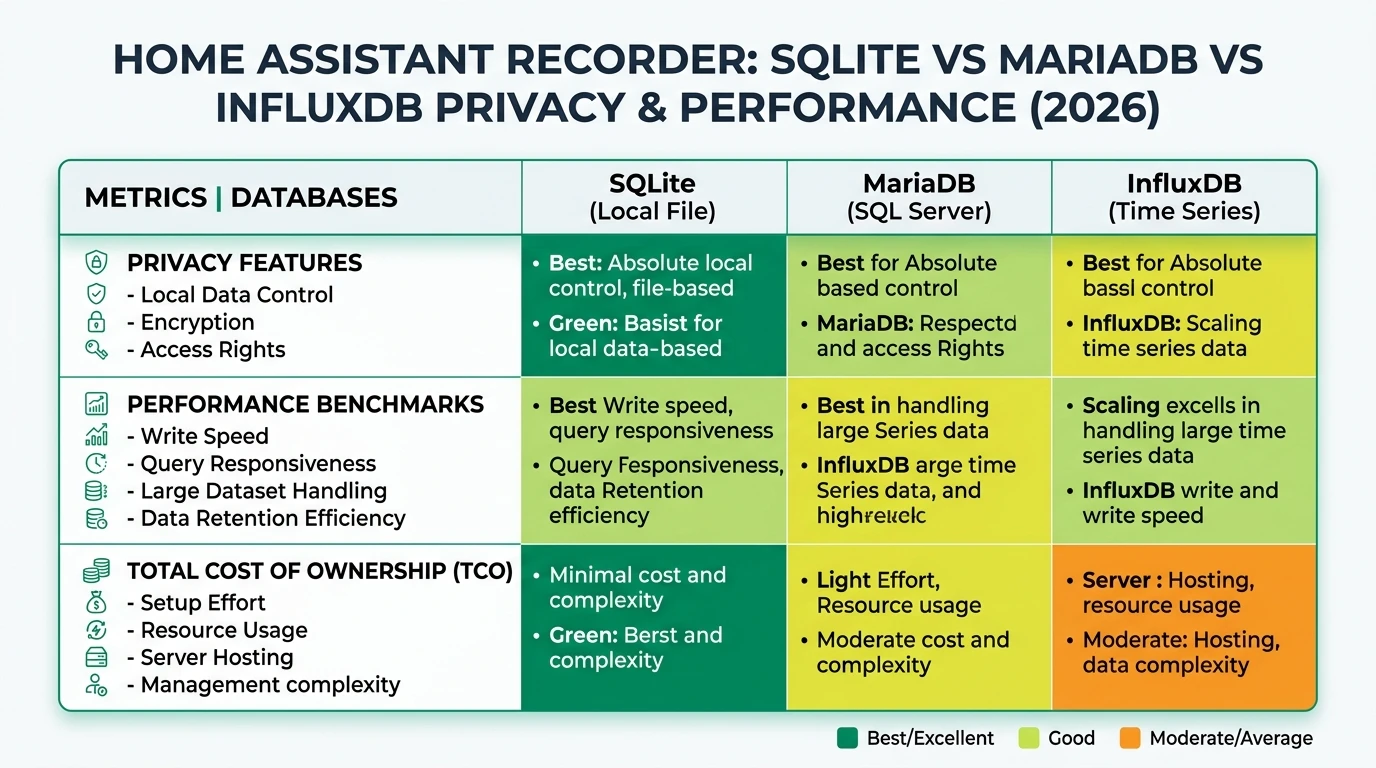
In 2026, choosing the right database backend for Home Assistant’s Recorder component involves balancing privacy, performance, and cost. SQLite, MariaDB, and InfluxDB each offer distinct advantages and trade-offs. Tie database sizing to HA backup and DR, Proxmox vs Docker vs bare metal, and Yellow vs Green vs mini PC so storage and backups stay coherent.
Bottom line: Your choice should align with your setup size, privacy concerns, and performance needs, ensuring a future-proof solution for your smart home data management.
| Situation | Default |
|---|---|
| Under ~100k events/day after purge | SQLite on durable storage |
| Heavy graphs + many integrations | MariaDB on SSD |
| Long-term watt/temp trends | InfluxDB + Grafana (optional) |
Understanding Home Assistant Recorder Databases
Home Assistant’s Recorder component is crucial for logging and analyzing data from your smart home devices. It supports multiple database backends, each with unique characteristics. SQLite is the default option, known for its ease of use and low resource consumption. It’s ideal for small setups where simplicity and cost are priorities. However, as your smart home grows, you might face performance bottlenecks with SQLite, especially if you’re logging data from numerous entities.
MariaDB offers a more robust solution for larger setups. It supports complex queries and integrates seamlessly with visualization tools like Grafana. This makes it a preferred choice for users who need detailed insights into their smart home data. However, MariaDB requires more advanced setup and maintenance, often necessitating additional hardware like SSDs to avoid SD card wear.
InfluxDB, on the other hand, specializes in time-series data, making it perfect for long-term data retention and analysis. While it doesn’t replace the Recorder, it complements it by providing powerful analytics capabilities. InfluxDB’s 2026 updates, including a SQL engine, enhance its usability for smart home applications, allowing for more flexible data queries and integrations.
Privacy and Local Control
Privacy is a critical concern for smart home users, and each database option offers varying degrees of local control. SQLite operates entirely locally, storing data in a single file on your device. This ensures that your data remains private and secure, with no external network dependencies. It’s a straightforward choice for users prioritizing privacy and simplicity.
MariaDB also supports local installations, often running on a NAS or virtual machine within your home network. This setup allows for multi-user access and more complex data management while maintaining data privacy. However, it requires careful configuration to ensure that data remains secure, especially if accessed remotely.
InfluxDB, while primarily used for time-series data, also supports local installations. Its architecture is designed to handle large volumes of data efficiently, making it suitable for users who need to analyze trends over time without compromising privacy. By running InfluxDB locally, you can ensure that your data is not exposed to external servers, aligning with privacy-focused smart home setups.
Performance and Scalability
Performance is a key factor when selecting a database for Home Assistant Recorder, especially as your smart home setup expands. SQLite is efficient for small setups, but its performance can degrade with larger datasets. It handles basic logging tasks well but may struggle with complex queries or high-frequency data logging.
MariaDB excels in performance for medium to large setups. It supports faster queries and can handle larger datasets more efficiently than SQLite. This makes it ideal for users who need to analyze data from numerous devices or require integration with advanced analytics tools. However, MariaDB’s performance benefits come with increased complexity and hardware requirements.
InfluxDB is unmatched in handling time-series data, offering superior performance for long-term data retention and analysis. Its ability to downsample data and perform complex queries makes it a powerful tool for users focused on trend analysis and historical data insights. InfluxDB’s 2026 enhancements, including a SQL engine, further improve its performance, making it a compelling choice for data-intensive applications.
| Criterion | SQLite | MariaDB | InfluxDB |
|---|---|---|---|
| Privacy/Local Control | Fully local, no network. | Local (NAS/VM), multi-access. | Local add-on, time-series only. |
| Offline Reliability | High; single-file, no deps. | High if local; separate backups. | High; scales offline. |
| Performance | Improved to match externals; SD wear risk. | Faster queries/large sets; higher growth. | Best for time-series; downsampling. |
| TCO (Hardware) | Lowest; SD ok small setups. | SSD/VM needed; NAS backup. | Add-on; scales large data. |
| DB Growth (ex.) | Slower growth. | Faster than SQLite. | Optimized retention. |
Total Cost of Ownership
When evaluating database options for Home Assistant Recorder, it’s essential to consider the total cost of ownership (TCO). SQLite offers the lowest TCO, as it can run on basic hardware like a Raspberry Pi with an SD card. However, frequent writes can lead to SD card wear, necessitating occasional replacements.
MariaDB requires more robust hardware, such as an SSD or a virtual machine, to ensure optimal performance and longevity. This increases the initial setup cost but provides better performance and scalability for larger setups. Additionally, running MariaDB on a NAS can incur ongoing power costs, which should be factored into the TCO.
InfluxDB’s TCO is influenced by its storage requirements. While it can scale efficiently, the cost of additional storage should be considered, especially for setups with extensive data retention needs. However, its ability to handle large datasets without significant performance degradation makes it a cost-effective choice for users focused on long-term data analysis.
Checklist
- Evaluate setup size and data retention needs
- Consider hardware requirements and costs
- Assess privacy and local control preferences
- Plan for future scalability and performance
- Factor in ongoing maintenance and power costs
Migration and Setup Complexity
Migrating to a new database backend can be a complex process, and it’s crucial to understand the setup requirements for each option. SQLite is the simplest to set up, as it’s the default option for Home Assistant Recorder. It requires no additional configuration, making it ideal for beginners or small setups.
Migrating to MariaDB involves editing the configuration.yaml file and setting up the database on a suitable platform, such as a NAS or virtual machine. This process can be more complex, especially if you want to retain historical data during the migration. Tools and community guides are available to assist with this process, but it requires a higher level of technical expertise.
InfluxDB setup involves installing the add-on and configuring it to work alongside the Recorder. While it doesn’t replace the Recorder, it complements it by providing advanced analytics capabilities. Migration scripts are available to help transfer data, but users should be aware of potential security risks associated with custom scripts.
FAQ
Frequently Asked Questions
Why choose SQLite for Home Assistant Recorder?
SQLite is ideal for small setups due to its simplicity, low cost, and ease of use. It’s the default option and requires no additional configuration.
What are the benefits of using MariaDB?
MariaDB offers better performance and scalability for medium to large setups, supporting complex queries and integration with tools like Grafana.
Is InfluxDB a replacement for Recorder?
No, InfluxDB is not a direct replacement for Recorder. It complements it by providing advanced analytics for time-series data.
How does privacy differ between these databases?
All options offer local control, but SQLite is fully local with no network dependencies, while MariaDB and InfluxDB can be configured for local-only use.
What are the hidden costs of using these databases?
Hidden costs include hardware wear and power consumption. SQLite may require SD card replacements, while MariaDB and InfluxDB have higher initial setup costs.
Primary Sources Table
| Index | Title/Description | Direct URL |
|---|---|---|
| [1] | Benefit of Recorder on MariaDB over SQLite? | HA Community |
| [2] | MariaDB database growth is > than SQLite | HA Community |
| [3] | Recorder settings | HA Community |
| [4] | 9 Home Assistant Integrations You Should Be Using in 2026 - InfluxDB | InfluxData |
| [5] | Understanding Home Assistant’s Database and Statistics Model | SmartHomeScene |
| [6] | Why you (probably) don’t need InfluxDB in HA | HA Community |
| [7] | Migration of Home Assistant’s log database to InfluxDB · GitHub | GitHub |
| [8] | How to convert Home Assistant database to MariaDB - YouTube | YouTube |
Conclusion
Choosing the right database backend for Home Assistant Recorder in 2026 requires careful consideration of privacy, performance, and cost. Each option—SQLite, MariaDB, and InfluxDB—offers unique benefits and challenges. Your decision should be guided by your specific needs, including setup size, data retention requirements, and privacy concerns. By understanding the strengths and limitations of each database, you can make an informed choice that ensures efficient and secure data management for your smart home.