Smart Home Privacy
Home Assistant Yellow vs Green vs Mini PC for Privacy
Compare Home Assistant Yellow, Green, and a mini PC in 2026 for radios, NVMe, Frigate headroom, and keeping HA on-LAN with minimal cloud surface.
Quick answer: Which Home Assistant appliance should privacy-focused buyers pick?
Green is the turnkey HAOS box with radio for most apartments. Yellow adds CM4 + NVMe for heavier add-ons. A quiet x86 mini-PC wins when you run Frigate, multiple containers, or want headroom for years.
Source: Home Assistant hardware
Executive Summary
Choosing the right hardware for running Home Assistant in 2026 involves balancing privacy, local control, and future-proofing. Home Assistant Green, Yellow, and Mini PCs each offer unique benefits tailored to different user needs. Cross-read Green vs SkyConnect for beginners, Raspberry Pi vs mini-PC vs NAS, and backup/disaster recovery before you standardize hardware. Official overview: Home Assistant installation.
The bottom line is that your choice should align with your specific needs for privacy, budget, and technical expertise. Each option ensures local control, minimizing cloud dependencies and enhancing your smart home’s security.
| Profile | Hardware | Why |
|---|---|---|
| First hub, few cameras | Green | Lowest friction HAOS |
| Matter + Thread + NVMe path | Yellow | Expansion without a full PC build |
| Frigate + Coral + many services | Mini PC | CPU/GPU headroom |
Understanding Privacy and Local Control
Privacy is a paramount concern for smart home enthusiasts, particularly when choosing hardware that supports Home Assistant. In 2026, the emphasis is on local processing and control, ensuring that your data remains within your home network without unnecessary cloud interactions. Home Assistant Green, Yellow, and Mini PCs all support Home Assistant OS (HAOS), which is designed to operate offline, providing a secure environment for your smart home devices.
Home Assistant Green is pre-installed with HAOS and includes built-in Zigbee and Matter support, eliminating the need for additional USB dongles. This setup not only simplifies the installation process but also reduces potential attack surfaces, enhancing your home’s security. The Green model is fanless and operates at a low power draw, making it a discreet and energy-efficient option for privacy-conscious users12.
Home Assistant Yellow offers a more modular approach, with onboard Zigbee, Thread, and Matter support. It allows for the addition of a Raspberry Pi Compute Module 4 (CM4) and NVMe storage, providing flexibility for future expansions. This makes Yellow a compelling choice for users who plan to integrate more devices over time or require additional storage for local data processing13.
Mini PCs, such as those based on the Beelink N100, offer the highest level of customization and power. They require a manual installation of HAOS but provide the flexibility to disable unnecessary features like WiFi in the BIOS, further securing your setup. This option is ideal for advanced users who need the processing power to handle heavy automations and multiple camera streams45.
Evaluating Offline Reliability
Offline reliability is crucial for maintaining a functional smart home environment, especially during internet outages. Home Assistant hardware options are designed to ensure that core functionalities, such as automations and device control, continue to operate without cloud dependency.
Home Assistant Green is designed to be a low-power, fanless device, consuming approximately 2W at idle. Its use of eMMC storage is efficient for light to moderate workloads, but users should be aware of potential wear over time with heavy database writes. This makes Green an excellent choice for users with basic smart home setups12.
Yellow, on the other hand, offers more robust offline capabilities with its support for NVMe SSDs, which provide faster read/write speeds and greater durability compared to eMMC storage. This makes Yellow suitable for users who anticipate heavier data processing needs, such as those involving local video storage or extensive automation scripts13.
Mini PCs stand out for their ability to handle demanding tasks with ease. They typically consume more power, around 10W at idle, but offer the stability and performance needed for complex setups. With the right configuration, a Mini PC can serve as a reliable hub for a large number of devices and integrations, making it a future-proof choice for power users56.
Total Cost of Ownership (TCO) Analysis
When considering the total cost of ownership over five years, it’s important to factor in both the initial purchase price and ongoing expenses such as power consumption and potential upgrades. Each hardware option presents a different cost profile that aligns with varying user needs and budgets.
Home Assistant Green is the most cost-effective option, with an upfront cost ranging from $99 to $129. Its low power consumption translates to minimal ongoing expenses, making it an attractive choice for budget-conscious users. However, potential hidden costs include the need for a USB dongle if additional connectivity is required, and the possibility of replacing the eMMC storage after several years of heavy use137.
Yellow’s modular design incurs a higher initial cost, typically around $200 to $260 when factoring in the CM4 and NVMe SSD. While this option requires a larger upfront investment, it offers greater flexibility for future expansions, which can offset costs related to upgrading or replacing components over time13.
Mini PCs represent the highest initial investment, with prices ranging from $150 to $400 depending on the configuration. They also have higher power consumption costs, but their robust performance and scalability can justify the expense for users with demanding smart home setups. Used Mini PCs can offer a more affordable entry point, though they may require additional components such as SSDs and power supplies457.
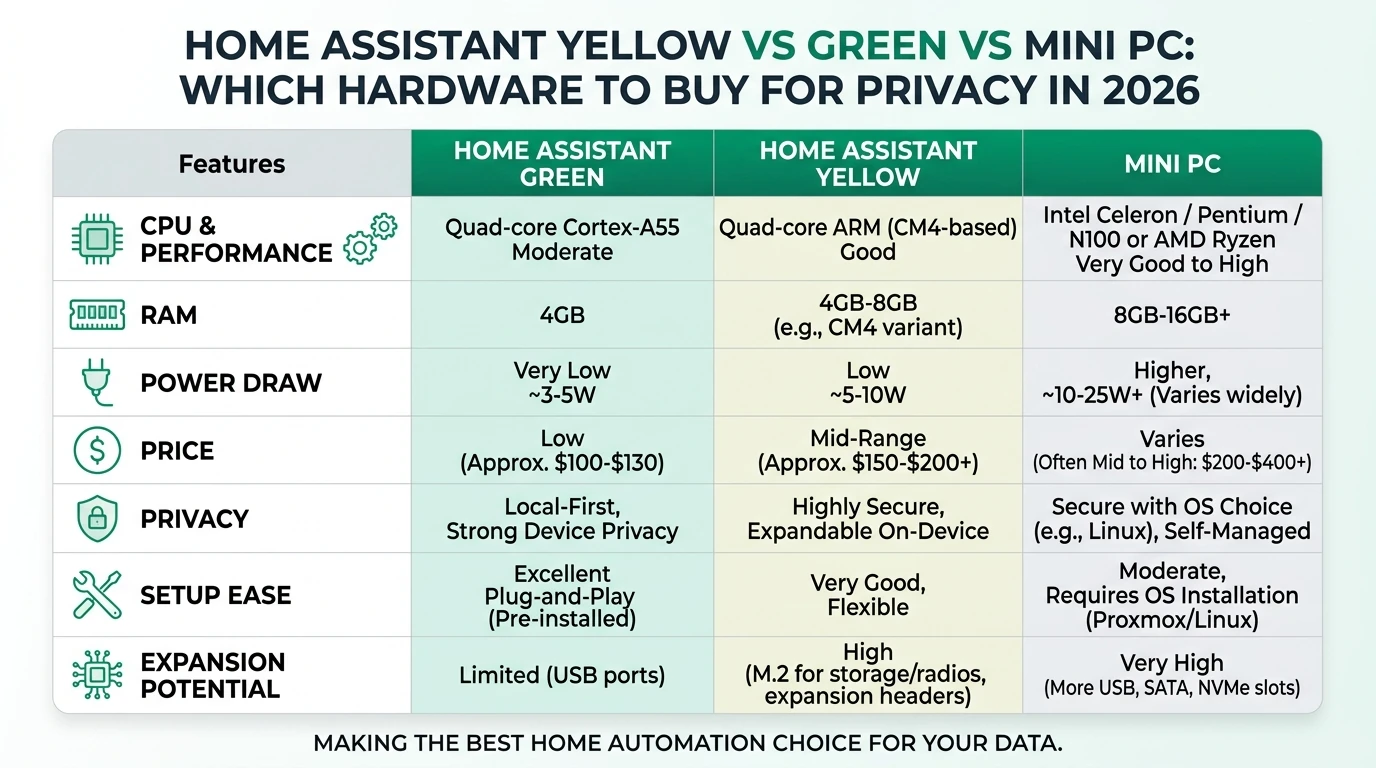
| Criterion | Home Assistant Green | Home Assistant Yellow | Mini PC |
|---|---|---|---|
| Privacy/Local Control | Built-in Zigbee/Matter | Modular, onboard radios | Customizable, HAOS install |
| Offline Reliability | 2W idle, fanless | NVMe SSD, modular | 10W+ idle, robust |
| Min Specs (HA 2026) | 1.9GHz, 4GB RAM | 1.5GHz+, expandable | 2GHz+, 4-8GB RAM |
| TCO Estimate (5 yrs) | $99-129 + $10 power | $200+ + $20 power | $150-400 + $50 power |
Setup Complexity and User Experience
The complexity of setting up Home Assistant hardware can vary significantly between the Green, Yellow, and Mini PC options. Understanding these differences can help you choose the right device based on your technical expertise and willingness to tinker.
Home Assistant Green offers the simplest setup experience, designed for plug-and-play use. With HAOS pre-installed, users can get their smart home up and running in minutes, making it an ideal choice for beginners or those who prefer a hassle-free installation process127.
Yellow requires a bit more effort, as users need to supply and install a Raspberry Pi CM4 and potentially an NVMe SSD. This additional step provides an opportunity for customization and expansion, but it also means that the setup process is more involved. Yellow is well-suited for users who are comfortable with a moderate level of technical engagement and who anticipate expanding their smart home over time13.
Mini PCs demand the most technical expertise, as users must manually install HAOS and configure the BIOS settings to optimize performance and security. This option is best for tech-savvy users who enjoy the flexibility and power that a Mini PC offers. The setup process can take anywhere from 10 to 30 minutes, depending on the user’s familiarity with the hardware and software457.
Checklist
- Consider your technical expertise before choosing a device
- Evaluate your need for future expansion
- Factor in setup time and complexity
- Ensure compatibility with existing smart home devices
- Prioritize local control and privacy features
Privacy and Security Considerations
Ensuring the privacy and security of your smart home is a critical aspect of selecting the right Home Assistant hardware. Each option provides different levels of security features and privacy controls that can help protect your data and devices.
Home Assistant Green and Yellow are both official products, designed with privacy in mind. They offer full local control, meaning that your data does not need to leave your home network for core functionalities. This reduces the risk of data breaches and unauthorized access. The onboard radios in both devices minimize the need for external USB dongles, further reducing potential attack vectors123.
Mini PCs offer the highest degree of customization, allowing users to disable unnecessary features such as WiFi in the BIOS. This flexibility can enhance security, but it also requires users to be vigilant about firmware updates and potential vulnerabilities. Installing HAOS on a Mini PC can mitigate some risks, but users should be aware of the generic firmware risks associated with these devices45.
While all options support local control, it’s important to consider the long-term security implications of using Matter and Thread protocols. As these technologies evolve, staying informed about potential vulnerabilities and updates is crucial to maintaining a secure smart home environment14.
FAQ
Frequently Asked Questions
Which Home Assistant hardware is best for beginners?
Home Assistant Green is ideal for beginners due to its plug-and-play setup and pre-installed HAOS, making it easy to start using immediately.
Can I expand my Home Assistant setup with the Yellow model?
Yes, Home Assistant Yellow offers modular expansion options, including support for a Raspberry Pi CM4 and NVMe SSD, making it suitable for growing smart home setups.
Is a Mini PC a good choice for heavy automation tasks?
Absolutely, Mini PCs provide robust processing power and flexibility, making them ideal for handling complex automations and multiple camera streams.
How does local control enhance privacy?
Local control ensures that your data remains within your home network, reducing the risk of data breaches and unauthorized access by eliminating cloud dependencies.
What are the hidden costs associated with Home Assistant hardware?
Hidden costs can include additional components like USB dongles for Green, NVMe SSDs for Yellow, and power supplies for Mini PCs, as well as potential storage replacements over time.
Primary Sources Table
| Index | Source Title/Description | Direct URL |
|---|---|---|
| 1 | Home Assistant Green vs. Yellow: What’s the Difference 2026? | Reolink blog |
| 2 | Home Assistant Hardware in 2026: Requirements and… - InfluxDB | InfluxData |
| 3 | Home Assistant Green vs.? - Hardware (Community) | HA Community |
| 4 | Home Assistant Green vs Yellow vs Blue: Which one to get? | Seeed |
| 5 | From Pi to Powerhouse: The Ultimate 2026 Home Assistant Mini PC… | HA Community |
| 6 | How to choose the best beginner Home Assistant hardware! (YouTube) | YouTube |
| 7 | Best Home Assistant Devices Compared for Power & Reliability | Grounded Electric |
| 8 | Which device should I choose to run my Home Assistant on - Hardware | HA Community |
Conclusion
Choosing the right hardware for your Home Assistant setup in 2026 involves considering your specific needs for privacy, local control, and future-proofing. Home Assistant Green offers simplicity and cost-effectiveness for beginners, while Yellow provides modularity for those anticipating growth. Mini PCs deliver the power and flexibility needed for complex setups. By understanding the strengths and limitations of each option, you can make an informed decision that aligns with your smart home goals.
Footnotes
-
Home Assistant Green vs. Yellow: What’s the Difference 2026? ↩ ↩2 ↩3 ↩4 ↩5 ↩6 ↩7 ↩8 ↩9 ↩10
-
Home Assistant Hardware in 2026: Requirements and… - InfluxDB ↩ ↩2 ↩3 ↩4
-
Home Assistant Green vs Yellow vs Blue: Which one to get? ↩ ↩2 ↩3 ↩4 ↩5 ↩6
-
Home Assistant Green vs.? - Hardware (Community) ↩ ↩2 ↩3 ↩4 ↩5
-
From Pi to Powerhouse: The Ultimate 2026 Home Assistant Mini PC… ↩ ↩2 ↩3 ↩4 ↩5
-
Best Home Assistant Devices Compared for Power & Reliability ↩
-
How to choose the best beginner Home Assistant hardware! (YouTube) ↩ ↩2 ↩3 ↩4