Smart Home Privacy
How to Block Smart Home Devices From Internet Access
A step-by-step local-network hardening guide to isolate smart home devices, block unnecessary internet traffic, and preserve local automations safely.
Quick answer: Can I safely block my smart home devices from internet access?
Yes, in most cases. The reliable method is VLAN segmentation plus firewall allow-lists for only the local services devices need. Roll out in stages so critical automations are validated before full enforcement.
Source: CISA and NIST guidance on secure-by-design and least privilege
Executive summary
Most smart home devices do not need unrestricted internet access to perform local tasks. Cameras need local NVR access. Sensors need local controller access. Switches need local command paths. Broad internet egress is usually a convenience default, not a strict requirement.
Blocking internet access incorrectly can break automations or firmware updates. Blocking access correctly strengthens privacy, reduces attack surface, and makes device behavior more predictable1.
Bottom line: isolate IoT traffic, allow local dependencies explicitly, and treat internet egress as opt-in.
Warning: do not apply blanket internet blocks on a flat network without segmentation, or you may interrupt unrelated household services.
1) Pre-flight checklist before enforcement
Network hardening starts with visibility. You need a current inventory of IoT MAC addresses, hostnames, local dependencies, and critical automations. Without this baseline, blocks become guesswork.
Capture a short traffic baseline for each device category first. Even basic router telemetry helps identify whether a device talks to local systems only or attempts frequent outbound calls.
Pre-flight requirements
- List every smart home device and assign owner/location labels.
- Identify critical automations that must survive internet outage.
- Document local service dependencies (hub, NVR, DNS, time source).
- Create maintenance window and rollback plan.
- Back up router/firewall and controller configurations.
This preparation aligns with the architecture model in the cloud-free pillar guide.
2) Segment IoT traffic with VLANs
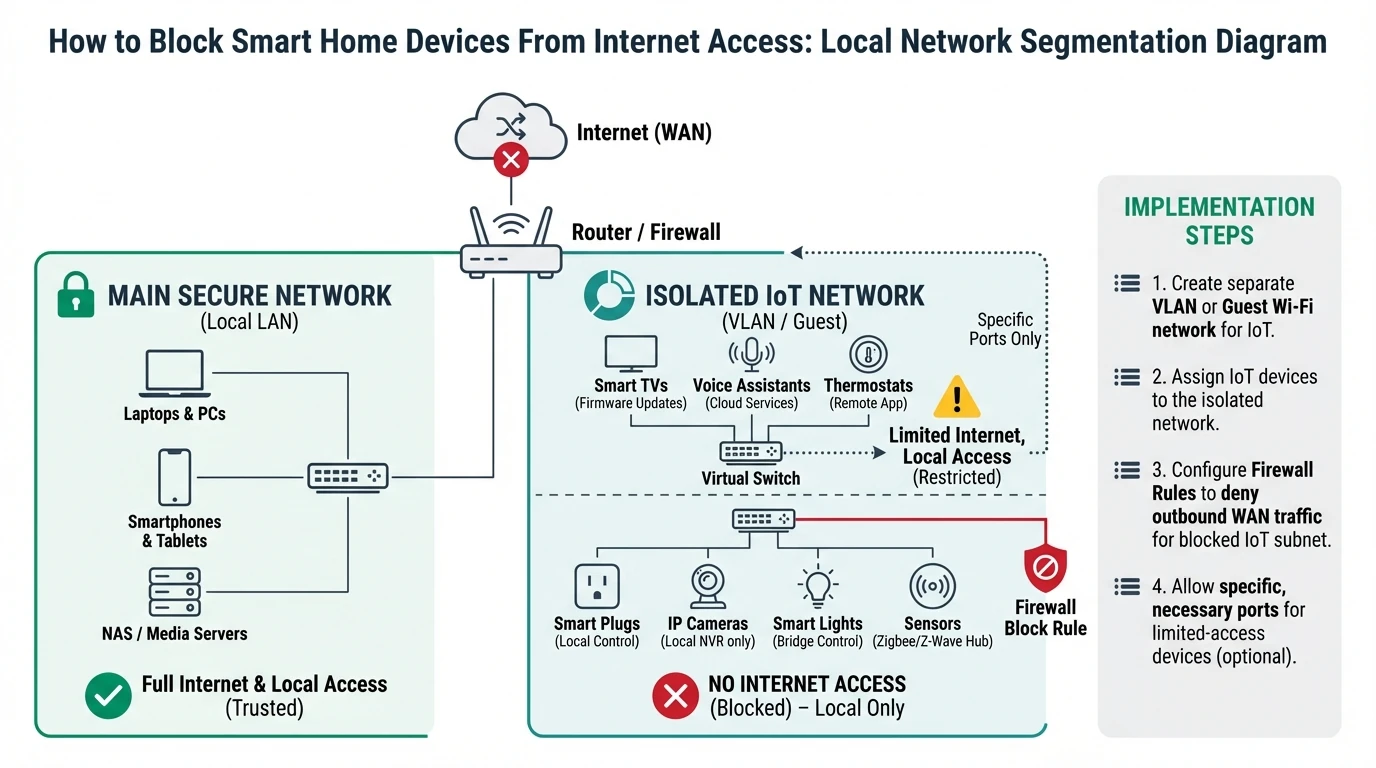
Segmentation lets you apply policy without collateral damage. Place IoT endpoints into a dedicated VLAN, then define explicit traffic flows between VLANs.
Do not optimize for elegance on day one. A simple three-zone model is often enough: trusted, IoT, and guest/media.
| VLAN | Devices | Inbound policy | Outbound policy |
|---|---|---|---|
| Trusted LAN | Laptops, phones, workstations | Full admin access | Internet allowed |
| IoT Local-Only | Cameras, sensors, plugs, hubs | Allow trusted admin as needed | Internet blocked by default |
| Guest/Media | TV, guest phones | No trusted LAN access | Internet allowed |
If your hub and cameras are still cloud-dependent, review hub lock-in risks and camera architecture trade-offs first.
3) Build explicit allow-list firewall rules
Once segmentation is in place, define minimal required traffic for each device class. Typical local allow-list targets include DNS resolver, NTP source, local controller, and NVR.
Avoid broad “allow any local” rules for convenience. Narrow ports and destination IPs whenever possible.
| Device class | Required destinations | Typical ports/protocols | Internet egress |
|---|---|---|---|
| IP cameras | NVR, DNS, NTP | RTSP/ONVIF + DNS/NTP | Blocked |
| Zigbee/Z-Wave hub | Local controller, DNS | HTTPS local API + DNS/NTP | Blocked or tightly limited |
| Smart plugs/switches | Local hub only | Local control protocol | Blocked |
Test each rule in monitor mode before hard deny where your firewall supports staged policy deployment.
4) Validate automations in offline mode
Policy quality is proven under failure simulation, not by dashboard configuration alone. Run planned WAN outage tests and verify expected behavior.
A reliable test includes repeated triggers at different times of day, not a single quick check. Time-based scenes and presence automations may fail only under specific conditions.
| Validation test | Pass condition | Failure indicator |
|---|---|---|
| Motion-triggered lights | Trigger under WAN loss | Trigger latency or no action |
| Door event alerting | Local notification/log generated | No event registered locally |
| Camera recording | Continuous timeline in NVR | Gap during WAN outage |
5) Handle updates and exceptions without breaking policy
Some devices need temporary internet access for firmware updates. This should be handled through time-bound exception rules, not permanent broad egress.
Track each exception in a change log. If an update requires new persistent cloud endpoints, reassess whether the device remains aligned with your privacy model.
| Exception type | Recommended handling | Expiry |
|---|---|---|
| Firmware update | Temporary outbound allow by IP/domain list | 1-2 hours |
| License activation | Isolated staging network | One-time |
| Device replacement onboarding | Controlled temporary egress | Until local validation complete |
6) Monitor and continuously improve policy
Blocking internet once is not enough. Device behavior can change after updates, and household workflows evolve. Add periodic policy audits and anomaly reviews.
A practical cadence is monthly egress review and quarterly full rule audit. Include logs from firewall and hub integration errors to detect hidden dependencies early.
Operational maturity score for internet-blocking deployments
| Product | Cloud required | Local storage | Mandatory account | Offline control | Score / 10 |
|---|---|---|---|---|---|
| Baseline segmented + explicit allow-lists | No | Not applicable | No | Strong | 8.7 |
| Partial segmentation + broad local allow | No | Not applicable | No | Medium | 6.5 |
| Flat network + selective app blocks | Often yes | Not applicable | Yes | Weak | 3.9 |
Frequently Asked Questions
Frequently Asked Questions
Will blocking internet break all smart devices?
No. Many devices continue to operate locally when local dependencies are preserved. Failures usually occur when hidden cloud dependencies were never documented.
Do I need enterprise firewall hardware to do this well?
No. Prosumer gateways and managed switches can be enough if they support VLANs, rule-based filtering, and logging.
How should I handle firmware updates if internet is blocked?
Use temporary, time-limited exceptions with monitoring. Revert to blocked state immediately after update verification.
Is DNS blocking alone sufficient for privacy?
It helps, but it is not sufficient. Network segmentation and explicit traffic policy enforcement are more robust.
How often should rules be reviewed?
Monthly for outbound traffic anomalies and quarterly for full policy review is a practical baseline for most homes.
Primary sources
| Source | Type | URL |
|---|---|---|
| CISA Secure by Design | Security guidance | cisa.gov |
| NIST cybersecurity references | Security framework | nist.gov |
| ENISA IoT good practices | EU guidance | enisa.europa.eu |
Conclusion
Blocking smart home internet access is one of the highest leverage privacy controls available to households. Done correctly, it preserves convenience while sharply reducing involuntary data exposure and dependency risk.
Treat implementation as a disciplined rollout: inventory, segmentation, allow-lists, validation, and ongoing review. That sequence creates durable privacy, not temporary policy theater.
Footnotes
-
Reduced outbound exposure lowers opportunities for remote exploitation and data exfiltration, especially for low-maintenance IoT firmware footprints. ↩