How-To
Using Wyze Cameras Without a Cloud Subscription
Explore how to use Wyze cameras with local storage options, ensuring privacy and offline reliability without cloud subscriptions.
Quick answer: Can I use Wyze cameras without a cloud subscription?
Yes. Insert a Class 10 microSD card and configure event or continuous recording in the Wyze app. Footage stays on the device; no Cam Plus required for local storage.
Source: Wyze Support
Executive Summary
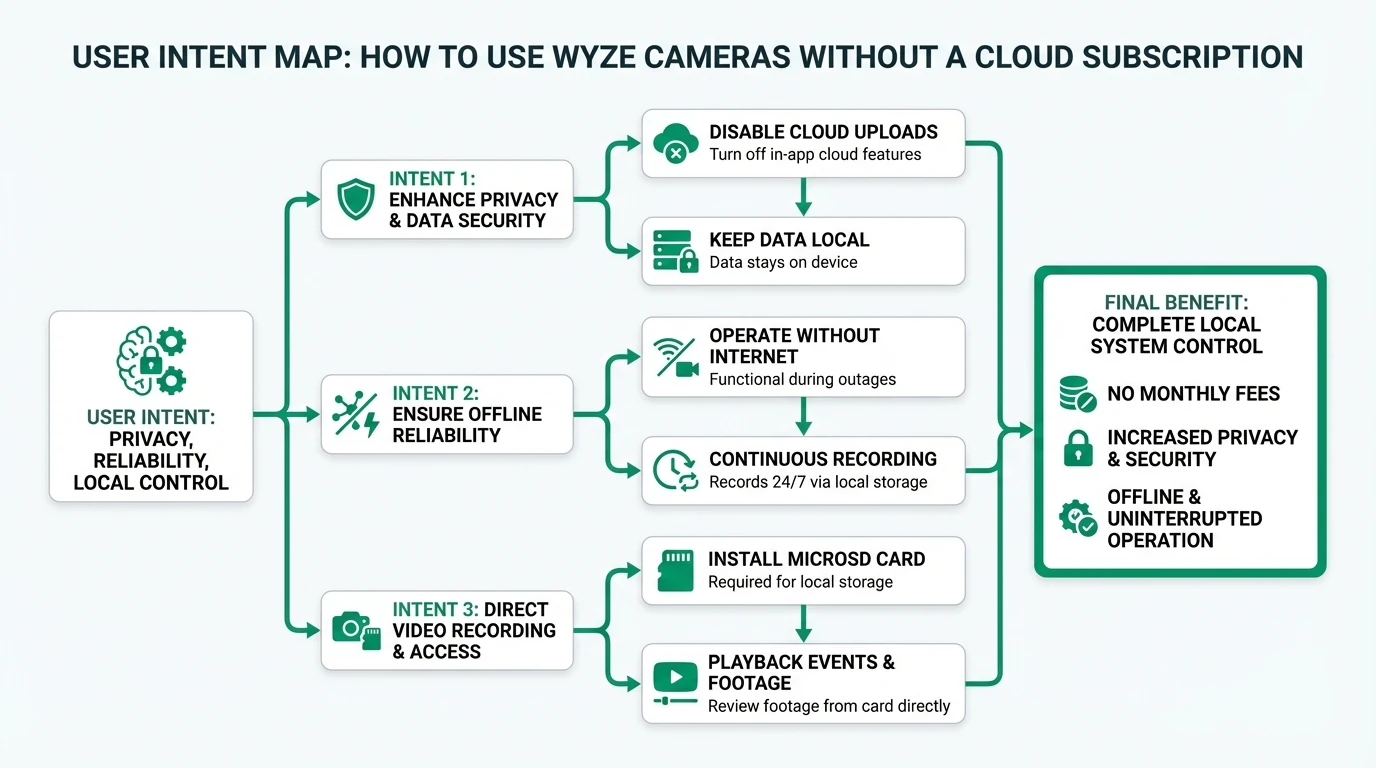
Wyze cameras offer a flexible solution for users who prefer local storage over cloud subscriptions. By utilizing microSD cards, users can record footage directly to the device, enhancing privacy and ensuring reliability during internet outages. This guide explores the practical steps and considerations for setting up Wyze cameras without relying on cloud services, focusing on privacy, offline reliability, and cost-effectiveness.
Bottom line: Using Wyze cameras with local storage is a viable option for those prioritizing privacy and cost savings, though it requires careful setup and maintenance.
Privacy and Local Control
For many users, privacy is a paramount concern when it comes to home security cameras. Wyze cameras provide an option to record footage directly to a microSD card, bypassing the need for cloud storage. This approach ensures that video data remains on the device, reducing the risk of unauthorized access through cloud breaches. By using local storage, users maintain full control over their footage, which can be accessed directly from the microSD card without involving Wyze servers1.
The setup process for local storage is straightforward. For a broader camera comparison, see our subscription-free camera guide. Users need to insert a compatible microSD card into the camera and configure the recording settings via the Wyze app. Options include event-based recording, which captures footage when motion is detected, or continuous recording, which provides a constant stream of video. Both options store data locally, allowing users to review footage without relying on cloud services2.
Despite the advantages, there are some limitations to consider. For instance, while Wyze officially supports microSD cards up to 32GB for most models, users have reported success with larger capacities, such as 128GB or even 256GB. However, these unofficial configurations may lead to instability or data loss, as they are not officially endorsed by Wyze3. Users opting for larger cards should monitor their performance closely and be prepared for potential issues.
Wyze local storage vs cloud privacy
| Product | Cloud required | Local storage | Mandatory account | Offline control | Score / 10 |
|---|---|---|---|---|---|
| Wyze + Cam Plus (cloud) | Yes | Optional microSD | Yes | Weak | 4.0 |
| Wyze + microSD only | No (for storage) | microSD 32GB+ | App only | Strong | 7.5 |
Offline Reliability
One of the key benefits of using Wyze cameras with local storage is their ability to function independently of an internet connection. This offline reliability is particularly valuable in areas with unstable internet service or during temporary outages. By recording directly to a microSD card, Wyze cameras can continue to capture footage even when disconnected from the internet, ensuring continuous monitoring4. For network-level control, see our internet-blocking guide.
The duration of footage that can be stored locally depends on the capacity of the microSD card and the recording settings chosen. For example, a 128GB card can store approximately 11 days of continuous high-definition video, providing ample coverage for most users’ needs5. However, it’s important to note that Wyze cameras do not natively support network-attached storage (NAS), which means users must manually retrieve and manage footage from the microSD card.
While local storage offers significant advantages in terms of reliability, users should be aware of potential challenges. For instance, outdoor and battery-powered models may have limited recording capabilities due to power constraints. Continuous recording can drain the battery quickly, so event-based recording is recommended for these models to conserve power6. Additionally, environmental factors such as heat and moisture can affect the longevity of microSD cards, necessitating regular checks and replacements.
Total Cost of Ownership (TCO)
One of the primary motivations for using Wyze cameras without a cloud subscription is the potential for cost savings. By opting for local storage, users can avoid recurring subscription fees associated with cloud services, such as Wyze’s Cam Plus, which ranges from $1.99 to $19.99 per month7. Instead, the main expenses are the initial purchase of the camera and the cost of microSD cards.
Wyze cameras are relatively affordable, with prices typically ranging from $20 to $50 depending on the model. MicroSD cards, which are necessary for local storage, vary in price based on capacity. A 32GB card can cost as little as $5, while larger capacities, such as 128GB or 256GB, may range from $20 to $508. Over time, users may need to replace microSD cards due to wear and tear, but the overall cost remains lower than ongoing subscription fees.
However, it’s important to consider potential hidden costs. For example, users may need to purchase additional power adapters for continuous recording or base stations for certain outdoor models. Additionally, the lack of official support for larger microSD cards means users may face increased maintenance and troubleshooting efforts. Despite these considerations, the total cost of ownership for local storage solutions is generally lower than that of cloud-based alternatives, making it an attractive option for budget-conscious users.
Checklist for Setting Up Wyze Cameras with Local Storage
- Ensure your Wyze camera model supports microSD card storage.
- Purchase a Class 10 microSD card (32GB officially supported, larger sizes at your own risk).
- Insert the microSD card into the camera and format it using the Wyze app.
- Configure recording settings to 'Events Only' or 'Continuous' based on your needs.
- Regularly check and replace microSD cards to prevent data loss.
Compatibility and Setup Complexity
Setting up Wyze cameras for local storage is generally a straightforward process, but it requires attention to detail to ensure compatibility and optimal performance. Most Wyze camera models, including the v2, v3, and v4, support microSD card storage, with the notable exception of the Wyze Video Doorbell v1/Pro9. Users should verify their camera model’s compatibility with microSD cards before proceeding with setup.
The setup process involves inserting a Class 10 microSD card into the camera and configuring the recording settings via the Wyze app. Users can choose between event-based recording, which captures footage when motion is detected, or continuous recording for constant surveillance. The app provides a user-friendly interface for managing these settings, making it accessible even for those with limited technical expertise10.
Despite the ease of setup, users should be aware of potential challenges. For instance, formatting the microSD card to FAT32 is necessary for compatibility, and this step may require additional software or tools. Additionally, while larger microSD cards can provide extended recording capacity, they are not officially supported by Wyze and may lead to instability or data loss. Users opting for these configurations should be prepared to troubleshoot and monitor performance closely11.
Security and Privacy Implications
Using Wyze cameras with local storage offers significant privacy benefits by keeping video data on the device rather than uploading it to the cloud. This approach reduces the risk of unauthorized access through cloud breaches and ensures that users maintain full control over their footage12. Additionally, Wyze cameras support peer-to-peer (P2P) remote access, allowing users to view live streams directly from the camera to their phone without storing data on Wyze servers13.
However, there are some security considerations to keep in mind. While local storage reduces cloud-related risks, it relies on the physical security of the microSD card. Users should ensure that their cameras are placed in secure locations to prevent unauthorized access or tampering. Additionally, while Wyze cameras do not encrypt data stored on the microSD card, users can enhance security by regularly checking and replacing cards to prevent data loss14.
It’s also important to note that while Wyze cameras offer local storage options, the app still requires an internet connection for initial setup and live view. This means that some metadata may be accessible remotely, although the actual video footage remains on the device. Users prioritizing privacy should consider these factors and weigh the benefits of local storage against potential risks15.
FAQ
Frequently Asked Questions
Can I use any microSD card with my Wyze camera?
While Wyze officially supports microSD cards up to 32GB, users have reported success with larger capacities. However, these configurations may lead to instability or data loss.
How do I set up local storage on my Wyze camera?
Insert a compatible microSD card into the camera, then use the Wyze app to configure recording settings to ‘Events Only’ or ‘Continuous.’
What happens if my internet goes down?
Wyze cameras with local storage can continue recording to the microSD card even during internet outages, ensuring continuous monitoring.
Are there any hidden costs with local storage?
Potential hidden costs include purchasing additional power adapters or base stations, as well as replacing microSD cards due to wear and tear.
Is my footage secure with local storage?
Local storage reduces cloud-related risks, but users should ensure the physical security of the microSD card and regularly check for data integrity.
Primary Sources Table
| Index | Title/Description | Direct URL |
|---|---|---|
| [1] | Which Wyze Cams have local storage? (Official Wyze Support) | Link |
| [2] | Does Wyze Cam Have Local Storage? - The Hardware Hub (YouTube, May 2025) | Link |
| [3] | Wyze camera access to local NAS (Wyze Forum) | Link |
| [4] | Can you record only locally and not to the cloud? (Wyze Forum) | Link |
| [5] | Local Storage (Wyze Forum) | Link |
| [6] | Storage capacity (Wyze Forum) | Link |
| [7] | Local storage for outdoor camera (Wyze Forum) | Link |
| [8] | Wyze Cam v4 Product Page (Official) | Link |
Conclusion
In conclusion, using Wyze cameras with local storage is a practical and cost-effective solution for users seeking to enhance privacy and offline reliability. By opting for microSD card storage, users can maintain full control over their footage and avoid the recurring fees associated with cloud subscriptions. While there are some challenges and considerations, such as compatibility and security, the benefits of local storage make it an attractive option for many users.
For more information on local storage security cameras, explore our guide on best local storage security cameras without subscription 2026. If you’re interested in running a smart home entirely on a local network, check out our guide on can I run a smart home entirely on a local network. Additionally, for a comparison of smart home hubs with no mandatory cloud account, visit our guide on comparison of smart home hubs with no mandatory cloud account.
Footnotes
-
Wyze Support, “Which Wyze Cams have local storage?” ↩
-
The Hardware Hub, “Does Wyze Cam Have Local Storage?” ↩
-
Wyze Forum, “Can you record only locally and not to the cloud?” ↩
-
Wyze Forum, “Local storage for outdoor camera” ↩
-
Wyze Forum, “Storage capacity” ↩
-
Wyze Forum, “Local Storage” ↩
-
Wyze Cam v4 Product Page ↩
-
Wyze Forum, “Wyze camera access to local NAS” ↩
-
Wyze Support, “Which Wyze Cams have local storage?” ↩
-
Wyze Forum, “Local Storage” ↩
-
Wyze Forum, “Storage capacity” ↩
-
Wyze Forum, “Can you record only locally and not to the cloud?” ↩
-
Wyze Forum, “Wyze camera access to local NAS” ↩
-
Wyze Forum, “Local storage for outdoor camera” ↩
-
Wyze Forum, “Can you record only locally and not to the cloud?” ↩