Comparisons
Let's Encrypt vs Self-Signed for Local Smart Homes
Compare Let's Encrypt and self-signed certificates for local smart home HTTPS in 2026. Prioritize privacy and offline reliability.
Quick answer:
Executive Summary
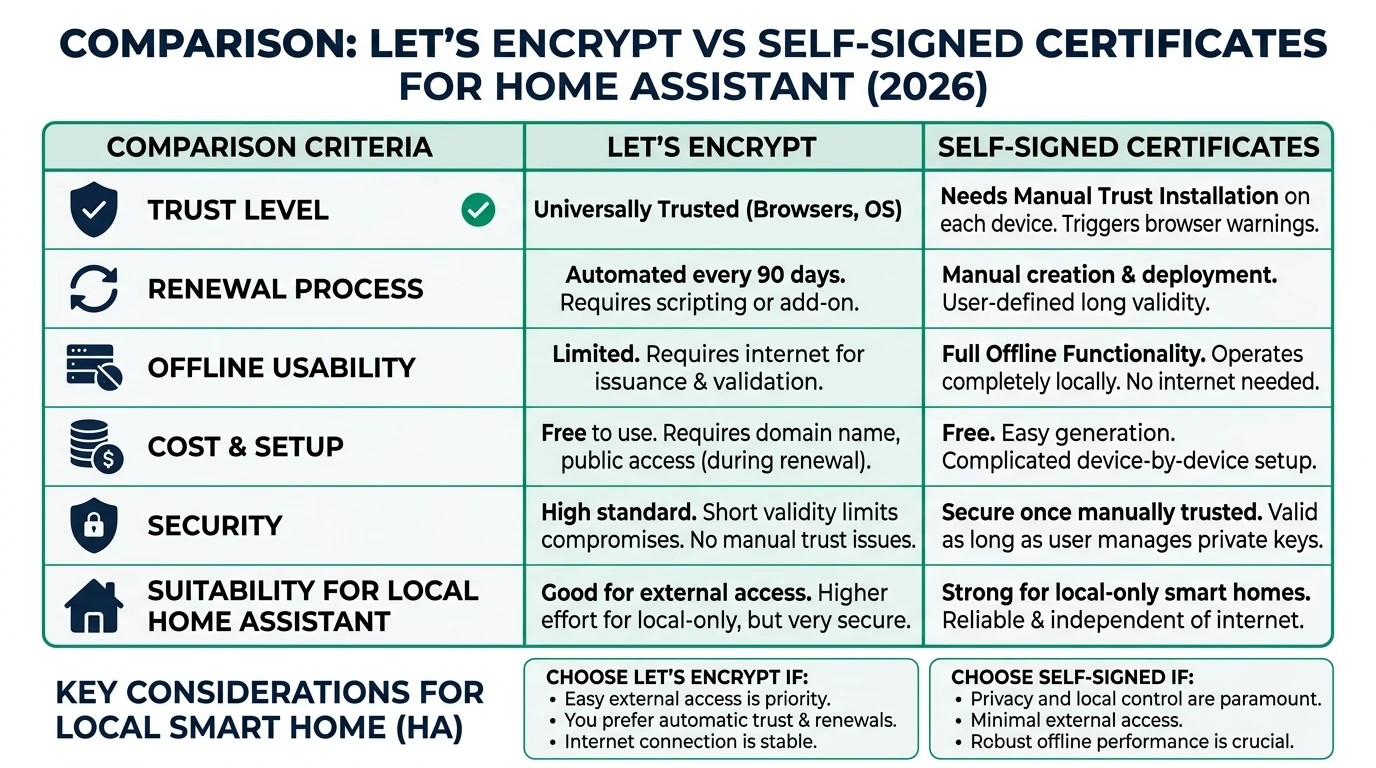
In 2026, securing your local smart home setup with HTTPS is crucial for privacy and control. This guide compares Let’s Encrypt and self-signed certificates, focusing on their suitability for Home Assistant environments. Let’s Encrypt offers browser trust and ease of use for remote access but requires internet connectivity and exposes your domain in public logs. Conversely, self-signed certificates provide complete privacy and offline reliability, ideal for isolated networks but require manual trust configuration on each device.
Bottom line: For purely local setups prioritizing privacy and offline reliability, self-signed certificates are the optimal choice. If remote access and seamless browser integration are needed, Let’s Encrypt is more suitable.
Privacy and Local Control
When it comes to privacy, self-signed certificates have a clear advantage over Let’s Encrypt. Self-signed certificates do not require any external validation, meaning your smart home setup remains entirely private. There are no public logs or third-party interactions, which is crucial for users who prioritize privacy and control over their local network. This is especially important in a world where data privacy concerns are ever-increasing.
Let’s Encrypt, on the other hand, requires a public domain and DNS provider to issue certificates. This means that your domain is logged in public Certificate Transparency logs, potentially exposing your smart home setup to unwanted attention. While Let’s Encrypt certificates are trusted by browsers, this comes at the cost of reduced privacy.
For users who value local control, self-signed certificates are preferable. They allow you to manage your certificates without relying on external services or exposing your network to the internet. This is particularly beneficial for smart home setups that operate entirely within a local network, where external access is neither needed nor desired.
| Criterion | Let’s Encrypt | Self-Signed |
|---|---|---|
| Privacy | Public CT logs expose subdomains1; requires DNS provider2. | Fully private; no external logs or validation34. |
| Local Control | Needs public domain/DNS; port exposure or cloud relay52. | Complete; IP-only/wildcard support3. |
In summary, if privacy and local control are your top priorities, self-signed certificates are the better choice. They provide the security you need without compromising your privacy or relying on external services.
Offline Reliability and Maintenance
Offline reliability is another critical factor when choosing between Let’s Encrypt and self-signed certificates for your smart home. Self-signed certificates excel in this area, as they do not depend on internet connectivity for issuance or renewal. Once generated, they can be used indefinitely within your local network, providing a stable and reliable solution for offline environments.
Let’s Encrypt certificates, however, have a 90-day expiry period, requiring regular renewal. This process necessitates internet access and can be a potential point of failure if not managed correctly. For users with limited internet access or those who prefer an entirely offline setup, this can be a significant drawback.
Maintenance is also a consideration. Self-signed certificates require a one-time setup, after which they can be used without further intervention. In contrast, Let’s Encrypt requires ongoing maintenance to ensure certificates are renewed before expiry. This can involve setting up automation scripts and monitoring to prevent downtime.
| Criterion | Let’s Encrypt | Self-Signed |
|---|---|---|
| Offline Reliability | Fails without internet (90-day expiry36); manual renewal risky. | 100% offline; customizable expiry (e.g., 730 days via OpenSSL4). |
Ultimately, for users seeking a low-maintenance, reliable solution for an offline smart home, self-signed certificates are the superior option. They offer peace of mind with minimal upkeep, ensuring your smart home remains secure and operational.
Total Cost of Ownership
When evaluating the total cost of ownership (TCO) over three years, both Let’s Encrypt and self-signed certificates have their own cost structures. Let’s Encrypt is free in terms of direct costs, but it requires a domain, which typically costs around $10-15 per year. Additionally, the time investment for setting up and maintaining the renewal process can add up to 10-12 hours over three years.
Self-signed certificates, on the other hand, have no direct costs and require minimal time investment. The initial setup takes approximately 15 minutes, and there are no ongoing maintenance requirements. This makes self-signed certificates an attractive option for users looking to minimize both financial and time investments.
| Criterion | Let’s Encrypt | Self-Signed |
|---|---|---|
| TCO (3 years) | $0 direct; ~2-4 hours/year renewal labor2; domain ~$10/year. | $0 forever; ~15-min initial setup4. |
For users prioritizing cost-effectiveness and simplicity, self-signed certificates provide a clear advantage. They offer a one-time setup with no hidden costs, making them ideal for budget-conscious smart home enthusiasts.
Security and Browser Trust
Security is a paramount concern for any smart home setup. Let’s Encrypt provides Domain Validation (DV) certificates, which are trusted by browsers and operating systems. This means users will not encounter security warnings when accessing their smart home interface, providing a seamless user experience.
Self-signed certificates also offer encryption, but they do not provide the same level of trust as Let’s Encrypt certificates. Users will need to manually install the certificate authority (CA) on each device or browser to avoid security warnings. This can be a cumbersome process, especially for users with multiple devices.
| Criterion | Let’s Encrypt | Self-Signed |
|---|---|---|
| Security | Provides DV validation, trusted by browsers/OS (no warnings)53; 90-day expiry limits damage3. | Offers encryption but no trust—manual CA install needed per device/browser314. |
For users who prioritize a seamless experience without browser warnings, Let’s Encrypt is the better choice. However, if you are willing to manage the manual CA installation process, self-signed certificates can provide adequate security for a local-only setup.
Setup Complexity and Support Burden
The complexity of setting up and maintaining certificates is an important consideration for smart home users. Let’s Encrypt requires a more complex setup process, involving the installation of add-ons, configuration of DNS settings, and automation of certificate renewals. This can take between 30 to 60 minutes initially, with ongoing maintenance required to ensure certificates are renewed on time.
Self-signed certificates offer a simpler setup process. Using OpenSSL, you can generate a certificate in about 15 minutes, and once installed, there is no need for further maintenance. This simplicity makes self-signed certificates an attractive option for users who prefer a straightforward, hassle-free setup.
| Criterion | Let’s Encrypt | Self-Signed |
|---|---|---|
| Setup Complexity | 30-60 min initial (add-on + DuckDNS + automation527); ongoing: manual blueprint for 7-day pre-expiry renewal2. | 5-15 min OpenSSL command (openssl req -sha256 -newkey rsa:4096 -x509 -days 7304); copy PEM files, edit yaml, restart. |
For users who value simplicity and minimal ongoing maintenance, self-signed certificates are the preferred choice. They provide a quick and easy setup with no additional support burden.
Checklist
- Evaluate your need for remote access
- Consider your privacy priorities
- Assess your willingness to manage manual CA installations
- Calculate potential costs and time investments
- Decide based on your setup's offline requirements
FAQ
Frequently Asked Questions
Why choose self-signed certificates for local smart homes?
Self-signed certificates offer maximum privacy and offline reliability, making them ideal for local-only smart home setups where external access is not required.
What are the main drawbacks of Let's Encrypt for local setups?
Let’s Encrypt requires internet connectivity for certificate renewal and exposes your domain in public logs, which can be a privacy concern for local setups.
How often do Let's Encrypt certificates need renewal?
Let’s Encrypt certificates expire every 90 days, requiring regular renewal to maintain secure connections.
Can self-signed certificates be used on multiple devices?
Yes, but you must manually install the certificate authority on each device to avoid security warnings.
Is there a cost associated with using Let's Encrypt?
While Let’s Encrypt certificates are free, you may incur costs for a domain and the time investment for setup and maintenance.
Primary Sources Table
Conclusion
In conclusion, the choice between Let’s Encrypt and self-signed certificates for your local smart home setup depends on your specific needs and priorities. If privacy, offline reliability, and minimal maintenance are your primary concerns, self-signed certificates are the best option. They provide a straightforward, cost-effective solution that keeps your smart home secure without relying on external services.
For further insights on smart home privacy and technology, explore our guides on Apple HomeKit Secure Video vs Local NVR for Privacy, Aqara vs Shelly vs Tuya Privacy 2026, and Best Hardware for Local AI Smart Home 2026.
Footnotes
-
Self Signed and LetsEncrypt Certificates for the LAN - YouTube. ↩ ↩2
-
Home Assistant: Auto-renewing Let’s Encrypt SSL. ↩ ↩2 ↩3 ↩4 ↩5
-
A Comparison of Let’s Encrypt, Commercial and Private Certificate Authorities, and Self-Signed SSL Certificates. ↩ ↩2 ↩3 ↩4 ↩5 ↩6
-
Certificate Authority and self-signed certificate for SSL/TLS. ↩ ↩2 ↩3 ↩4 ↩5
-
How to configure Let’s Encrypt SSL Certificates for Home Assistant. ↩ ↩2 ↩3
-
Differences between Let’s Encrypt SSL certificates and traditional CA-issued certificates. ↩
-
SSL certificate for localhost using Lets Encrypt and duckdns. ↩