Smart Home Privacy
OpenWrt vs Stock Firmware for Smart Home Privacy
Compare OpenWrt and stock firmware for smart home privacy and VLAN segmentation in 2026.
Quick answer: OpenWrt or stock firmware for a private smart home LAN?
OpenWrt removes vendor dashboards, enables VLANs and firewall rules you control, and receives community security fixes longer than many OEM trees—at the cost of install time. Stock firmware is easier but often bundles telemetry and slower updates.
Source: OpenWrt project
Executive Summary
In the evolving landscape of smart home technology, choosing the right router firmware is crucial for ensuring privacy and efficient network management. Start from OpenWrt upstream docs and compare to your OEM’s policy. Layer this guide with VLAN segmentation for IoT, OPNsense vs pfSense if you use a dedicated firewall, and best smart home mesh for privacy for Wi‑Fi choices. OpenWrt is renowned for package-based firewalls and no vendor app dependency; stock firmware often includes telemetry and limited VLAN depth.
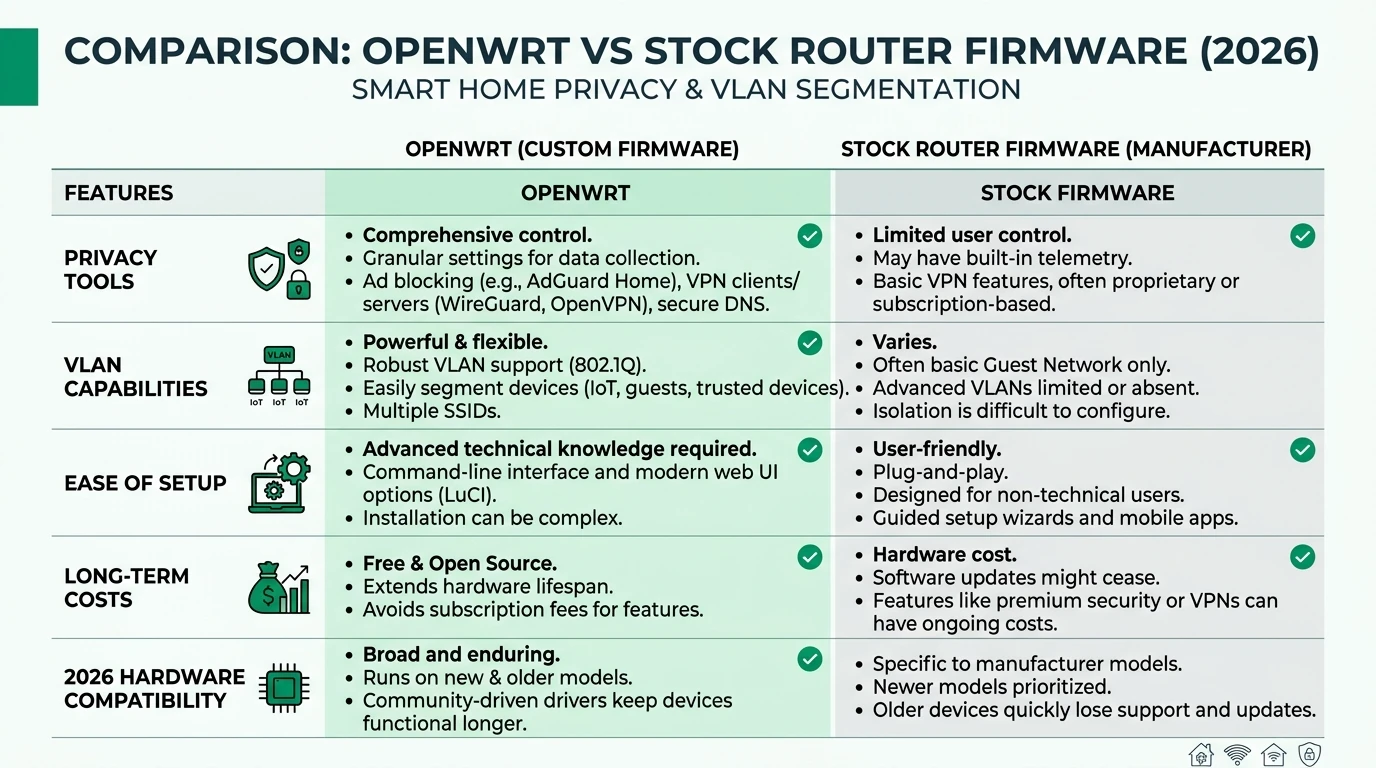
OpenWrt’s ability to support VLAN segmentation natively through the 802.1Q standard allows for effective isolation of smart home devices, a critical feature as the number of connected devices continues to grow. This level of control is not typically available with stock firmware, which may offer basic VLAN support but lacks the flexibility and depth of OpenWrt. Additionally, OpenWrt excels in offline reliability, as it does not rely on cloud services, ensuring that your network remains functional even without an internet connection.
From a cost perspective, OpenWrt is a cost-effective solution, offering free software and low power consumption, estimated at around $5 per month. This is in stark contrast to stock firmware, which may require frequent hardware upgrades, adding to the total cost of ownership. However, OpenWrt does come with a steeper learning curve, requiring technical knowledge for installation and setup, whereas stock firmware is generally more user-friendly.
Bottom line: For tech-savvy homeowners who prioritize privacy and network segmentation, OpenWrt is the superior choice over stock firmware, offering greater control, reliability, and cost savings.
Privacy and Security: OpenWrt vs Stock Firmware
When it comes to privacy and security, OpenWrt stands out as a robust option for smart home networks. It offers a high level of privacy through features such as package-based firewalls and the absence of telemetry, which means that your data is not being sent back to the manufacturer. This is a significant advantage over stock firmware, which often includes vendor tracking and telemetry that can compromise your privacy1. With OpenWrt, you can install additional privacy tools like AdGuard Home, which provides local ad-blocking capabilities, further enhancing your network’s security.
In contrast, stock firmware typically provides a medium level of privacy. While it may include some basic security features, the potential for vendor tracking and the lack of regular updates can leave your network vulnerable. Manufacturers often cease updates for stock firmware once a product reaches its end of life, which can expose your network to security risks2. OpenWrt, on the other hand, benefits from a community-driven approach, with regular updates and patches that keep your network secure.
OpenWrt also excels in providing local control over your network. With a writable file system and support for hundreds of devices, you have the flexibility to customize your network to suit your specific needs. This level of control is not available with stock firmware, which is often restricted and does not allow for extensive customization3. For users who prioritize privacy and security, OpenWrt is the clear choice.
VLAN Segmentation: Enhancing Smart Home Security
VLAN segmentation is a critical feature for smart home networks, allowing you to isolate devices and manage traffic more effectively. OpenWrt offers native support for VLAN segmentation through the 802.1Q standard, which enables you to create separate networks for different types of devices. This is particularly useful in a smart home environment, where you may want to isolate IoT devices from your main network to prevent potential security breaches4.
With OpenWrt, setting up VLANs is straightforward using the LuCI interface, which provides a graphical interface for managing your network. This allows you to easily configure VLANs and assign devices to specific networks, ensuring that your smart home devices are properly isolated. In contrast, stock firmware typically offers only basic VLAN support, which may not be sufficient for more complex network setups5.
The ability to segment your network is not only important for security but also for performance. By isolating devices, you can prevent network congestion and ensure that critical devices have the bandwidth they need. This is particularly important as the number of connected devices in a smart home continues to grow. OpenWrt’s flexibility in managing VLANs makes it an ideal choice for users who need advanced network segmentation capabilities.
| Criteria | OpenWrt | Stock Firmware |
|---|---|---|
| Privacy | High (package-based firewalls, no telemetry) 🟢 | Medium (vendor tracking possible) 🟡 |
| VLAN Segmentation | Native (802.1Q via DSA) 🟢 | Basic/limited 🟡 |
| Local Control | Full (writable FS, 100s devices) 🟢 | Restricted 🔴 |
| Offline Reliability | Excellent (no cloud deps) 🟢 | Variable (updates cease) 🟡 |
| TCO (5-yr est.) | Low (~$5/mo power max) 🟢 | Medium (new hardware buys) 🟡 |
| Scenario | Lean OpenWrt | Stay stock |
|---|---|---|
| IoT VLAN + firewall rules | Strong fit | Often partial / hidden |
| Parental time-boxing only | Either | Stock may suffice |
| ISP router you cannot flash | N/A | Put OpenWrt/AP behind DMZ |
Local Control and Offline Reliability
One of the key advantages of OpenWrt is its ability to provide full local control over your network. Unlike stock firmware, which often restricts user access to certain features, OpenWrt offers a writable file system that allows you to customize your network to your specific needs. This includes the ability to install additional packages and configure your network settings to suit your preferences6.
OpenWrt’s local control extends to its support for a wide range of devices, including 2026 Wi-Fi 7 models. This ensures that you can continue to use your existing hardware, even as new technologies emerge. In contrast, stock firmware is often tied to specific hardware models and may not support newer devices, requiring you to purchase new hardware more frequently7.
Offline reliability is another area where OpenWrt excels. Because it does not rely on cloud services, your network remains functional even if your internet connection goes down. This is particularly important in a smart home environment, where you may have critical devices that need to remain operational at all times. Stock firmware, on the other hand, may include features that require an internet connection, which can compromise your network’s reliability8.
Checklist
- Install OpenWrt for full local control
- Use LuCI interface for VLAN setup
- Ensure offline reliability with no cloud dependencies
- Regularly update OpenWrt for security patches
- Test VLAN configurations for optimal performance
Total Cost of Ownership: OpenWrt vs Stock Firmware
When considering the total cost of ownership, OpenWrt offers significant advantages over stock firmware. As a free, open-source solution, OpenWrt eliminates the need for costly software licenses, reducing your overall expenses. Additionally, OpenWrt’s low power consumption, estimated at around $5 per month, makes it a cost-effective choice for long-term use9.
In contrast, stock firmware often requires frequent hardware upgrades, which can add to your total cost of ownership. Manufacturers may cease support for older models, forcing you to purchase new hardware to maintain your network’s functionality. This can be a significant expense, particularly if you have a large smart home network with multiple devices10.
OpenWrt also extends the life of your existing hardware, allowing you to continue using older devices even as new technologies emerge. This not only reduces your overall costs but also minimizes electronic waste, making it an environmentally friendly choice. For users who prioritize cost savings and sustainability, OpenWrt is the superior option.
Setup Complexity and Support
While OpenWrt offers numerous advantages, it does come with a steeper learning curve compared to stock firmware. Installing OpenWrt requires technical knowledge, particularly when it comes to flashing the firmware and configuring your network settings. This process can be complex and time-consuming, especially for users who are not familiar with Linux or networking concepts11.
Setting up VLANs with OpenWrt also requires some technical expertise, as it involves editing configuration files and using the command line interface. However, the LuCI interface provides a user-friendly way to manage your network, making it easier to configure VLANs and other settings once you are familiar with the system12.
In contrast, stock firmware is generally more user-friendly, offering a plug-and-play experience with basic VLAN support via a web interface. This makes it a more accessible option for users who are not comfortable with technical setups. However, the trade-off is that you may not have access to the same level of customization and control that OpenWrt provides13.
Frequently Asked Questions
What are the privacy benefits of using OpenWrt?
OpenWrt enhances privacy by eliminating telemetry, offering package-based firewalls, and supporting local ad-blocking tools like AdGuard Home.
How does OpenWrt support VLAN segmentation?
OpenWrt supports VLAN segmentation natively through the 802.1Q standard, allowing for effective isolation of smart home devices.
Is OpenWrt compatible with Wi-Fi 7 routers?
Yes, OpenWrt supports a wide range of devices, including 2026 Wi-Fi 7 models, ensuring compatibility with the latest technology.
What are the costs associated with using OpenWrt?
OpenWrt is free to use, with low power consumption estimated at around $5 per month, making it a cost-effective solution.
How difficult is it to set up OpenWrt?
Setting up OpenWrt requires technical knowledge and can be complex, but the LuCI interface provides a user-friendly way to manage your network.
Primary Sources Table
| Index | Title/Description | Direct URL |
|---|---|---|
| [1] | Power consumption of OpenWrt vs. stock firmware (Netgear R7800) | OpenWrt forum |
| [2] | Flint 2 - OpenWrt vs. Stock firmware | GL.iNet forum |
| [3] | OpenWrt vs Stock Firmware – Is It Worth the Switch? (YouTube) | YouTube |
| [4] | OpenWrt vs Merlin (YouTube) | YouTube |
| [5] | DD-WRT or OpenWrt - Which alternative router firmware | Airix |
| [6] | OpenWRT vs DD-WRT: Comparison | itorakul |
| [7] | What OpenWrt router to buy in 2025? | Habr |
| [8] | Best Open-Source VPN Routers 2026 | FlashRouters |
Conclusion
In conclusion, OpenWrt offers significant advantages over stock firmware for smart home networks, particularly in terms of privacy, VLAN segmentation, and cost-effectiveness. While it requires a higher level of technical expertise to set up and manage, the benefits it provides in terms of control, security, and long-term savings make it a worthwhile investment for tech-savvy homeowners. For those who prioritize ease of use, stock firmware may be a more accessible option, but it comes with limitations in terms of privacy and customization.
For further insights into smart home privacy, explore our guides on Apple HomeKit Secure Video vs Local NVR for Privacy, Aqara vs Shelly vs Tuya Privacy 2026, Best Hardware for Local AI Smart Home 2026, Pi-hole vs AdGuard, and private network stack.
Footnotes
-
OpenWrt vs Stock Firmware – Is It Worth the Switch? (YouTube) ↩
-
Flint 2 - OpenWrt vs. Stock firmware ↩
-
OpenWRT vs DD-WRT: Comparison ↩
-
DD-WRT or OpenWrt - Which alternative router firmware ↩
-
What OpenWrt router to buy in 2025? ↩
-
Power consumption of OpenWrt vs. stock firmware (Netgear R7800) ↩
-
Best Open-Source VPN Routers 2026 ↩
-
OpenWrt vs Merlin (YouTube) ↩
-
Power consumption of OpenWrt vs. stock firmware (Netgear R7800) ↩
-
Flint 2 - OpenWrt vs. Stock firmware ↩
-
DD-WRT or OpenWrt - Which alternative router firmware ↩
-
OpenWRT vs DD-WRT: Comparison ↩
-
OpenWrt vs Stock Firmware – Is It Worth the Switch? (YouTube) ↩