Smart Home Privacy
Proxmox vs Docker vs Bare Metal for Home Assistant
Compare Proxmox, Docker, and bare metal for Home Assistant in 2026. Optimize privacy, offline reliability, and TCO.
Quick answer: Should I run Home Assistant on bare metal, Proxmox, or Docker?
Use Home Assistant OS on bare metal when you want the lowest moving parts. Choose Proxmox when you need VMs/LXC for Frigate, Pi-hole, or NAS roles on one box. Pick Docker or Container when you already run a Linux host and want portable stacks—accept more manual maintenance than HA OS.
Executive Summary
In 2026, choosing the right platform for hosting Home Assistant (HA) involves balancing simplicity, privacy, offline reliability, and total cost of ownership (TCO). Start from upstream guidance: Home Assistant installation and Proxmox VE for hypervisor context. Map hardware using our Raspberry Pi vs mini-PC vs NAS and complete homelab costs guides before you buy. Bare metal installations offer straightforward setups ideal for beginners, while Proxmox provides robust multi-app management for advanced users. Docker offers portability for those already comfortable with Compose and host patching.
Bottom line: For a single-app, hassle-free setup, opt for bare metal. If you require multi-app capabilities and robust isolation, Proxmox is the way to go. Docker suits those who prioritize portability and are comfortable with manual configurations.
Understanding Bare Metal for Home Assistant
Bare metal installations of Home Assistant are the most straightforward approach for users who prioritize simplicity and minimal setup complexity. By installing Home Assistant Operating System (HA OS) directly onto the hardware, you eliminate the need for additional layers like hypervisors or container engines. This direct installation ensures that all system resources are dedicated to running Home Assistant, which can be particularly beneficial for users with limited hardware resources.
The primary advantage of bare metal is its ease of setup. Typically, you only need to flash the HA OS onto a USB drive and boot your device. This process is well-documented and supported by the Home Assistant community, making it accessible even to those with limited technical expertise. Moreover, bare metal installations offer excellent offline reliability, as the system is designed to function independently of external dependencies1.
However, the simplicity of bare metal comes with limitations. While it excels in running Home Assistant, it lacks the flexibility to host additional applications or services. This can be a drawback for users who wish to expand their home automation setup with tools like Pi-hole or Frigate. Additionally, while the initial setup is straightforward, any future changes or upgrades might require more manual intervention compared to virtualized environments.
In terms of privacy, bare metal installations provide a high level of local control. Since there are no intermediary layers, the attack surface is minimized, reducing potential vulnerabilities. This setup is ideal for users who prioritize security and wish to keep their smart home operations entirely local2.
| Criteria | Bare Metal (HA OS) |
|---|---|
| Privacy/Local Control | Full local; no external dependencies. |
| Offline Reliability | Excellent; single-purpose, survives power cuts if backed up. |
| TCO (Hardware/Power) | Lowest; 4GB RAM minimum, ~5-10W idle (est. NUC). |
| Performance Overhead | None (native). |
While bare metal installations are perfect for those seeking simplicity and reliability, they may not be the best choice for users looking to expand their home automation ecosystem beyond Home Assistant.
Exploring Proxmox for Home Assistant
Proxmox Virtual Environment (VE) offers a powerful solution for users who need to run multiple applications alongside Home Assistant. As an open-source hypervisor, Proxmox allows you to create virtual machines (VMs) and Linux containers (LXC) on the same hardware, providing excellent resource management and isolation. This makes it an attractive option for advanced users who want to maximize their hardware’s potential.
One of the key benefits of using Proxmox is its ability to run Home Assistant as a VM, which offers full support for the Supervisor and add-ons. This setup provides a high degree of flexibility, allowing you to easily integrate additional services like Pi-hole or Frigate without compromising the performance or reliability of Home Assistant3. Proxmox’s web-based interface simplifies the management of VMs and containers, reducing the need for command-line interactions.
Proxmox also excels in terms of offline reliability and privacy. Its clustering capabilities ensure that your Home Assistant setup remains operational even in the event of hardware failures. Additionally, Proxmox’s use of KVM (Kernel-based Virtual Machine) for virtualization provides strong isolation between VMs, enhancing security and privacy. This means that even if one VM is compromised, it does not affect the others4.
However, setting up Proxmox requires a moderate level of technical expertise. While the installation process is well-documented, configuring VMs and containers can be complex, especially for users unfamiliar with virtualization technologies. Additionally, Proxmox requires more hardware resources than bare metal installations, with a recommended minimum of 8GB RAM to ensure smooth operation.
| Criteria | Proxmox (VM/LXC) |
|---|---|
| Privacy/Local Control | High; isolated VMs/LXCs, full hardware passthrough (e.g., USB/Zigbee). |
| Offline Reliability | Superior; HA clustering, live migration, backups. |
| TCO (Hardware/Power) | 8GB+ RAM; efficient slicing (e.g., HA + Pi-hole on N150 Mini PC). |
| Performance Overhead | Negligible (HA compile time same as bare metal). |
For users who need a robust, multi-application environment with strong isolation and privacy features, Proxmox is an excellent choice. However, it requires a willingness to invest time in setup and maintenance.
Docker for Home Assistant: Flexibility and Portability
Docker provides a flexible and portable solution for running Home Assistant, particularly appealing to developers and users familiar with containerization. By using Docker, you can run Home Assistant alongside other applications on the same host, leveraging the lightweight nature of containers to minimize resource usage. This approach is ideal for users who prioritize portability and wish to experiment with different configurations.
One of the main advantages of Docker is its ease of use for deploying applications. With a simple docker run command, you can quickly spin up a Home Assistant instance, making it an attractive option for users who frequently test or modify their setups. Docker’s portability also allows you to move your Home Assistant setup between different machines with minimal effort, which can be beneficial for users who upgrade their hardware frequently5.
However, Docker’s flexibility comes with some trade-offs. Unlike Proxmox, Docker does not provide full OS isolation, which can pose security risks if not properly managed. Additionally, Docker installations of Home Assistant require manual configuration of add-ons and integrations, which can increase the complexity and maintenance burden compared to using the Supervisor in a Proxmox VM6.
In terms of offline reliability, Docker is moderate. While containers can restart automatically after outages, they may require manual intervention to ensure all services are running correctly. This can be a disadvantage for users who need a highly reliable setup that operates seamlessly without constant oversight.
| Criteria | Docker (on Linux) |
|---|---|
| Privacy/Local Control | Good; app-level, but host OS exposes more. |
| Offline Reliability | Moderate; container restarts needed post-outage. |
| TCO (Hardware/Power) | Low; shares host, but manual maintenance adds time cost. |
| Performance Overhead | Minimal (~less RAM than LXC). |
Docker is best suited for users who value flexibility and are comfortable with the intricacies of container management. It offers a lightweight and portable solution but requires careful consideration of security and maintenance practices.
Privacy and Security Considerations
When choosing a platform for Home Assistant, privacy and security are paramount. Each option—bare metal, Proxmox, and Docker—offers different levels of control and isolation, impacting the overall security posture of your smart home setup.
Bare metal installations provide the highest level of privacy by minimizing the attack surface. With no intermediary layers, there are fewer potential vulnerabilities, making it an ideal choice for users who prioritize security and wish to keep their operations entirely local7. This setup ensures that your data remains within your control, without reliance on external services.
Proxmox offers robust security features through its use of VMs and containers. The isolation provided by KVM virtualization ensures that each VM operates independently, reducing the risk of cross-contamination in the event of a security breach. This makes Proxmox a strong contender for users who need to run multiple applications securely on the same hardware8. Additionally, Proxmox does not include telemetry by default, further enhancing privacy.
Docker, while flexible, requires careful management to maintain security. Containers share the host OS kernel, which can pose risks if not properly configured. Users must ensure that their Docker setup is regularly updated and that security best practices are followed to mitigate potential vulnerabilities9. Despite these challenges, Docker’s app-level isolation provides a reasonable level of privacy for users familiar with container security.
Understanding the privacy and security implications of each platform is crucial for making an informed decision. Users should weigh the benefits of isolation and control against the complexity of setup and maintenance.
Total Cost of Ownership: Hardware and Power Considerations
The total cost of ownership (TCO) is a critical factor when selecting a platform for Home Assistant. This includes not only the initial hardware investment but also ongoing power consumption and maintenance costs. Each option—bare metal, Proxmox, and Docker—has different implications for TCO, which can influence your decision based on budget and resource availability.
Bare metal installations typically have the lowest TCO, as they require minimal hardware resources. A basic setup with 4GB of RAM and a low-power processor is sufficient to run Home Assistant efficiently. This makes bare metal an attractive option for users with limited budgets or those looking to minimize power consumption10. The simplicity of the setup also reduces maintenance costs, as there are fewer components to manage.
Proxmox, while more resource-intensive, offers efficient resource management through virtualization. By running multiple applications on the same hardware, you can maximize the utility of your investment, potentially reducing the need for additional devices. However, Proxmox requires a more substantial initial investment in hardware, with a recommended minimum of 8GB RAM to ensure smooth operation11. The ability to run multiple applications can offset these costs by consolidating your smart home infrastructure.
Docker provides a low-cost solution in terms of hardware, as it shares the host system’s resources. This can be advantageous for users who already have a suitable Linux host and wish to add Home Assistant without additional hardware investment. However, the manual maintenance required for Docker setups can increase the time cost, which should be considered when evaluating TCO12.
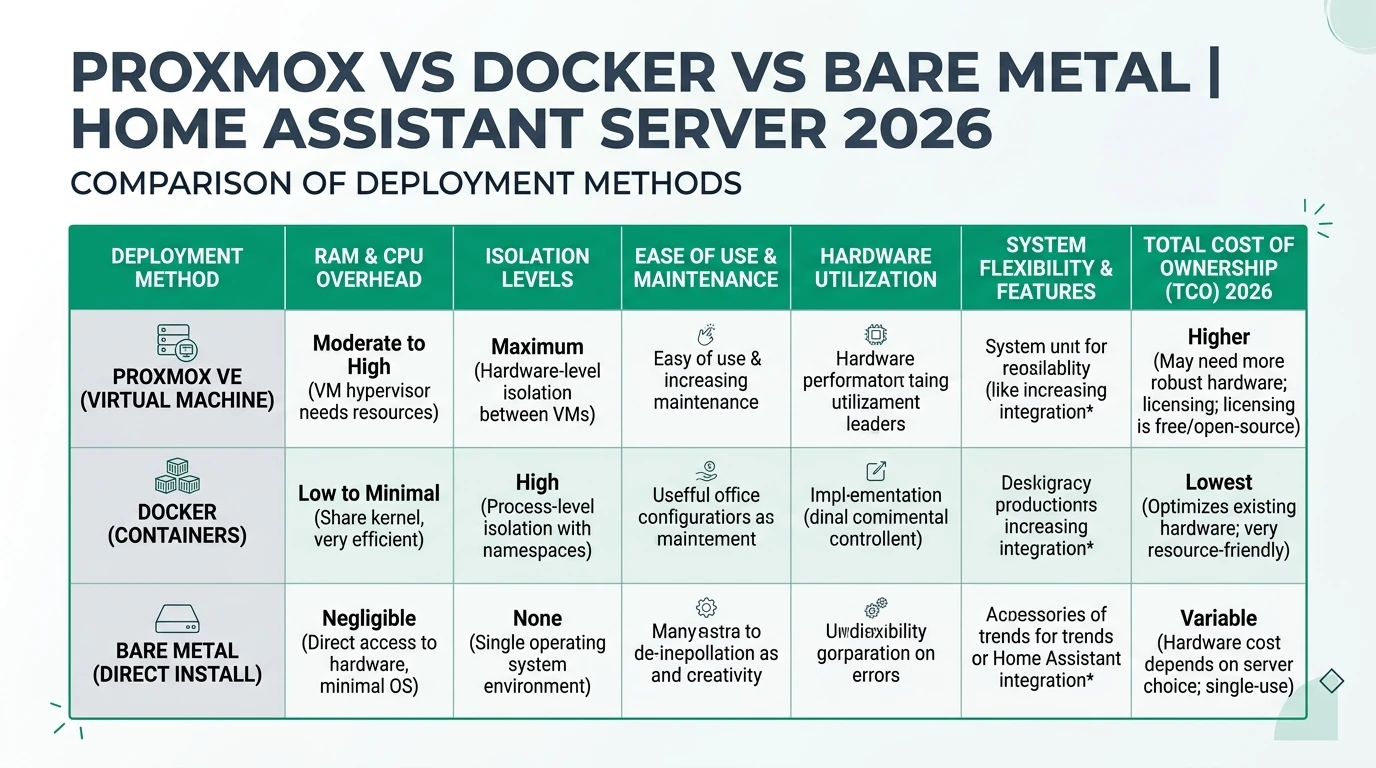
| Criteria | Bare Metal (HA OS) | Proxmox (VM/LXC) | Docker (on Linux) |
|---|---|---|---|
| TCO (Hardware/Power) | Lowest; 4GB RAM min, ~5-10W idle. | 8GB+ RAM; efficient slicing. | Low; shares host, but manual maintenance adds time cost. |
Evaluating the TCO of each platform involves considering both the upfront and ongoing costs. Users should assess their budget, hardware availability, and willingness to invest time in maintenance when making their decision.
Setup Complexity and Support Burden
The complexity of setting up and maintaining your Home Assistant environment varies significantly between bare metal, Proxmox, and Docker. Understanding the support burden associated with each option can help you choose the platform that aligns with your technical skills and available time.
Bare metal installations are the simplest to set up, requiring only a USB flash of the HA OS and a straightforward boot process. This ease of setup makes it an ideal choice for beginners or those who prefer a hassle-free experience. The Home Assistant community provides extensive support through forums and documentation, making it easy to find help if needed13.
Proxmox, while more complex, offers a comprehensive solution for users who need to manage multiple applications. The initial setup involves installing Proxmox on bare metal and configuring VMs or containers, which can be challenging for those unfamiliar with virtualization. However, Proxmox’s web-based interface simplifies ongoing management, and the community provides a wealth of resources, including templates and scripts, to assist with setup and maintenance14.
Docker offers a middle ground in terms of complexity. While deploying applications is straightforward for those familiar with containerization, configuring Home Assistant with the necessary add-ons and integrations requires more manual effort. This can increase the support burden, particularly for users who are new to Docker15. However, the flexibility and portability of Docker make it a popular choice for developers and those who frequently modify their setups.
Checklist
- Bare metal: Flash HA OS USB, boot.
- Proxmox: Install on bare metal, configure VMs/containers.
- Docker: Deploy containers, manual add-on configuration.
Understanding the setup complexity and support burden of each platform is essential for making an informed decision. Users should consider their technical expertise and available time when choosing the best option for their Home Assistant setup.
FAQ
Frequently Asked Questions
Is Proxmox overkill for only Home Assistant?
Often yes. If HA is the sole workload, bare metal HA OS minimizes layers. Proxmox shines when you colocate Frigate, DNS, or file shares on one machine.
Does Docker get Home Assistant Supervisor?
Supervised installs exist but are an advanced path; most Docker users run Core/Container and manage add-ons manually—plan for extra maintenance.
Which option has the smallest attack surface?
Bare metal HA OS exposes fewer daemons than a full hypervisor or multi-container host, assuming you keep updates current and avoid unrelated services.
Can I pass Zigbee or Coral USB through Proxmox?
Yes—USB passthrough to a VM/LXC is common; document your controller and back up the VM before kernel updates.
Where does backup fit in?
Pair any architecture with off-site copies—see Home Assistant backup guide for 3-2-1 patterns.
Primary Sources Table
| Index | Title/Description | Direct URL |
|---|---|---|
| 1 | Proxmox vs Bare Metal vs Docker, where to start? - HA Community | Home Assistant Community |
| 2 | Choosing a Server for Home Assistant - HA Community | HA Community thread |
| 3 | Home Assistant Proxmox install guides | SmartHomeScene Proxmox guide |
| 4 | Proxmox vs Docker discussion | YouTube comparison |
| 5 | Proxmox vs Docker write-up | WunderTech |
Conclusion
Choosing the right platform for hosting Home Assistant in 2026 depends on your specific needs and technical expertise. Bare metal installations offer simplicity and reliability, making them ideal for beginners or those who prioritize a hassle-free setup. Proxmox provides robust multi-app management and isolation, suitable for advanced users who need to run multiple applications securely. Docker offers flexibility and portability, appealing to developers and those familiar with containerization.
For further insights into smart home privacy and hardware recommendations, explore our guides on Apple HomeKit Secure Video vs Local NVR for Privacy, Aqara vs Shelly vs Tuya Privacy 2026, Best Hardware for Local AI Smart Home 2026, self-host cameras + automation on one PC, and network stack hardening.
Footnotes
-
Proxmox vs Bare Metal vs Docker, where to start? - HA Community ↩
-
Choosing a Server for Home Assistant - HA Community ↩
-
Home Assistant Proxmox 9 Install Guide (2026) - SmartHomeScene ↩
-
Proxmox vs Docker (2026): YouTube Video ↩
-
Proxmox vs Docker: Best Option to Use in 2026? - WunderTech ↩
-
The BEST alternative to Docker and VMs! Proxmox LXC - YouTube ↩
-
Thoughts About Self-Hosting AI, Proxmox CT vs. Docker - YouTube ↩
-
UDMS Part 3: 15 Best Home Server OS + Proxmox VM vs LXC ↩
-
Proxmox vs Docker: Best Option to Use in 2026? - WunderTech ↩
-
Choosing a Server for Home Assistant - HA Community ↩
-
Home Assistant Proxmox 9 Install Guide (2026) - SmartHomeScene ↩
-
Proxmox vs Docker (2026): YouTube Video ↩
-
Proxmox vs Bare Metal vs Docker, where to start? - HA Community ↩
-
Home Assistant Proxmox 9 Install Guide (2026) - SmartHomeScene ↩
-
Proxmox vs Docker: Best Option to Use in 2026? - WunderTech ↩