Smart Home Privacy
Reolink vs Ubiquiti: Which Has Better Local-Only Privacy?
Explore the local-only privacy features of Reolink and Ubiquiti security systems, focusing on data protection without cloud reliance.
Quick answer: Which security system offers better local-only privacy: Reolink or Ubiquiti?
Ubiquiti provides superior local-only privacy due to its fully on-premises NVR storage and no cloud dependency. Reolink offers strong local options with optional cloud; both work offline.
Source: Privacy Guides community
Executive Summary
When it comes to local-only privacy in security camera systems, both Reolink and Ubiquiti offer compelling features. However, Ubiquiti stands out with its robust local-only privacy capabilities, thanks to its fully on-premises NVR storage and lack of cloud dependency. Reolink, while offering local storage options, also provides optional cloud services, which may not align with the needs of those seeking a purely local solution.
Bottom line: For users prioritizing local-only privacy, Ubiquiti is the superior choice, though it requires a more technical setup.
Privacy and Local-Only Operation
Privacy is a critical concern for users seeking security systems that operate without cloud reliance. Ubiquiti excels in this area by offering a fully local NVR storage solution, eliminating the need for cloud services and reducing the risk of data exposure1. Reolink, while providing local storage options via microSD and NVR, also offers optional cloud services, which may introduce potential privacy risks2.
Reolink vs Ubiquiti privacy score comparison
| Product | Cloud required | Local storage | Mandatory account | Offline control | Score / 10 |
|---|---|---|---|---|---|
| Reolink PoE + NVR | Optional | NVR + microSD | No (local only) | Strong | 8.5 |
| Ubiquiti UniFi Protect | No | NVR only | No | Strong | 9.2 |
While both systems support local storage, Ubiquiti’s approach ensures that data remains entirely within the user’s control, making it the preferred choice for privacy-focused users. For broader architecture context, see the cloud-free pillar guide.
Local Control and Ecosystem Integration
Local control is another important factor for users who wish to manage their security systems independently of cloud services. Ubiquiti’s UniFi Protect system integrates seamlessly with its ecosystem, offering a high degree of local control through its proprietary app and NVR3. However, this integration requires proprietary hardware, which may limit flexibility4.
Reolink provides a more flexible approach, supporting a range of devices and offering compatibility with third-party systems like Home Assistant5. This flexibility makes Reolink a viable option for users seeking a less restrictive setup. Compare hub options in our no-mandatory-cloud hub matrix.
Offline Reliability
Both Reolink and Ubiquiti offer reliable offline operation, ensuring that security systems remain functional even without internet access. Ubiquiti’s reliance on a local NVR ensures continuous operation, while Reolink’s use of local storage options like microSD cards provides a similar level of reliability6.
Checklist
- Ensure NVR is properly configured for offline operation.
- Regularly check local storage capacity and health.
- Test system functionality without internet access.
Offline reliability is crucial for maintaining security during internet outages, and both systems perform well in this regard.
Total Cost of Ownership (TCO)
The total cost of ownership is a significant consideration for many users. Reolink is generally more budget-friendly, with cameras priced around $100 and no mandatory subscription fees7. In contrast, Ubiquiti’s cameras range from $150 to $450, and the system requires additional investment in a UniFi controller8.
| System | Camera Price Range | Additional Costs | 5-Year TCO Estimate |
|---|---|---|---|
| Reolink | $100/cam | NVR ~$200–$400 | ~$500 for 4-cam setup |
| Ubiquiti | $150–$450/cam | Controller ~$300+ | ~$1,500+ for equivalent setup |
While Ubiquiti offers superior privacy features, Reolink’s lower cost makes it an attractive option for budget-conscious users. For a deeper camera comparison, use the subscription-free camera buyer guide.
| Criterion | Reolink | Ubiquiti | Best for privacy |
|---|---|---|---|
| Cloud account required | Optional | No | Ubiquiti |
| Local API / RTSP | Yes | Yes | Tie |
| Offline recording | Yes (NVR/microSD) | Yes (NVR only) | Tie |
| Data export control | User-controlled | User-controlled | Tie |
Setup Complexity and Support
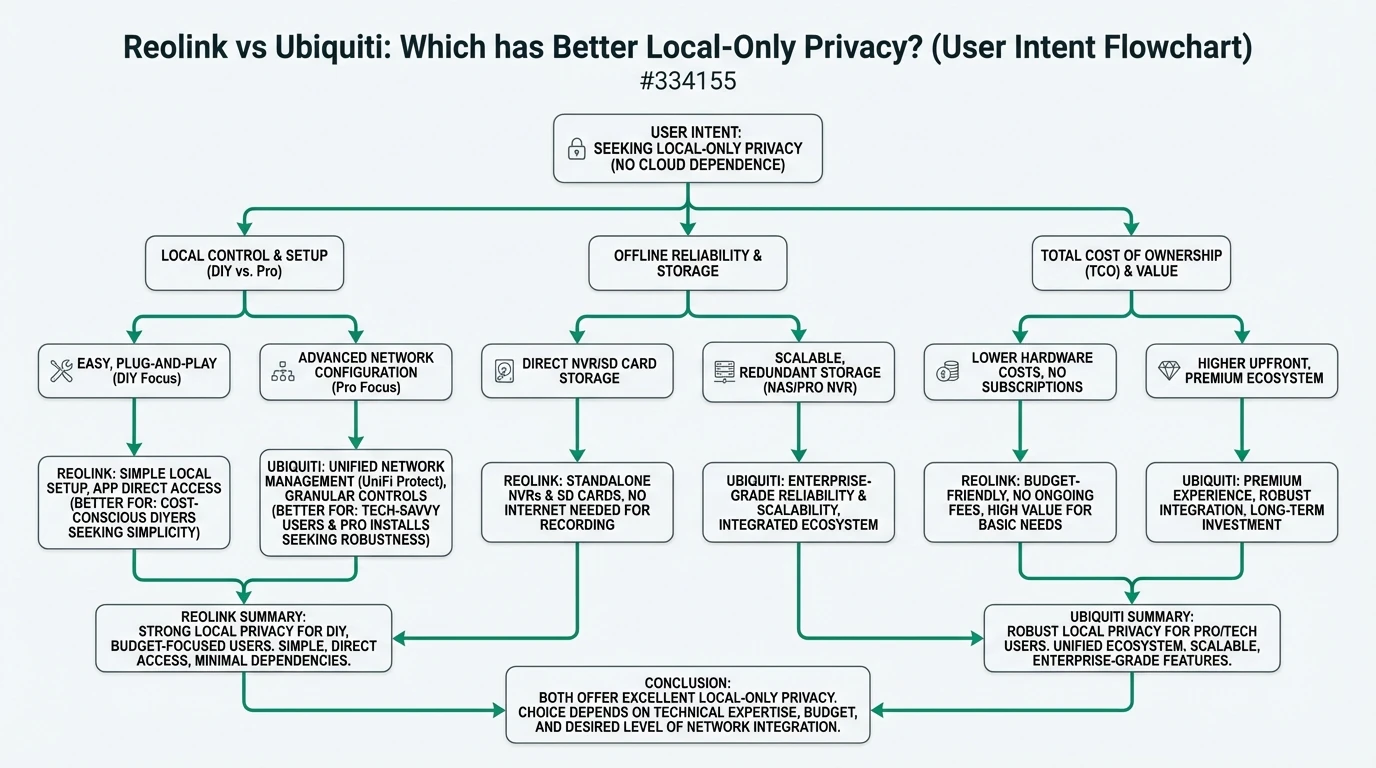
The complexity of setting up a security system can vary significantly between Reolink and Ubiquiti. Reolink is known for its user-friendly setup process, making it accessible to users with limited technical expertise9. In contrast, Ubiquiti requires a more technical setup, involving network configuration and integration with other UniFi devices10.
Despite the initial complexity, Ubiquiti offers a high level of control and customization, which can be rewarding for tech-savvy users. Reolink’s simpler setup process may appeal to those seeking a more straightforward installation experience. To lock down network access for any camera system, follow this internet-blocking guide.
Security and Privacy Implications
From a security and privacy perspective, Ubiquiti’s local-only approach minimizes the risk of data exposure through cloud services11. This makes it an ideal choice for users who prioritize privacy above all else. Reolink, while offering local storage options, may pose a risk if users opt for its cloud services12.
For users concerned about privacy, it’s important to carefully configure app settings and ensure that no unnecessary data is shared with third parties.
Primary Sources Table
| Index | Source Description | Direct URL |
|---|---|---|
| [1] | YouTube: Reolink vs Ubiquiti comparison (easy setup, local storage emphasis) | YouTube |
| [2] | YouTube: Reolink vs Ubiquiti 2025 (pricing, no-cloud Ubiquiti) | YouTube |
| [3] | YouTube: Reolink vs Ubiquiti 2025 (features, UniFi integration) | YouTube |
| [4] | YouTube: Reolink vs Ubiquiti 2025 (storage, value) | YouTube |
| [5] | YouTube: Reolink vs Ubiquiti 2025 (affordability, app issues) | YouTube |
| [6] | Privacy Guides forum: Reolink/Ubiquiti for beginners (community privacy recs) | Privacy Guides |
| [7] | Lawrence Systems forum: UniFi vs alternatives (3rd-party cams, local) | Lawrence Systems |
| [8] | Smart Home Hookup: Local doorbells (Reolink/UniFi VPN issues) | Smart Home Hookup |
Conclusion
In conclusion, both Reolink and Ubiquiti offer valuable features for users seeking local-only privacy in their security systems. Ubiquiti’s fully local NVR storage and lack of cloud dependency make it the superior choice for privacy-conscious users, despite its higher cost and setup complexity. Reolink, with its budget-friendly pricing and flexible setup, remains a viable option for those seeking a more accessible solution.
For further reading, explore our guides on best local storage security cameras without subscription, comparison of smart home hubs with no mandatory cloud account, and how to block smart home devices from accessing the internet.
Frequently Asked Questions
What makes Ubiquiti superior in local-only privacy?
Ubiquiti’s system relies entirely on local NVR storage, eliminating cloud dependency and reducing data exposure risks.
Is Reolink a good option for budget-conscious users?
Yes, Reolink offers affordable pricing and flexible setup options, making it a suitable choice for budget-conscious users.
How does setup complexity differ between Reolink and Ubiquiti?
Reolink is generally easier to set up, while Ubiquiti requires more technical expertise due to its integration with the UniFi ecosystem.
Can Reolink operate without cloud services?
Yes, Reolink can operate using local storage options like microSD and NVR, but it also offers optional cloud services.
What are the hidden costs associated with Ubiquiti?
Ubiquiti may require additional investment in proprietary hardware and ecosystem expansion, which can increase the total cost of ownership.
Footnotes
-
YouTube: Reolink vs Ubiquiti comparison (easy setup, local storage emphasis). ↩
-
YouTube: Reolink vs Ubiquiti 2025 (pricing, no-cloud Ubiquiti). ↩
-
YouTube: Reolink vs Ubiquiti 2025 (features, UniFi integration). ↩
-
YouTube: Reolink vs Ubiquiti 2025 (storage, value). ↩
-
Privacy Guides forum: Reolink/Ubiquiti for beginners (community privacy recs). ↩
-
Smart Home Hookup: Local doorbells (Reolink/UniFi VPN issues). ↩
-
YouTube: Reolink vs Ubiquiti 2025 (affordability, app issues). ↩
-
Lawrence Systems forum: UniFi vs alternatives (3rd-party cams, local). ↩
-
YouTube: Reolink vs Ubiquiti comparison (easy setup, local storage emphasis). ↩
-
YouTube: Reolink vs Ubiquiti 2025 (features, UniFi integration). ↩
-
YouTube: Reolink vs Ubiquiti 2025 (pricing, no-cloud Ubiquiti). ↩
-
Privacy Guides forum: Reolink/Ubiquiti for beginners (community privacy recs). ↩