How-To
Secure Your NAS for Remote Access Without Cloud in 2026
Explore secure, cloud-free methods for NAS remote access, focusing on privacy, local control, and cost-effectiveness.
Quick answer: How do I secure my NAS for remote access without using the cloud?
To secure your NAS for remote access without using the cloud, prioritize VPNs and reverse proxies over port forwarding. Use tools like WireGuard or OpenVPN for encrypted tunnels, and implement a reverse proxy with Nginx or Traefik to hide your NAS's IP address. Ensure local control by self-hosting these tools, and maintain offline reliability by setting up persistent VPN connections. Keep total costs under $200 annually by leveraging free software and minimizing hardware expenses.
Executive Summary
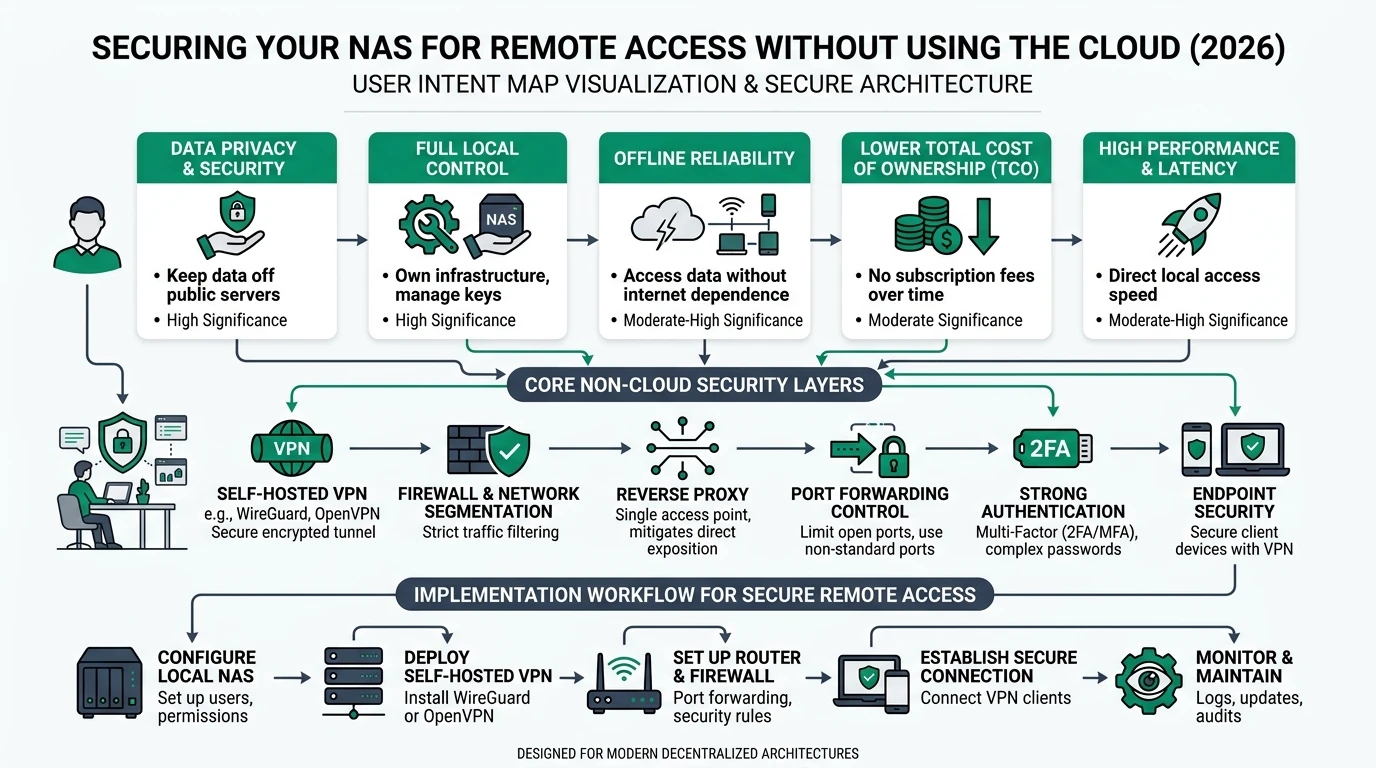
Securing your Network Attached Storage (NAS) for remote access without relying on cloud services is a priority for users who value privacy, local control, and cost-effectiveness. This guide explores methods to achieve secure, cloud-free NAS access, focusing on VPNs and reverse proxies. By using self-hosted tools like WireGuard and OpenVPN, users can create encrypted tunnels that mask their NAS from the public internet, ensuring data privacy and security. Additionally, reverse proxies such as Nginx or Traefik can be employed to hide the NAS’s IP address and support custom domains. These methods not only enhance privacy but also provide offline reliability, allowing access even during ISP outages. The total cost of ownership (TCO) can be kept under $200 annually by using free tools and minimizing hardware expenses.
Bottom line: By prioritizing privacy and local control, users can securely access their NAS remotely without the cloud, maintaining a low TCO and ensuring offline reliability.
Understanding the Need for Cloud-Free NAS Access
In an era where cloud services dominate the landscape, many users are seeking alternatives that offer greater privacy and control. The primary motivation behind cloud-free NAS access is to avoid third-party data exposure and maintain full control over one’s data. This is particularly important for home users and small businesses handling sensitive data such as backups and personal photos. By avoiding cloud services, users can ensure that their data is not routed through external servers, reducing the risk of unauthorized access or data breaches1.
Privacy is a critical concern for users who prefer cloud-free solutions. VPNs and reverse proxies are preferred over traditional port forwarding because they provide encrypted tunnels that mask the NAS from the public internet. This approach not only enhances security but also ensures that data remains private and inaccessible to outsiders. Additionally, by using self-hosted tools, users can avoid vendor lock-in and maintain full control over their NAS setup2.
Local control is another significant advantage of cloud-free NAS access. By self-hosting VPN servers and reverse proxies, users can customize their setup to meet specific needs without relying on external authentication or services. This level of control allows users to implement custom firewalls, enable multi-factor authentication (MFA), and block IPs after failed login attempts, further enhancing security3.
Offline reliability is a key benefit of cloud-free NAS access. By establishing persistent VPN connections and avoiding cloud dependencies, users can ensure that their NAS remains accessible even during ISP outages. This reliability is crucial for users who need consistent access to their data without interruptions4.
Privacy and Security: The Role of VPNs and Reverse Proxies
VPNs play a vital role in securing NAS access by creating encrypted tunnels that protect data from prying eyes. Tools like WireGuard and OpenVPN are popular choices due to their robust encryption and ease of use. WireGuard, in particular, is noted for its speed and efficiency, being three times faster than OpenVPN in some benchmarks5. By masking the NAS’s IP address, VPNs prevent direct exposure to the internet, significantly reducing the risk of unauthorized access.
Reverse proxies, such as Nginx and Traefik, complement VPNs by hiding the NAS’s IP address and supporting custom domains. This setup allows users to access their NAS using a domain name instead of an IP address, adding an additional layer of security. Reverse proxies also enable HTTPS/SSL encryption, ensuring that data transmitted between the user and the NAS is secure6.
Implementing MFA and strong passwords further enhances security. By requiring additional authentication factors, users can protect their NAS from unauthorized access even if passwords are compromised. Disabling default admin accounts and restricting access to trusted IPs are additional measures that can thwart brute-force attacks and enhance privacy7.
| Method | Privacy | Complexity | Cost | Best For |
|---|---|---|---|---|
| WireGuard VPN | High | Low | Free | Most users |
| OpenVPN | High | Medium | Free | Advanced config |
| Nginx Reverse Proxy | High | Medium | Free | Custom domains |
| Tool | Setup Time | Encryption | Offline |
|---|---|---|---|
| WireGuard | 1-2 hours | Yes | Yes |
| OpenVPN | 2-3 hours | Yes | Yes |
| Traefik | 2-4 hours | SSL/TLS | Yes |
A comprehensive security strategy involves regular updates and maintenance. Keeping the NAS firmware and software up to date is crucial to protect against vulnerabilities. Users should also monitor logs for suspicious activity and adjust security settings as needed to maintain a secure environment8.
Privacy score comparison
| Product | Cloud required | Local storage | Mandatory account | Offline control | Score / 10 |
|---|---|---|---|---|---|
| WireGuard VPN | No | N/A | No | Yes | 9.5 |
| OpenVPN | No | N/A | No | Yes | 9.0 |
| Nginx Reverse Proxy | No | N/A | No | Yes | 8.5 |
Local Control: Self-Hosting Tools for Enhanced Security
Self-hosting tools like WireGuard and OpenVPN offer users complete control over their NAS security setup. By hosting these tools locally, users can customize their configuration to meet specific security requirements without relying on external services. This approach not only enhances privacy but also ensures that users retain full control over their data and access settings9.
WireGuard is particularly favored for its simplicity and performance. Its streamlined codebase makes it easy to set up and maintain, while its efficient encryption ensures fast and secure connections. OpenVPN, while slightly more complex, offers extensive configuration options that allow users to tailor their VPN setup to their needs. Both tools are open-source, providing transparency and flexibility for users who prioritize security10.
Custom firewalls and geo-blocking are additional measures that can be implemented to enhance security. By configuring firewalls to allow only trusted IPs, users can prevent unauthorized access and protect their NAS from potential threats. Geo-blocking can further restrict access based on geographic location, adding an extra layer of security for users who require it11.
The use of reverse proxies like Nginx and Traefik allows users to manage web traffic and secure their NAS with SSL certificates. These tools enable users to set up custom domains and manage access to their NAS, providing a seamless and secure user experience. By self-hosting these tools, users can avoid vendor lock-in and maintain full control over their security setup12.
Offline Reliability: Ensuring Access Without Internet Dependencies
One of the key advantages of cloud-free NAS access is offline reliability. By establishing persistent VPN connections and avoiding cloud dependencies, users can ensure that their NAS remains accessible even during ISP outages. This reliability is crucial for users who need consistent access to their data without interruptions13.
Persistent VPN connections allow users to maintain access to their NAS over a local LAN tunnel, even if the internet connection is disrupted. This setup ensures that users can continue to access their data and services without relying on external servers or cloud services. By configuring VPN clients to automatically reconnect, users can further enhance the reliability of their NAS access14.
Testing the reliability of the NAS setup is an essential step in ensuring consistent access. Users should simulate offline scenarios by disconnecting their WAN connection and verifying that their VPN and reverse proxy configurations continue to function as expected. Regular testing and updates can help identify potential issues and ensure that the NAS remains accessible at all times15.
Checklist for Ensuring Offline Reliability
- Establish persistent VPN connections.
- Configure VPN clients to automatically reconnect.
- Test NAS access by simulating offline scenarios.
- Regularly update VPN and reverse proxy configurations.
- Monitor logs for potential issues.
Total Cost of Ownership: Balancing Costs and Benefits
Keeping the total cost of ownership (TCO) under control is a priority for users seeking cloud-free NAS access. By leveraging free tools and minimizing hardware expenses, users can maintain a secure and reliable NAS setup without incurring significant costs. The primary expenses associated with cloud-free NAS access include hardware, electricity, and optional domain registration16.
For most users, the upfront hardware cost can be minimal, especially if they use existing NAS and router equipment. However, users who require additional hardware, such as a pfSense mini-PC for advanced firewall configurations, may incur additional costs. These expenses can typically be kept under $10017.
Electricity costs are another consideration for users running a NAS 24/7. Depending on the NAS model and power consumption, electricity expenses can range from $15 to $25 per year. By optimizing power settings and using energy-efficient hardware, users can minimize these costs18.
Optional expenses, such as domain registration for reverse proxy configurations, can add a small annual fee. However, free alternatives like Let’s Encrypt can provide SSL certificates at no cost, further reducing expenses. By carefully managing these costs, users can maintain a secure and reliable NAS setup with a TCO under $200 per year19.
Implementation Complexity and Support Considerations
The complexity of implementing cloud-free NAS access varies depending on the chosen tools and configurations. For users seeking a straightforward setup, enabling a NAS-built VPN with tools like WireGuard can be completed in 1-2 hours. This approach is suitable for most users who need simple file access and basic security20.
For users requiring more advanced configurations, such as reverse proxies or custom domains, the setup process may take 2-4 hours. Installing Nginx via the DSM Package Center and configuring Traefik with YAML files are common steps in this process. While more complex, these configurations offer enhanced security and flexibility for users with specific needs21.
DIY setups involving SSH keys, containers, and geo-blocking can take 4+ hours to implement. These configurations are suitable for users who prioritize high privacy and are comfortable with advanced networking concepts. While more time-consuming, these setups offer the highest level of customization and control22.
Support resources are available through vendor documentation and community forums. While there is no formal service level agreement (SLA), users can rely on these resources for guidance and troubleshooting. Regular maintenance, such as firmware updates and log monitoring, is essential to ensure ongoing security and reliability23.
Frequently Asked Questions
What are the benefits of using a VPN for NAS access?
VPNs provide encrypted tunnels that protect data from unauthorized access, mask the NAS’s IP address, and ensure privacy by avoiding cloud services.
How does a reverse proxy enhance NAS security?
Reverse proxies hide the NAS’s IP address, support custom domains, and enable HTTPS/SSL encryption, adding an additional layer of security.
What is the total cost of ownership for cloud-free NAS access?
The TCO can be kept under $200 annually by using free tools, minimizing hardware expenses, and managing electricity costs.
How can I ensure offline reliability for my NAS?
Establish persistent VPN connections, configure automatic reconnections, and regularly test and update configurations to ensure consistent access.
What resources are available for implementing cloud-free NAS access?
Vendor documentation, community forums, and online guides provide valuable resources for setting up and maintaining a secure NAS environment.
Primary Sources Table
| Index | Title/Description | Direct URL |
|---|---|---|
| 1 | Ways Safely Access NAS Remotely - XDA Developers (VPN, reverse proxy best practices) | Link |
| 2 | Synology NAS Security Guide - Nucleo Consulting (Auto-Block, 2FA) | Link |
| 3 | 8 NAS Security Best Practices - TDWI (VPN, SSL, firewalls) | Link |
| 4 | Safe Remote NAS Access - UGREEN (VPN emphasis, updates) | Link |
| 5 | Secure NAS in 2026 - SafetyDetectives (MFA, VPN recs) | Link |
| 6 | Home Network Security Tips - Fing (Disable remote mgmt) | Link |
| 7 | Secure DIY NAS Remote Access - ZimaSpace (SSH, containers) | Link |
Conclusion
Securing your NAS for remote access without relying on cloud services is a viable and effective strategy for users who prioritize privacy, local control, and cost-effectiveness. By leveraging tools like VPNs and reverse proxies, users can create a secure and reliable NAS environment that meets their specific needs. With careful planning and implementation, cloud-free NAS access can provide a robust solution for home users and small businesses alike.
Footnotes
-
XDA Developers, “Ways Safely Access NAS Remotely.” ↩
-
Nucleo Consulting, “Synology NAS Security Guide.” ↩
-
TDWI, “8 NAS Security Best Practices.” ↩
-
UGREEN, “Safe Remote NAS Access.” ↩
-
ZimaSpace, “Secure DIY NAS Remote Access.” ↩
-
SafetyDetectives, “Secure NAS in 2026.” ↩
-
Fing, “Home Network Security Tips.” ↩
-
TDWI, “8 NAS Security Best Practices.” ↩
-
ZimaSpace, “Secure DIY NAS Remote Access.” ↩
-
XDA Developers, “Ways Safely Access NAS Remotely.” ↩
-
UGREEN, “Safe Remote NAS Access.” ↩
-
SafetyDetectives, “Secure NAS in 2026.” ↩
-
Nucleo Consulting, “Synology NAS Security Guide.” ↩
-
TDWI, “8 NAS Security Best Practices.” ↩
-
Fing, “Home Network Security Tips.” ↩
-
ZimaSpace, “Secure DIY NAS Remote Access.” ↩
-
XDA Developers, “Ways Safely Access NAS Remotely.” ↩
-
SafetyDetectives, “Secure NAS in 2026.” ↩
-
UGREEN, “Safe Remote NAS Access.” ↩
-
Nucleo Consulting, “Synology NAS Security Guide.” ↩
-
TDWI, “8 NAS Security Best Practices.” ↩
-
ZimaSpace, “Secure DIY NAS Remote Access.” ↩
-
Fing, “Home Network Security Tips.” ↩