How-To
Self-Host Cameras and Automation on Mini-PC
Guide to self-hosting cameras, home automation, and DNS on a mini-PC for privacy and cost-efficiency.
Quick answer:
Executive Summary
In 2026, self-hosting your smart home services on a mini-PC offers unparalleled privacy and control. By consolidating cameras, home automation, and DNS filtering onto a single device, homeowners can eliminate cloud dependencies and reduce long-term costs. This guide provides a comprehensive overview of setting up a mini-PC to manage these services efficiently. We explore hardware options, software configurations, and security considerations to ensure a robust and private smart home environment.
Bottom line: Self-hosting on a mini-PC is a cost-effective, privacy-focused solution for modern smart homes, offering control and flexibility unmatched by cloud-based alternatives.
Understanding the Self-Hosting Landscape
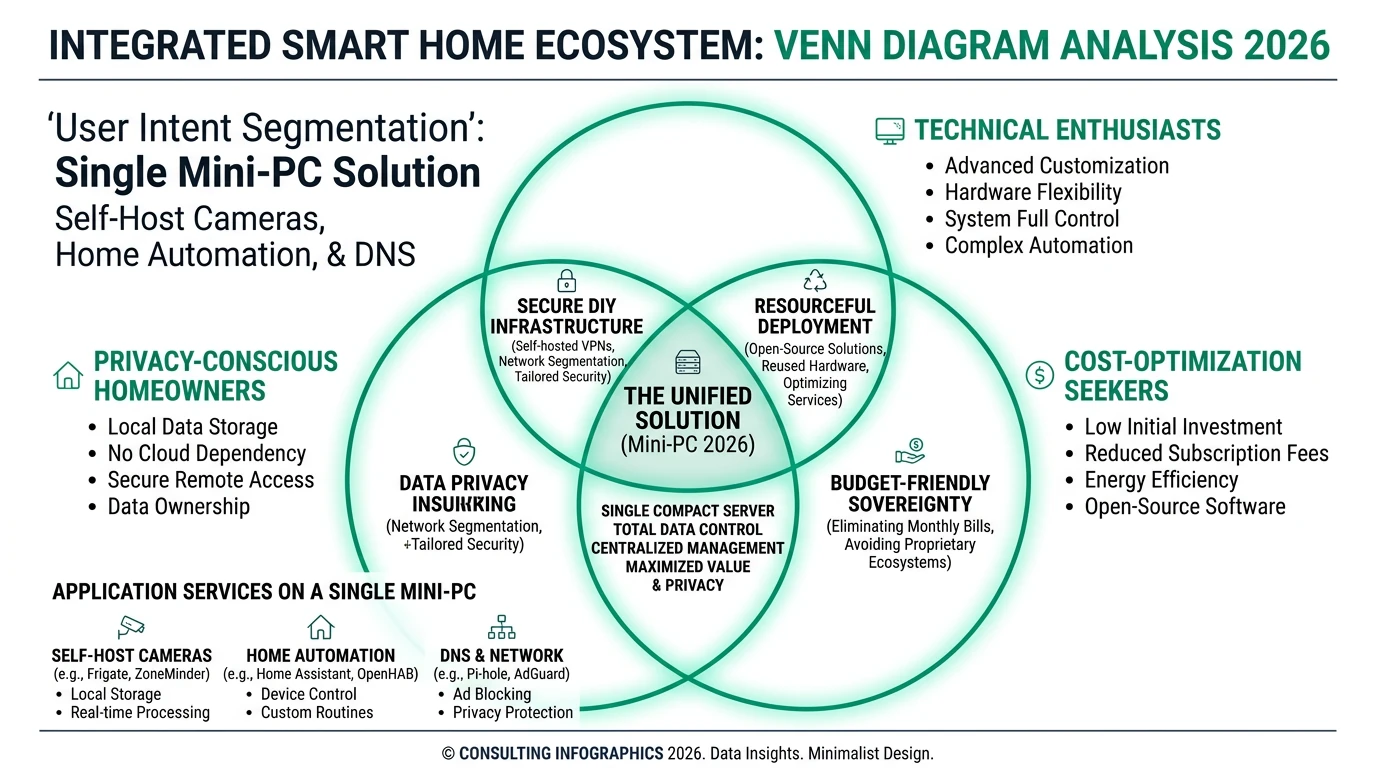
Self-hosting involves running services like home automation, DNS filtering, and camera management on hardware you own and control. This approach is increasingly popular among privacy-conscious homeowners and technical enthusiasts who wish to avoid cloud dependencies. By managing these services locally, users can ensure that their data remains private and secure, free from corporate data collection and potential breaches.
For privacy-conscious individuals, the primary appeal of self-hosting is the ability to keep all data, including DNS queries and camera footage, within their own network. This eliminates the risk of data exposure to third parties, a common concern with cloud-based services. Additionally, self-hosting allows for greater customization and control over the smart home environment, enabling users to tailor their setup to their specific needs.
Technical enthusiasts are drawn to self-hosting for its efficiency and cost optimization. By consolidating multiple services onto a single mini-PC, users can reduce hardware costs and simplify management. This approach also allows for easy scalability, as additional services can be added as needed without significant hardware upgrades. Moreover, self-hosting provides an opportunity to learn and experiment with new technologies, making it an attractive option for those interested in home labs and DIY projects.
Cost-optimization seekers benefit from the reduced total cost of ownership associated with self-hosting. While there is an initial investment in hardware, the absence of recurring subscription fees and the potential for lower long-term maintenance costs make self-hosting a financially attractive option. By carefully selecting hardware and software components, users can achieve a balance between performance and cost, ensuring a sustainable and efficient smart home setup.
Selecting the Right Mini-PC for Self-Hosting
Choosing the right mini-PC is crucial for a successful self-hosting setup. Key factors to consider include CPU performance, RAM capacity, storage options, and cooling solutions. These components determine the mini-PC’s ability to handle multiple services simultaneously and ensure reliable operation.
The Topton N100 and Beelink EQ12 are popular choices for self-hosting due to their robust specifications and affordability. The Topton N100 features a quad-core CPU, 8GB of RAM, and passive cooling, making it ideal for running services like OPNsense, a router OS that provides firewall rules and VLAN isolation. Its multiple 2.5GbE ports also facilitate high-speed network connections, essential for efficient data transfer and communication between devices.
The Beelink EQ12, on the other hand, offers a more versatile platform with support for Windows 11 and Docker via WSL2. Its 500GB M.2 drive provides ample storage for operating systems and applications, while its compact design and included case make it easy to integrate into any home setup. The Beelink ME Pro, with its dual NVMe slots and thermal management features, is another excellent option for users requiring additional storage and processing power.
When selecting a mini-PC, it’s important to consider the specific needs of your smart home setup. For instance, if you plan to run multiple cameras with object detection capabilities, a mini-PC with a powerful CPU and ample RAM is essential. Additionally, passive cooling solutions are recommended for 24/7 operation, as they eliminate fan noise and reduce the risk of hardware failure.
Ultimately, the choice of mini-PC should align with your performance requirements, budget, and future expansion plans. By carefully evaluating these factors, you can ensure a reliable and efficient self-hosting setup that meets your smart home needs.
Configuring Home Automation and DNS Filtering
Setting up home automation and DNS filtering on a mini-PC involves selecting the right software stack and configuring it to work seamlessly with your hardware. Home Assistant is a popular choice for home automation, offering a web-based interface and extensive integration options for devices using Z-Wave, Zigbee, and local APIs.
To install Home Assistant on a mini-PC, begin by downloading the Ubuntu operating system and booting it from a USB drive. Once installed, restore the Home Assistant image and configure the encryption key. This process typically takes around 10 minutes and provides a stable platform for managing your smart home devices.
For DNS filtering, Pi-hole is an effective solution that blocks ads and trackers at the network level. It can also act as a DHCP server, simplifying network management. To enhance privacy, Pi-hole can be paired with Unbound, a private DNS resolver that prevents DNS queries from being exposed to external servers. Configuring Pi-hole requires setting up firewall rules to ensure that only authorized devices can access the DNS server and that all DNS traffic is routed through Pi-hole.
Integrating these services with your mini-PC setup requires careful planning and configuration. For example, if you have multiple VLANs in your network, you’ll need to create firewall rules to allow Pi-hole access across segments while blocking unauthorized DNS traffic. Additionally, setting up a VPN gateway, such as WireGuard, can provide secure remote access to your home network without relying on cloud services.
By following these steps, you can create a robust and secure home automation and DNS filtering setup that enhances privacy and control over your smart home environment.
Managing Camera Systems and Local Storage
A key component of self-hosting is managing camera systems and local storage effectively. Privacy-first camera selection is crucial, as many commercial options default to cloud storage, which can compromise privacy. Reolink cameras are a popular choice for self-hosting due to their support for local storage via microSD cards and integration with Home Assistant.
When selecting cameras, prioritize models that offer local storage options and do not require mandatory cloud uploads. This ensures that all footage remains within your control and is not exposed to third-party servers. Additionally, consider the storage capacity and retention period needed for your setup. WD Purple surveillance drives are recommended for continuous recording, as they are designed for high-write endurance and reliability.
Integrating cameras with Home Assistant and Frigate, an open-source NVR software, allows for advanced features like object detection and real-time alerts. Frigate benefits from hardware acceleration, such as the Coral TPU, which enhances video processing capabilities and reduces CPU load. This is particularly important for setups with multiple cameras, where processing demands can be significant.
Proper storage management is essential for maintaining a reliable camera system. Regularly pruning recordings and using external drives for archival purposes can prevent storage bottlenecks and ensure that your system operates smoothly. Additionally, consider implementing a UPS with clean shutdown support to protect your data during power outages and ensure continuous operation.
By carefully selecting and configuring your camera systems and storage solutions, you can create a secure and efficient self-hosting setup that meets your privacy and performance needs.
Security and Privacy Considerations
Security and privacy are paramount when self-hosting smart home services. By keeping all data on hardware you control, you eliminate exposure to corporate data collection and potential breaches. However, self-hosting also increases your responsibility for security management and incident response.
One of the primary challenges in maintaining a secure self-hosting setup is ensuring that DNS filtering is effective across all devices. Some devices, such as those from Amazon and Apple, may override DHCP-assigned DNS servers and connect to public resolvers. To mitigate this, configure firewall rules to block non-Pi-hole DNS traffic and allow only Pi-hole servers to access public DoH providers.
Camera privacy is another critical consideration. Many commercial cameras, like those from Ring and Nest, default to cloud storage, exposing footage to potential breaches. By choosing cameras with local storage options, such as Reolink, and integrating them with Home Assistant, you can maintain control over your footage and enhance privacy.
VPNs, such as WireGuard, provide secure remote access to your home network without relying on cloud services. This is particularly important for accessing Home Assistant and other services while away from home. Additionally, implementing network segmentation with VLANs can enhance security by isolating IoT devices and restricting their access to sensitive data.
While self-hosting offers significant privacy benefits, it also requires ongoing maintenance and security management. Regularly updating software, configuring firewall rules, and monitoring network activity are essential tasks to ensure a secure and reliable setup. By taking these precautions, you can enjoy the privacy and control benefits of self-hosting while minimizing security risks.
Evaluating Costs and Total Cost of Ownership
Understanding the costs associated with self-hosting is crucial for making informed decisions. While the initial hardware investment can be significant, the long-term savings from avoiding subscription fees and reducing maintenance costs can make self-hosting a cost-effective option.
The primary hardware investment for a self-hosted setup includes a mini-PC, storage drives, cameras, and a VPN gateway. For example, a Beelink EQ12 or Topton N100 mini-PC costs between $200 and $400, while additional components like NVMe SSDs and Reolink cameras add to the total.
| Component | Budget ($) | Mid-range ($) | Enthusiast ($) |
|---|---|---|---|
| Mini-PC | 150–250 | 250–400 | 400–600 |
| Storage (NVMe + HDD) | 80–150 | 150–300 | 300–500 |
| Cameras (2–4) | 150–300 | 300–500 | 500–800 |
| DNS/automation software | Free (Pi-hole, HA) | Free | Free |
| Total | ~400–700 | ~700–1,200 | ~1,200–1,900 |
See our complete homelab costs guide for a full breakdown. A complete setup typically ranges from $600 to $1,200, depending on specific requirements and configurations.
Ongoing costs include electricity, which is relatively low for energy-efficient mini-PCs, and storage expansion as needed. Unlike cloud-based services, self-hosting does not incur subscription fees, which can save $100 to $200 per year compared to services like Ring or Nest. However, hidden costs such as time investment for setup and maintenance, backup storage, and network infrastructure should also be considered.
When evaluating the total cost of ownership over a five-year horizon, self-hosting can be significantly cheaper than cloud-dependent alternatives. While the initial investment is higher, the absence of recurring fees and the potential for reduced maintenance costs make self-hosting an attractive option for cost-conscious users.
By carefully considering these factors and planning your setup accordingly, you can achieve a balance between performance, privacy, and cost, ensuring a sustainable and efficient smart home environment.
Implementation Checklist
Checklist
FAQ
Frequently Asked Questions
What are the benefits of self-hosting smart home services?
Self-hosting offers privacy, control, and cost savings by keeping data on hardware you own and eliminating cloud dependencies.
Which mini-PC is best for self-hosting?
The Beelink EQ12 and Topton N100 are excellent choices, offering robust performance and flexibility for various services.
How do I ensure privacy with self-hosted cameras?
Choose cameras with local storage options, like Reolink, and integrate them with Home Assistant to avoid cloud uploads.
What is the total cost of ownership for self-hosting?
Over five years, self-hosting can cost $700–$1,500, significantly less than cloud-based alternatives with recurring fees.
How do I secure my self-hosted setup?
Regularly update software, configure firewall rules, and use VPNs for secure remote access to enhance security.
Primary Sources Table
| Source | URL | Type | Relevance | Date |
|---|---|---|---|---|
| Chris Kirby | https://chriskirby.net/setting-up-and-leveling-up-your-homelab-a-comprehensive-guide/ | Blog | Pi-hole DNS filtering, VLAN firewall rules, DoH blocking | 2025–2026 |
| Jonathan Peterson | https://jonathanpeterson.com/posts/my-home-automation-setup.html | Blog | Beelink EQ12 mini-PC, Docker/WSL2 setup, Pi-hole + Unbound + WireGuard stack | 2025–2026 |
| Danb Blog | https://danb.me/blog/2026-homelab/ | Blog | Topton N100 OPNsense router, 2.5GbE networking, Zigbee integration, 2026 setup | March 2026 |
| YouTube (10-minute install) | https://www.youtube.com/watch?v=BIpNBF31n6w | Video | Beelink ME Pro installation, dual NVMe slots, Home Assistant OS restoration | 3 weeks prior (Feb 2026) |
| Serenity Smart Homes | https://www.serenitysmarthomesnj.com/2025/02/18/building-the-ultimate-smart-home.html | Blog | Z-Wave/Zigbee protocols, Reolink cameras ($99.99), WD Purple drives ($110.58), GL.iNet Brume 2 ($51.69), local storage | Feb 2025 |
| Home Assistant Community | https://community.home-assistant.io/t/from-pi-to-powerhouse-the-ultimate-2026-home-assistant-mini-pc-build-quiet-stable-and-future-proof-for-10-years/948147 | Forum | Mini-PC build criteria, dual NVMe, Coral TPU, ECC RAM, UPS requirements, Frigate NVR | 2026 |
| Zima Space | https://shop.zimaspace.com/blogs/zima-campaign-hub/best-5-mini-pcs-for-home | Blog | Mini-PC comparison and recommendations | 2026 |
| YouTube (Ultimate Setup) | https://www.youtube.com/watch?v=VJQaqNtKXjY | Video | Home Assistant installation on mini-PC/NUC | 2025–2026 |
Conclusion
In conclusion, self-hosting cameras, home automation, and DNS services on a mini-PC in 2026 provides a powerful solution for privacy-conscious homeowners and technical enthusiasts. By carefully selecting hardware and configuring software, you can achieve a secure, efficient, and cost-effective smart home setup that meets your specific needs.
For further insights into smart home privacy and hardware options, explore our guides on Apple HomeKit Secure Video vs. Local NVR for Privacy, Best Hardware for Local AI Smart Home 2026, and Best Local LLMs for Home Automation 2026.