How-To
Setting Up a Separate VLAN for Smart Home Devices Privacy
Learn how to set up a separate VLAN for smart home devices to enhance privacy, local control, and offline reliability while minimizing costs.
Quick answer: Should I put smart home devices on a separate VLAN?
Yes. A dedicated IoT VLAN isolates devices from your main network, blocks lateral movement from compromised devices, and lets you control outbound traffic. Use UniFi or pfSense for affordable VLAN-capable hardware.
Source: HNS Berks, Lawrence Systems
Executive Summary
In the age of smart homes, privacy and security have become paramount concerns. Setting up a separate VLAN for your smart home devices is a strategic move to enhance privacy by isolating these devices from your main network. This guide explores how to achieve this isolation effectively, ensuring local control and offline reliability, all while keeping the total cost of ownership (TCO) low. By utilizing affordable hardware solutions such as UniFi switches or pfSense firewalls, users can prevent lateral hacks, data exfiltration, and malware spread, without compromising on usability for control apps and voice assistants like Alexa.
Bottom line: A separate VLAN for smart home devices is a practical approach to enhance privacy and security, offering a balance between cost and functionality.
Understanding VLANs and Their Role in Smart Home Privacy
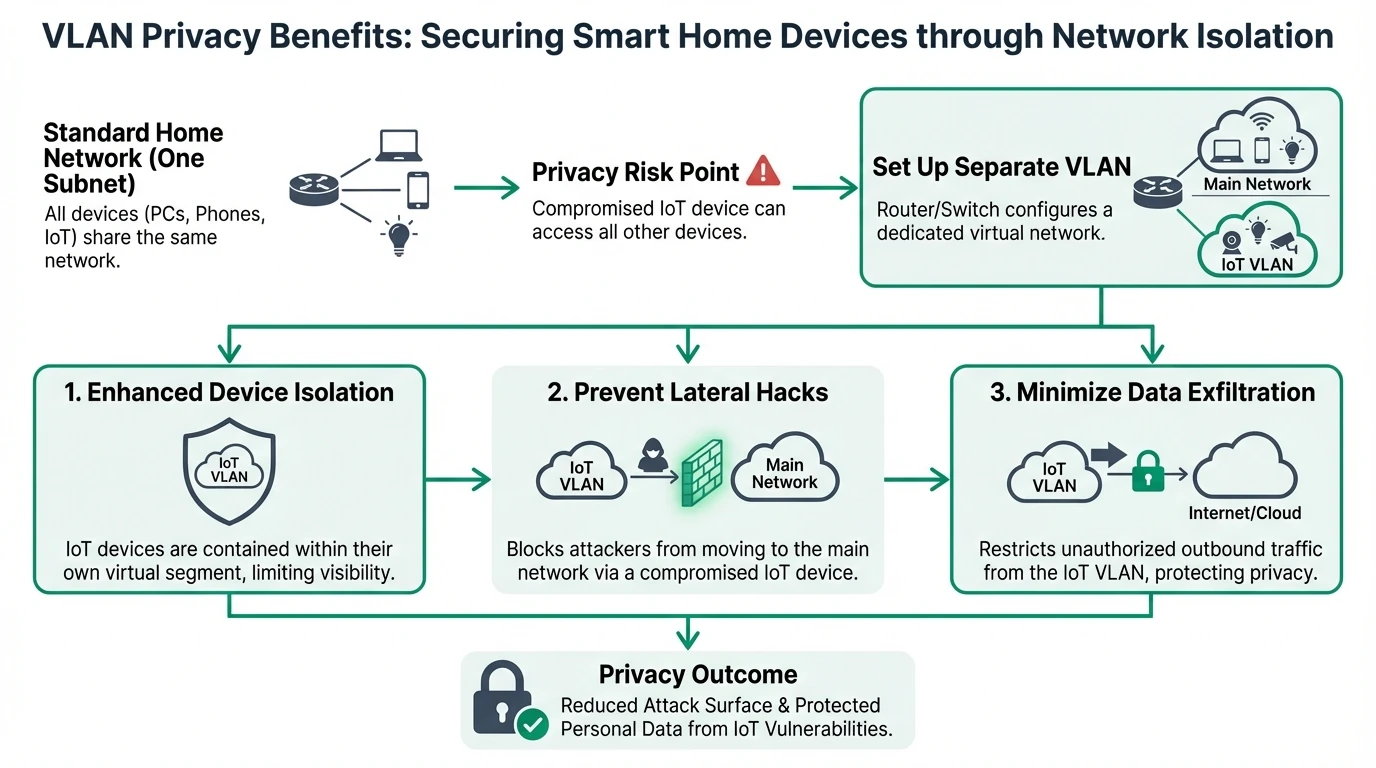
Virtual Local Area Networks (VLANs) are a powerful tool for enhancing the privacy and security of smart home devices. By segmenting your network into different VLANs, you can isolate devices, preventing them from communicating with each other unless explicitly allowed. This isolation is crucial for protecting against lateral hacks, where a compromised device could otherwise access other devices on the same network1.
The effectiveness of VLANs in isolating devices is largely dependent on the configuration of firewall rules. For a hands-on implementation, pair this with our internet-blocking guide. By implementing strict rules that block IoT-to-LAN traffic, you can ensure that smart home devices cannot scan or probe your main network. This setup not only enhances privacy but also reduces the risk of data exfiltration and malware spread2. Moreover, VLANs can be configured to block outbound internet traffic for specific devices, preventing them from “phoning home” and leaking data to external servers.
While VLANs offer significant privacy benefits, they also introduce complexity, particularly when it comes to maintaining local control. Many smart home devices rely on mDNS for discovery, which can be challenging to implement across VLANs without breaking Layer 2 isolation. Tools like Pi-hole can be used to manage DNS requests, but careful configuration is required to avoid weakening the network’s security3.
| VLAN level | Isolation | Local control | Typical setup time |
|---|---|---|---|
| None (flat) | None | Full | 0 |
| IoT VLAN only | Basic | Requires mDNS relay | 2–4 hours |
| IoT VLAN + firewall | Strong | Good with proper rules | 4–8 hours |
| IoT VLAN + egress deny | Very strong | Excellent | 8+ hours |
In summary, VLANs are a critical component of a secure smart home network. By effectively isolating devices and managing traffic, you can significantly enhance privacy and protect against various security threats. However, achieving this requires careful planning and configuration, particularly when balancing privacy with local control and usability.
Balancing Local Control and Offline Reliability
One of the primary challenges of setting up a separate VLAN for smart home devices is maintaining local control while ensuring offline reliability. Many smart home devices require internet access for full functionality, but this can compromise privacy and security. By configuring your VLAN to block unnecessary internet traffic, you can enhance offline reliability and reduce the risk of data leaks4.
Local control is essential for usability, particularly when using control apps and voice assistants like Alexa. To achieve this, you may need to implement mDNS or Avahi support across VLANs, allowing devices to discover each other without compromising security. This setup requires careful configuration of firewall rules to allow specific ports and protocols while blocking others5.
Offline reliability is another critical consideration, particularly for users who want to minimize their dependency on cloud services. By using local hubs like Home Assistant or Loxone, you can maintain control over your smart home devices even when the internet is unavailable. Compare hub options in our no-mandatory-cloud hub matrix. This approach not only enhances privacy but also ensures that your smart home remains functional during internet outages6.
In conclusion, balancing local control and offline reliability is a key consideration when setting up a separate VLAN for smart home devices. By carefully configuring your network and using local hubs, you can achieve a secure and reliable smart home environment that prioritizes privacy and usability.
Cost Considerations and Total Cost of Ownership
Setting up a separate VLAN for smart home devices involves both initial and ongoing costs. The choice of hardware is a significant factor in determining the total cost of ownership (TCO). Affordable options like UniFi switches and pfSense firewalls offer robust functionality without breaking the bank. For example, a setup with a Netgate 6100 and a UniFi switch can cost between $500 and $800, providing a solid foundation for a secure smart home network7.
Initial costs also include the time and effort required to configure the network. For beginners, setting up VLANs can take anywhere from 2 to 8 hours, depending on the complexity of the setup and the user’s familiarity with networking concepts. This time investment is crucial for ensuring that the network is configured correctly and that all devices are assigned to the appropriate VLANs8.
Ongoing costs include maintenance tasks such as firmware updates and firewall rule checks. These tasks are essential for keeping the network secure and functional, but they can also add to the overall TCO. It’s important to factor in these costs when planning your VLAN setup, as they can impact the long-term affordability of the solution9.
| Hardware | Approx. cost | VLAN support | Notes |
|---|---|---|---|
| UniFi switch | $150–300 | Yes | Easy management |
| pfSense/Netgate | $200–500 | Yes | Full firewall control |
| Consumer router | $50–150 | Often limited | Check VLAN support |
In summary, while setting up a separate VLAN for smart home devices involves some initial and ongoing costs, these can be managed effectively with careful planning and the right choice of hardware. By prioritizing cost-effective solutions and minimizing unnecessary expenses, you can achieve a secure and reliable smart home network without exceeding your budget.
Implementing VLANs: Step-by-Step Guide
Implementing VLANs for smart home devices involves several key steps, each of which requires careful planning and execution. The first step is to assess your needs and determine the number of VLANs required. For architecture context, see the cloud-free pillar guide. For most users, a setup with three to five VLANs is sufficient, with separate VLANs for IoT devices, guests, and trusted devices10.
Once you’ve determined your VLAN structure, the next step is to configure your router and switch to support VLAN tagging. This process involves assigning VLAN IDs to specific ports and SSIDs, ensuring that each device is connected to the appropriate VLAN. It’s important to follow the IEEE 802.1Q standard for VLAN tagging to ensure compatibility and reliability11.
After configuring your hardware, the next step is to set up firewall rules to manage traffic between VLANs. These rules should block IoT-to-LAN traffic while allowing specific ports and protocols for local control. It’s also important to configure mDNS or Avahi support if you need cross-VLAN discovery for control apps12.
Finally, it’s essential to test your VLAN setup to ensure that it meets your privacy and usability requirements. This testing process should include monitoring network traffic to verify that no devices are “phoning home” and that all control apps function correctly. If any issues are identified, you may need to adjust your firewall rules or VLAN configuration to address them13.
In conclusion, implementing VLANs for smart home devices is a complex but rewarding process that requires careful planning and execution. By following these steps and prioritizing privacy and usability, you can achieve a secure and reliable smart home network that meets your needs.
VLAN setup maturity for smart home privacy
| Product | Cloud required | Local storage | Mandatory account | Offline control | Score / 10 |
|---|---|---|---|---|---|
| Flat network (no VLAN) | Varies | N/A | N/A | Weak | 3.0 |
| IoT VLAN + basic firewall | No | N/A | No | Strong | 7.5 |
| IoT VLAN + mDNS relay + egress deny | No | N/A | No | Excellent | 9.0 |
Common Challenges and Troubleshooting Tips
Setting up a separate VLAN for smart home devices can present several challenges, particularly for users who are new to networking. One common issue is ensuring that all devices are correctly assigned to the appropriate VLANs. This process can be complicated by the need to configure VLAN tagging on both the router and switch, as well as on individual devices14.
Another challenge is maintaining local control while ensuring privacy and security. Many smart home devices rely on mDNS for discovery, which can be difficult to implement across VLANs without compromising security. To address this issue, it’s important to carefully configure firewall rules and consider using tools like Pi-hole to manage DNS requests15.
Troubleshooting VLAN issues can also be challenging, particularly when it comes to identifying and resolving connectivity problems. Common issues include misconfigured firewall rules, incorrect VLAN assignments, and network hardware that does not fully support VLAN tagging. To troubleshoot these issues, it’s important to systematically test each component of your network and verify that all settings are correct16.
In summary, while setting up a separate VLAN for smart home devices can be challenging, these challenges can be overcome with careful planning and troubleshooting. By understanding common issues and how to address them, you can achieve a secure and reliable smart home network that meets your privacy and usability needs.
VLAN Setup Checklist
- Assess the number of VLANs needed based on device count and privacy requirements.
- Select appropriate hardware (e.g., UniFi switches, pfSense firewalls) within budget.
- Configure VLAN tagging on routers and switches following IEEE 802.1Q standards.
- Set up firewall rules to block IoT-to-LAN traffic and allow necessary ports for local control.
- Test network setup to ensure no devices are 'phoning home' and all apps function correctly.
FAQ
Frequently Asked Questions
Why should I set up a separate VLAN for smart home devices?
Setting up a separate VLAN for smart home devices enhances privacy by isolating them from your main network, preventing lateral hacks and data exfiltration.
What hardware do I need for a VLAN setup?
Affordable options like UniFi switches and pfSense firewalls are recommended for robust functionality without high costs.
How can I maintain local control across VLANs?
Implementing mDNS or Avahi support across VLANs allows devices to discover each other without compromising security.
What are the ongoing costs of a VLAN setup?
Ongoing costs include maintenance tasks such as firmware updates and firewall rule checks, which are essential for security.
How can I troubleshoot VLAN issues?
Systematically test each component of your network and verify that all settings are correct to identify and resolve connectivity problems.
Primary Sources Table
| Index | Title/Description | Direct URL |
|---|---|---|
| 1 | How to keep your Smart Home safe with VLANs (HNS Berks) | hns-berks.co.uk |
| 2 | The 5 VLANs Every Home Network Should Have! (YouTube) | YouTube |
| 3 | Home automation on separate VLAN: How to control with apps? (Netgate Forum) | Netgate Forum |
| 4 | VLAN Setup Smarthome, Security vs. Convenience (Lawrence Systems Forum) | Lawrence Systems Forum |
| 5 | 5 VLAN rules every smart home should have (XDA) | XDA Developers |
| 6 | Why put IoT devices on their own VLAN? (Ubiquiti Community) | Ubiquiti Community |
| 7 | Best Practices for a Private Smart Home (Home Assistant Community) | Home Assistant Community |
Conclusion
Setting up a separate VLAN for smart home devices is a strategic approach to enhancing privacy and security. By isolating devices and managing network traffic, you can protect against lateral hacks, data exfiltration, and malware spread. While the setup process can be complex, the benefits of increased privacy and offline reliability make it a worthwhile investment for any smart home user.
For more information on enhancing smart home security, consider exploring our guides on best local storage security cameras without subscription, comparison of smart home hubs with no mandatory cloud account, and how to block smart home devices from accessing the internet.
Footnotes
-
How to keep your Smart Home safe with VLANs (HNS Berks) ↩
-
The 5 VLANs Every Home Network Should Have! (YouTube) ↩
-
Home automation on separate VLAN: How to control with apps? (Netgate Forum) ↩
-
VLAN Setup Smarthome, Security vs. Convenience (Lawrence Systems Forum) ↩
-
5 VLAN rules every smart home should have (XDA) ↩
-
Why put IoT devices on their own VLAN? (Ubiquiti Community) ↩
-
Best Practices for a Private Smart Home (Home Assistant Community) ↩
-
How to keep your Smart Home safe with VLANs (HNS Berks) ↩
-
The 5 VLANs Every Home Network Should Have! (YouTube) ↩
-
Home automation on separate VLAN: How to control with apps? (Netgate Forum) ↩
-
VLAN Setup Smarthome, Security vs. Convenience (Lawrence Systems Forum) ↩
-
5 VLAN rules every smart home should have (XDA) ↩
-
Why put IoT devices on their own VLAN? (Ubiquiti Community) ↩
-
Best Practices for a Private Smart Home (Home Assistant Community) ↩
-
How to keep your Smart Home safe with VLANs (HNS Berks) ↩
-
The 5 VLANs Every Home Network Should Have! (YouTube) ↩