Smart Home Privacy
Synology vs QNAP vs TrueNAS for Home Assistant
Compare Synology, QNAP, and TrueNAS for Home Assistant and Frigate self-hosting in 2026, focusing on Docker compatibility and privacy.
Quick answer:
Executive Summary
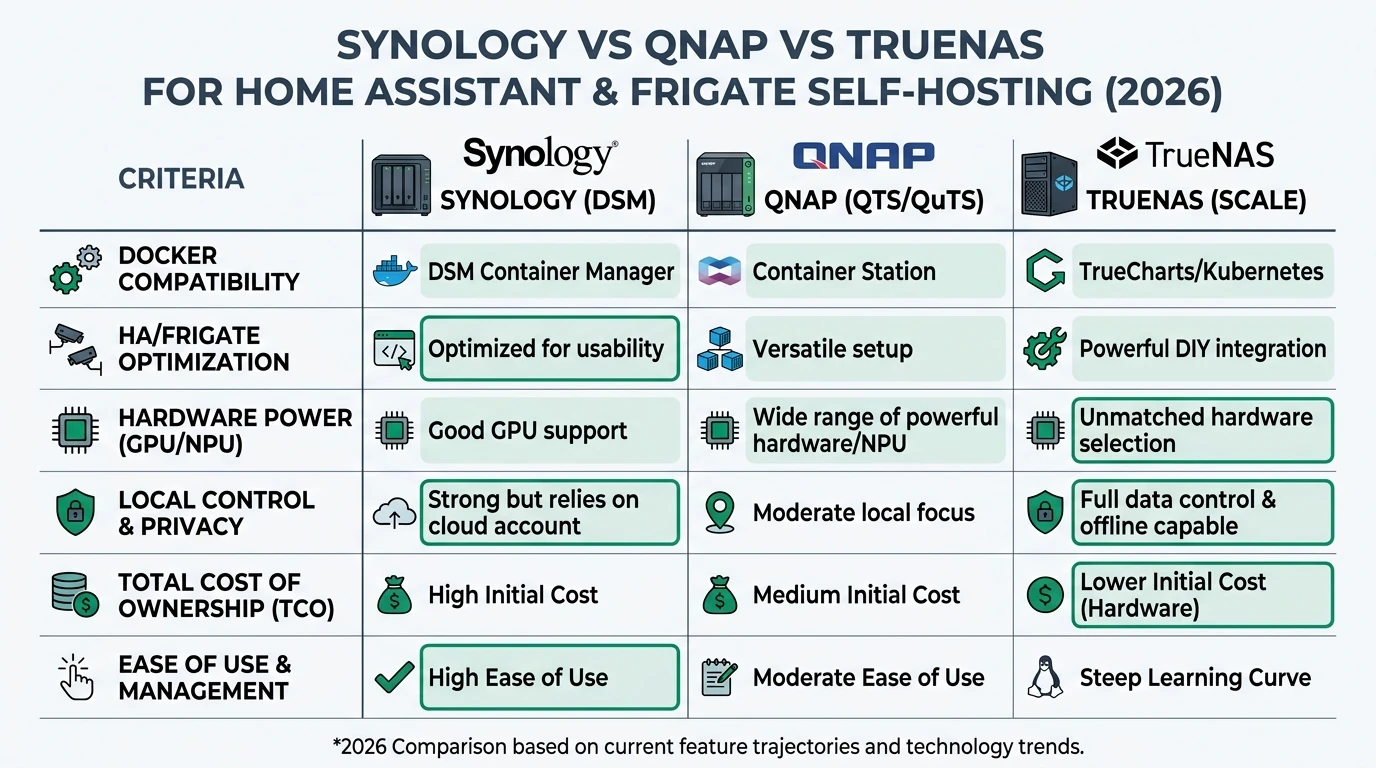
In 2026, choosing the right NAS for self-hosting Home Assistant and Frigate involves balancing Docker compatibility, privacy, offline reliability, and total cost of ownership (TCO). Synology, QNAP, and TrueNAS each present distinct advantages and challenges. Synology’s DSM offers a user-friendly interface with strong Docker support, making it ideal for users who prioritize simplicity. QNAP provides powerful hardware options and flexible configurations, appealing to those needing high performance and network capabilities. TrueNAS, with its open-source foundation and ZFS file system, stands out for privacy-conscious users seeking robust data protection and low TCO.
Bottom line: For maximum privacy and data integrity, choose TrueNAS. For ease of use, Synology is best. For performance, consider QNAP.
Docker Compatibility and Performance
When evaluating NAS platforms for Docker-based applications like Home Assistant and Frigate, Docker compatibility and performance are critical. Synology’s DSM 7.2+ supports Docker through its Container Manager, offering a straightforward setup process. This makes it particularly appealing for users who want to quickly deploy and manage containers without deep technical expertise. Synology’s Btrfs file system enhances data integrity with snapshots, although it may not match the robustness of ZFS in TrueNAS.
QNAP’s Container Station provides a versatile environment for Docker applications, supporting a wide range of configurations and network setups. This flexibility is beneficial for users running mixed workloads or requiring advanced networking features like 10GbE. However, the setup process can be more complex compared to Synology, requiring a bit more technical know-how to optimize performance.
TrueNAS Scale, leveraging Kubernetes, offers a powerful platform for Docker applications, particularly for users who value container isolation and scalability. Its ZFS file system is renowned for data integrity, making it an excellent choice for applications like Frigate that require reliable storage for video streams. However, the learning curve for TrueNAS can be steep, especially for users unfamiliar with ZFS and Kubernetes.
| Criterion | Synology | QNAP | TrueNAS |
|---|---|---|---|
| Docker Support | DSM native (Container Manager) | Container Station | Scale (Kubernetes-native) |
| Ease of Use | High | Medium | Low |
| Performance | Moderate | High (10GbE support) | High (ZFS, Kubernetes) |
In summary, Synology offers ease of use, QNAP provides robust performance features, and TrueNAS excels in data integrity and privacy. Your choice should align with your technical expertise and specific needs for Docker applications.
Privacy and Local Control
Privacy and local control are paramount for users self-hosting Home Assistant and Frigate, as these applications often handle sensitive data. Synology and QNAP both offer local control, allowing users to operate their NAS without mandatory cloud dependencies. Synology’s DSM includes features like firewalls and two-factor authentication, enhancing security, though past vulnerabilities have been noted and patched.
QNAP provides strong encryption and user-friendly interfaces, but its corporate nature raises potential concerns about telemetry. Users seeking maximum privacy might prefer TrueNAS, which is open-source and free from proprietary telemetry. TrueNAS’s modular jails offer excellent isolation for Docker containers, further enhancing security and privacy.
TrueNAS’s ZFS file system is a standout feature for privacy-conscious users. It provides robust data protection through features like bit-rot protection and encryption, ensuring data integrity even in offline scenarios. This makes TrueNAS particularly appealing for users who prioritize data security and wish to avoid cloud dependencies entirely.
Overall, while Synology and QNAP offer good privacy features, TrueNAS provides the highest level of local control and data integrity, making it the best choice for privacy-focused users.
Offline Reliability and Data Integrity
Offline reliability is crucial for self-hosting environments, where uninterrupted access to applications like Home Assistant and Frigate is essential. Synology’s Btrfs file system offers features like snapshots and checksums, providing a degree of data protection. However, its reliance on proprietary hardware can limit flexibility and increase costs.
QNAP’s custom RAID configurations offer flexibility and performance, but they may not match the data integrity guarantees provided by TrueNAS’s ZFS. QNAP’s hardware options, such as NVMe SSDs for fast storage tiers, can enhance performance for applications like Frigate that require high I/O throughput.
TrueNAS’s ZFS file system is renowned for its data integrity features, including bit-rot protection and snapshots. These features ensure data reliability even in offline scenarios, making TrueNAS an excellent choice for users who prioritize data protection. However, the complexity of setting up and managing ZFS can be a barrier for less experienced users.
| Feature | Synology (Btrfs) | QNAP (Custom RAID) | TrueNAS (ZFS) |
|---|---|---|---|
| Data Integrity | Moderate | Moderate | High |
| Offline Operation | Reliable | Reliable | Highly Reliable |
| Setup Complexity | Low | Medium | High |
In conclusion, while Synology and QNAP offer reliable offline operation, TrueNAS provides superior data integrity and offline reliability, making it the best choice for users who prioritize these features.
Total Cost of Ownership (TCO)
Total cost of ownership is a critical consideration for users evaluating NAS platforms for self-hosting. Synology, QNAP, and TrueNAS each have different cost structures, influenced by hardware, power consumption, and support requirements.
Synology’s DS1525+ is priced around $700 for a 5-bay setup, excluding drives. While its proprietary hardware can increase costs, its ease of use and robust support network can offset these expenses for users who value simplicity.
QNAP’s TS-932PX, priced around $800, offers powerful hardware options and expandability, making it a good choice for users who need high performance and network capabilities. However, its higher upfront cost and potential for additional configuration expenses should be considered.
TrueNAS offers the lowest TCO, particularly for DIY enthusiasts. A TrueNAS Mini X+ setup costs around $600, with DIY options potentially reducing costs to $400. TrueNAS’s open-source nature eliminates licensing fees, and its efficient power consumption further reduces long-term costs.
| Cost Component | Synology | QNAP | TrueNAS |
|---|---|---|---|
| Upfront Cost | $700 (5-bay) | $800 (5-bay) | $600 (Mini X+) / $400 (DIY) |
| Power Consumption | Moderate | Moderate | Low |
| Support Costs | Moderate | Moderate | Low (community support) |
Ultimately, TrueNAS offers the lowest TCO, especially for users willing to engage with the DIY community. Synology and QNAP provide more polished solutions but at a higher cost.
Setup Complexity and Support
The complexity of setting up and maintaining a NAS for self-hosting Home Assistant and Frigate varies significantly between Synology, QNAP, and TrueNAS. Synology offers the simplest setup process, with its DSM interface providing a user-friendly experience for deploying Docker applications. This makes it an attractive option for users who prefer a plug-and-play approach.
QNAP’s setup process is more involved, requiring users to configure network settings and optimize Docker performance. However, its intuitive interface and robust documentation can help mitigate these challenges, making it a viable option for users with moderate technical expertise.
TrueNAS presents the most complex setup, particularly for users unfamiliar with ZFS and Kubernetes. The initial configuration of ZFS pools and Docker containers can be time-consuming, but the TrueNAS community offers extensive support and resources to assist users. This makes TrueNAS a good choice for users who are comfortable with a DIY approach and willing to invest time in learning the system.
Checklist
- Evaluate technical expertise before choosing a NAS
- Consider community support for complex setups
- Assess long-term maintenance requirements
- Factor in initial setup time for each platform
In summary, Synology is the easiest to set up and maintain, while TrueNAS offers powerful capabilities for users willing to navigate its complexity. QNAP strikes a balance, offering robust features with moderate setup requirements.
Recommended Decision Tree
Choosing the right NAS for self-hosting Home Assistant and Frigate depends on your specific needs and priorities. The following decision tree can help guide your choice:
- Need maximum privacy and data integrity for Frigate? → Choose TrueNAS for its ZFS file system and open-source nature.
- Prioritize ease of setup and offline simplicity for Home Assistant? → Opt for Synology with its user-friendly DSM interface.
- Require 10GbE and mixed Docker performance on a budget? → Consider QNAP for its powerful hardware and network capabilities.
- DIY-tolerant with growth plans (bays/throughput)? → TrueNAS Mini or DIY setup offers flexibility and low TCO.
- All else equal, prioritize low TCO and offline reliability? → TrueNAS provides the best value with its efficient power consumption and community support.
FAQ
Frequently Asked Questions
Which NAS is best for privacy in 2026?
TrueNAS is the best choice for privacy due to its open-source nature and robust data integrity features like ZFS.
Is Synology easy to set up for Home Assistant?
Yes, Synology offers a user-friendly setup process with its DSM interface, making it ideal for quick deployment.
Can QNAP handle high-performance Docker workloads?
Yes, QNAP’s hardware and network capabilities make it suitable for high-performance Docker applications.
What is the TCO for a TrueNAS setup?
TrueNAS offers the lowest TCO, especially for DIY setups, with no licensing fees and efficient power consumption.
How does TrueNAS ensure data integrity?
TrueNAS uses the ZFS file system, which provides features like bit-rot protection and snapshots for robust data integrity.
Primary Sources Table
| Index | Title/Description | Direct URL |
|---|---|---|
| 1 | Are Synology and QNAP Becoming Irrelevant in 2026? - YouTube | Watch Video |
| 2 | TrueNAS Mini X+ vs QNAP TS-932PX vs Synology DS1525+ | Read Article |
| 3 | The Best NAS OS in 2026 (For Every Type of User) - YouTube | Watch Video |
| 4 | Are Synology and QNAP Becoming Irrelevant in 2026? | Read Forum |
| 5 | Compare QNAP NAS vs TrueNAS 2026 | TrustRadius | Read Comparison |
| 6 | Best NAS for Under $499 (2025/2026) | Read Guide |
| 7 | Which Network Attached Storage System is Best in 2026? - YouTube | Watch Video |
| 8 | If I want to buy a QNAP or Synology to then install TrueNAS Scale… | Read Forum |
| 9 | TrueNAS vs Unraid vs Synology | Best NAS Platform in 2026? - YouTube | Watch Video |
Conclusion
In 2026, selecting the right NAS for self-hosting Home Assistant and Frigate requires careful consideration of your priorities, whether they be privacy, ease of use, performance, or cost. Synology, QNAP, and TrueNAS each offer unique strengths, making them suitable for different user needs. By understanding the nuances of each platform, you can make an informed decision that aligns with your technical expertise and self-hosting goals.
For further exploration of privacy-focused smart home solutions, consider reading our guides on Apple HomeKit Secure Video vs Local NVR for Privacy, Aqara vs Shelly vs Tuya Privacy 2026, and Best Hardware for Local AI Smart Home 2026.