Smart Home Privacy
The Ultimate 2026 Cloud-Free Smart Home Guide
Build a resilient local-only smart home in 2026 with practical architecture choices, privacy scoring, network hardening, and upgrade sequencing.
Quick answer: Can you build a smart home without handing all data to the cloud?
Yes. In 2026, you can run a highly capable smart home with local automations, local video retention, and cloud-optional remote access. The key is picking hardware and software with offline control paths and no mandatory account lock-in.
Source: NIST Consumer IoT Baseline
Executive summary
Most smart home buyers optimize for convenience first, then patch privacy later. That order is expensive. A cloud-first stack is easy to buy but hard to unwind once cameras, locks, and automation rules are distributed across separate vendor apps.
A local-only architecture reverses the sequence. You design for data ownership, deterministic behavior, and graceful degradation when vendors change terms, discontinue APIs, or experience outages1. Features can be layered on top later, but control never leaves your network by default.
Bottom line: choose local control paths before choosing “smart” features. A simpler stack that stays predictable offline is usually more secure, cheaper over five years, and easier to audit.
Warning: “Works with Home Assistant” is not enough on its own. Verify whether local APIs are complete, officially documented, and available without internet activation.
1) Define your threat model before buying anything
A cloud-free setup starts with one decision: what failure are you trying to prevent? Different answers produce different device choices. A family that wants continuity during outages has different requirements than a home office protecting confidential client material.
Avoid buying products by brand reputation alone. Privacy posture depends on implementation details: account requirements, local API stability, firmware update behavior, and whether local logs can be exported for review.
| Threat profile | Primary concern | Must-have capability | Common anti-pattern |
|---|---|---|---|
| Home continuity | Internet outage | Local automations + local dashboards | Cloud automation scenes only |
| Data minimization | Third-party access | Local storage + encrypted backups | Vendor-only cloud archive |
| Home office security | Lateral movement risk | VLAN isolation + firewall policy | Flat LAN with unrestricted IoT |
Use this guide with the hands-on implementation playbook on blocking device internet access before you purchase hardware bundles.
2) Core architecture: edge-first, cloud-optional
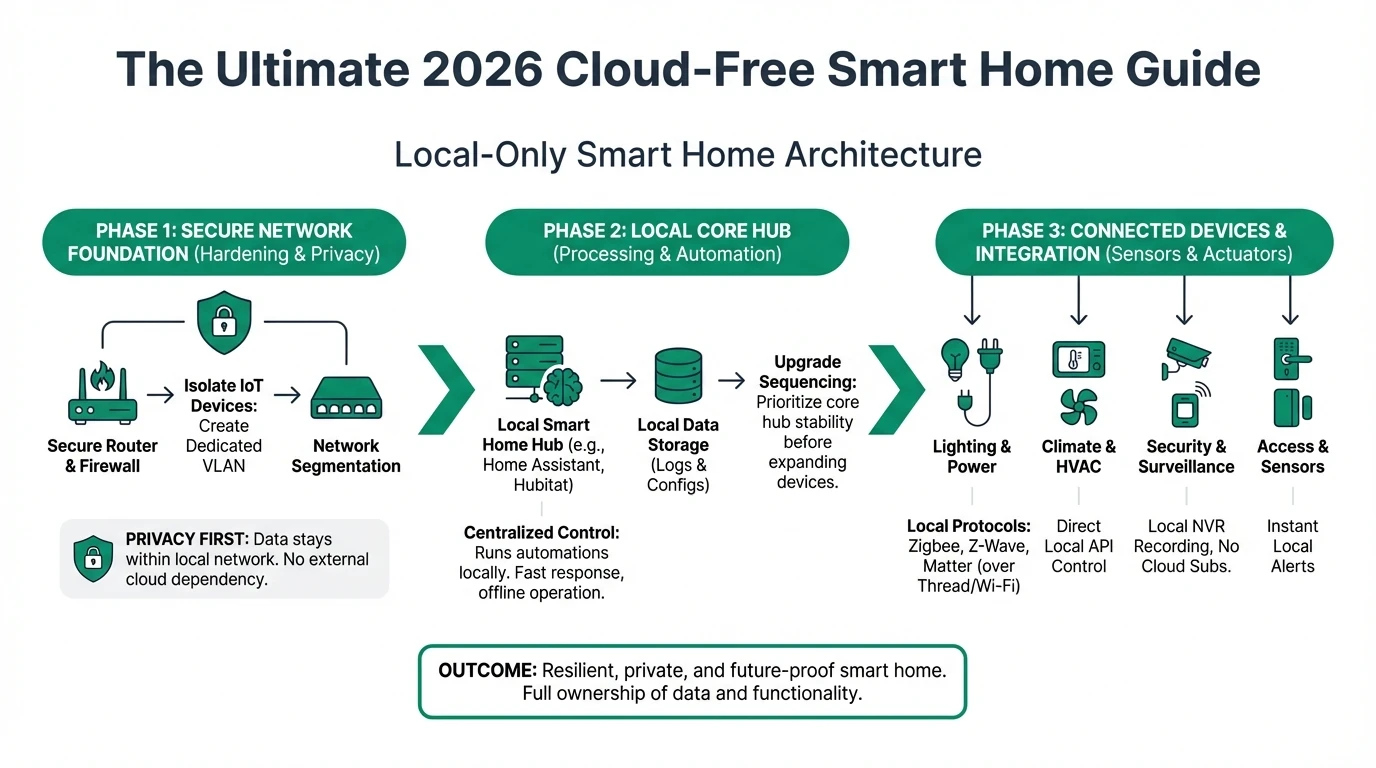
A practical local-first architecture has four layers: endpoints, transport, local control plane, and storage. Endpoints should keep functioning when the cloud path is unavailable. Transport should prioritize standards (Zigbee, Z-Wave, Ethernet) over proprietary relay flows.
The control plane is usually a local hub (for example Home Assistant) plus an NVR for camera ingestion. Storage should be split by retention objective: short-term hot footage on NVR, longer retention snapshots or exports on NAS.
| Layer | Recommended baseline | Why it matters for privacy |
|---|---|---|
| Endpoint devices | Local API + local fallback control | Reduces dependency on app vendor availability |
| Transport | Ethernet for cameras, Zigbee/Z-Wave for low-power devices | Keeps traffic deterministic and inspectable |
| Control plane | Home Assistant + local automation engine | Preserves automation logic during outages |
| Storage | Local NVR + encrypted NAS backup | Prevents involuntary cloud upload of sensitive footage |
If you are comparing hubs, start with our no-mandatory-cloud-account hub matrix.
3) Camera stack design choices (the biggest privacy lever)
Cameras are usually the most sensitive stream in a smart home. For most households, local retention with remote access through a secured reverse proxy or VPN is safer than unmanaged cloud clip storage.
The practical decision is not “brand A vs brand B.” It is “which system preserves local control when the vendor policy changes?” Subscription pricing can be recovered later, but lost control is harder to restore.
Example camera ecosystem privacy scores
| Product | Cloud required | Local storage | Mandatory account | Offline control | Score / 10 |
|---|---|---|---|---|---|
| Reolink PoE + local NVR | No | Native NVR + microSD | No (for local operations) | Strong | 8.8 |
| Ubiquiti Protect | No (for recording), optional for remote workflows | Native on-site | Account optional but common for remote | Strong | 8.4 |
| Consumer cloud-first Wi-Fi camera | Often yes | Limited or unavailable | Yes | Weak | 4.1 |
For a dedicated buying breakdown, use the camera-first buyer’s guide: best local storage cameras without subscription.
4) Hub and automation control plane
The hub determines whether automations survive API outages. If motion-based lighting, lock rules, or occupancy scenes depend on cloud callbacks, your system can fail silently during a WAN disruption.
Pick hubs that expose local state and local automations by default. Evaluate onboarding friction, but do not trade away recoverability. Beginner friction can be reduced with templates and blueprints; platform lock-in is harder to reverse.
| Hub option | Mandatory cloud account | Local automations | Beginner friendliness | Long-term control |
|---|---|---|---|---|
| Home Assistant | No | Excellent | Medium | Excellent |
| Hub with optional cloud relay | Usually no | Good | High | Good |
| Cloud-native all-in-one app hub | Usually yes | Limited | High (initially) | Low |
The right implementation pattern is: local automations first, cloud integrations second, and cloud automations last.
5) Network segmentation blueprint
Network segmentation is the control that turns “privacy claims” into enforceable policy. If IoT and personal computing devices share one flat network, a vulnerable plug or camera can become a pivot point.
Start with a dedicated IoT VLAN and explicit allow-list rules to your local controller, NVR, and DNS resolver. Block broad outbound internet access by default, then add exceptions only when needed for firmware updates.
| Segment | Typical devices | Allowed destinations | Default internet policy |
|---|---|---|---|
| VLAN 10 (trusted) | Laptops, phones, workstations | Any | Allowed |
| VLAN 20 (IoT local-only) | Cameras, sensors, hubs | NVR, Home Assistant, DNS | Blocked |
| VLAN 30 (media/guest) | TV, guest devices | Internet only | Allowed, no east-west access |
Use staged deployment: isolate cameras first, then locks and sensors, then voice assistants. This sequence reduces operational risk while still delivering quick privacy wins.
6) Cost model and migration order
Cloud-first systems often look cheaper at checkout but more expensive over 36-60 months. Subscription camera archives, premium automations, and vendor account tiers create recurring commitments.
A phased local migration controls cost and avoids all-at-once rewiring. Most households can start by migrating the highest-sensitivity assets (cameras, entry points, occupancy signals) and leave low-risk convenience devices for later.
| Cost line | Cloud-first baseline | Local-first baseline |
|---|---|---|
| Camera retention | Monthly subscription | Upfront NVR/NAS |
| Automation reliability | Vendor dependent | Local runtime dependent |
| Vendor lock-in risk | High | Medium to low |
| Exit cost after 2 years | High | Medium |
7) Local-only deployment checklist
Cloud-free baseline in 30 days
- Define your threat model and outage tolerance in writing.
- Pick at least one local-first hub and one local storage path before device shopping.
- Segment IoT traffic into a dedicated VLAN and enforce egress policy.
- Validate every critical automation in offline mode.
- Create encrypted backup/export workflows for camera evidence and configuration files.
- Document rollback plans before every firmware update window.
Treat documentation as part of security. If someone else in your household cannot recover key automations from your notes, your setup is operationally fragile.
Frequently Asked Questions
Frequently Asked Questions
Is a totally cloud-free smart home realistic for most homes?
Yes, for core functions such as lighting, security cameras, locks, and climate control. Some voice assistants or niche integrations may remain cloud-assisted, but the operational core can stay local.
Do I need enterprise networking hardware for VLAN isolation?
No. Many prosumer routers and switches support VLANs and basic policy rules. The key requirement is explicit segmentation controls, not enterprise branding.
What is the first upgrade with the highest privacy return?
Camera retention. Moving from mandatory cloud retention to local NVR storage often delivers the largest immediate privacy and cost benefit.
Can local-only setups still support remote access safely?
Yes. The safer pattern is encrypted remote access through VPN or hardened reverse proxy workflows instead of direct port exposure.
How often should I reassess my architecture?
At least quarterly, and after any major firmware, policy, or integration change. Reassess account dependencies and outbound traffic behavior regularly.
Primary sources
| Source | Type | URL |
|---|---|---|
| NIST IoT cybersecurity baseline material | Security framework | nist.gov |
| CISA secure-by-design guidance | Security guidance | cisa.gov |
| ENISA baseline recommendations | EU security guidance | enisa.europa.eu |
Conclusion
Cloud-free smart home design is less about ideological purity and more about risk engineering. If you prioritize local execution, verifiable data paths, and segmented networking, you can still keep convenience while drastically reducing forced trust in third parties.
Use this pillar guide as your architecture map, then move to product-level decisions with the linked camera and hub comparisons. The fastest path to better privacy is not replacing everything at once; it is replacing the highest-risk dependencies first.
Footnotes
-
Availability incidents and policy changes are recurring realities in cloud services; architecture should treat them as expected events, not outliers. ↩