Buying Guides
Top NVR for Home Use with No Cloud Access 2026
Explore the best NVRs for home use in 2026 that ensure privacy with no cloud access, featuring local storage and control.
Quick answer: What is the best NVR for home use with no cloud access in 2026?
For the best NVR for home use in 2026 with no cloud access, consider the Amcrest NV4108-A2 for its balance of privacy, reliability, and cost. It supports ONVIF, offers 8 channels, and ensures local storage control.
Executive Summary
In 2026, the demand for Network Video Recorders (NVRs) that operate entirely offline is on the rise, driven by privacy concerns and the desire to avoid subscription fees. This guide evaluates top-rated NVRs for home use that prioritize local storage and control, ensuring no cloud access is required. We focus on models that support the ONVIF standard for multi-camera compatibility, offer robust offline reliability, and minimize total costs over a 3-5 year period. Key contenders include the Amcrest NV4108-A2, TP-Link VIGI NVR1008H, and Reolink RLK8-520D4, each offering unique strengths in privacy, reliability, and cost-effectiveness.
Bottom line: The Amcrest NV4108-A2 stands out as the best overall choice for those seeking a balance of privacy, reliability, and cost in an NVR for home use without cloud access.
Privacy and Local Control
Privacy is a paramount concern for users seeking NVRs that operate without cloud access. The Amcrest NV4108-A2 excels in this area, offering ONVIF Profile S/T support, which ensures compatibility with a wide range of third-party cameras while maintaining local control. This model allows users to store footage directly on local hard drives, eliminating the need for cloud storage and associated privacy risks. The TP-Link VIGI NVR1008H also provides robust privacy features, with RTSP fallback ensuring that video streams remain secure and local.
For those prioritizing privacy, it’s crucial to select an NVR that supports ONVIF standards, as this ensures encrypted RTSP streams without the need for internet connectivity. This feature is particularly important for users who wish to integrate cameras from different manufacturers, as it guarantees seamless interoperability. The Reolink RLK8-520D4, while more affordable, also adheres to these standards, making it a viable option for budget-conscious users who do not want to compromise on privacy.
In terms of local control, the ability to expand storage capacity is a significant advantage. The Amcrest NV4108-A2, for example, offers expandable HDD options, allowing users to increase storage as needed without relying on external services. This flexibility is essential for users who anticipate needing more storage space as they add more cameras or increase recording quality. The TP-Link VIGI NVR1008H, with its plug-and-play design, simplifies the setup process while maintaining local control, making it an attractive option for those new to NVR systems.
Privacy score comparison
| Product | Cloud required | Local storage | Mandatory account | Offline control | Score / 10 |
|---|---|---|---|---|---|
| Amcrest NV4108-A2 | No | Yes | No | Yes | 9.5 |
| TP-Link VIGI NVR1008H | No | Yes | No | Yes | 9.0 |
| Reolink RLK8-520D4 | No | Yes | No | Yes | 8.5 |
Offline Reliability
Offline reliability is a critical factor for NVRs, as users need assurance that their systems will function seamlessly without internet connectivity. The Reolink RLK16-410B4 is a standout in this category, offering a robust PoE setup that ensures uptime greater than 99%. This model supports 24/7 recording, making it ideal for users who require constant surveillance without the risk of downtime associated with Wi-Fi-based systems.
The Camius 8-ch NVR also demonstrates impressive offline reliability, with a bandwidth capacity of up to 640Mbps. This high bandwidth allows for smooth video streaming and recording, even when multiple cameras are in use. Additionally, the Camius system supports up to 80TB of storage, providing ample space for high-resolution footage over extended periods. This makes it a suitable choice for users with large properties or those who require detailed video archives.
H.265+ compression technology is another feature that enhances offline reliability by reducing storage requirements by up to 50%. This technology is supported by many top NVR models, including the Amcrest NV4108-A2 and Reolink RLK8-520D4, allowing users to maximize storage efficiency without sacrificing video quality. By choosing an NVR with H.265+ compression, users can ensure that their systems remain reliable and efficient, even as storage demands increase.
Total Cost of Ownership
When evaluating NVRs, it’s essential to consider the total cost of ownership (TCO) over a 3-5 year period. This includes the initial purchase price, potential HDD upgrades, and ongoing power costs. The Reolink RLK8-520D4 is an affordable option, with an initial cost of approximately $400 for a kit that includes four cameras and a 2TB hard drive. This model’s lack of subscription fees further reduces long-term costs, making it an attractive choice for budget-conscious users.
The Amcrest NV4108-A2, priced around $300, offers a competitive TCO due to its expandable storage options and compatibility with a wide range of cameras. Users can start with a smaller initial investment and gradually expand their system as needed, minimizing upfront costs while ensuring future scalability. The TP-Link VIGI NVR1008H, with a base price of $200, is another cost-effective option, particularly for users with smaller homes or fewer cameras.
Hidden costs, such as HDD upgrades and power consumption, should also be considered when calculating TCO. HDD upgrades typically cost around $100 for an additional 4TB, which can last up to three years at 4K resolution. Power consumption is relatively low, averaging $20 per year for most NVR systems. By factoring in these costs, users can make informed decisions that align with their budget and long-term surveillance needs.
| NVR Model | Initial Cost | Channels | Storage | Best For |
|---|---|---|---|---|
| Amcrest NV4108-A2 | ~$300 | 8 | Expandable | Medium homes |
| TP-Link VIGI NVR1008H | ~$200 | 8 | Built-in | Small homes |
| Reolink RLK8-520D4 | ~$400 (kit) | 8 | 2TB included | Budget kits |
| Feature | Amcrest | TP-Link VIGI | Reolink |
|---|---|---|---|
| ONVIF Support | Yes | Yes | Yes |
| PoE | Yes | Yes | Yes |
| H.265+ | Yes | Yes | Yes |
Cost Consideration Checklist
- Initial purchase price
- HDD upgrade costs
- Power consumption
- Subscription fees (if any)
- Camera compatibility and expansion
Home Fit and Compatibility
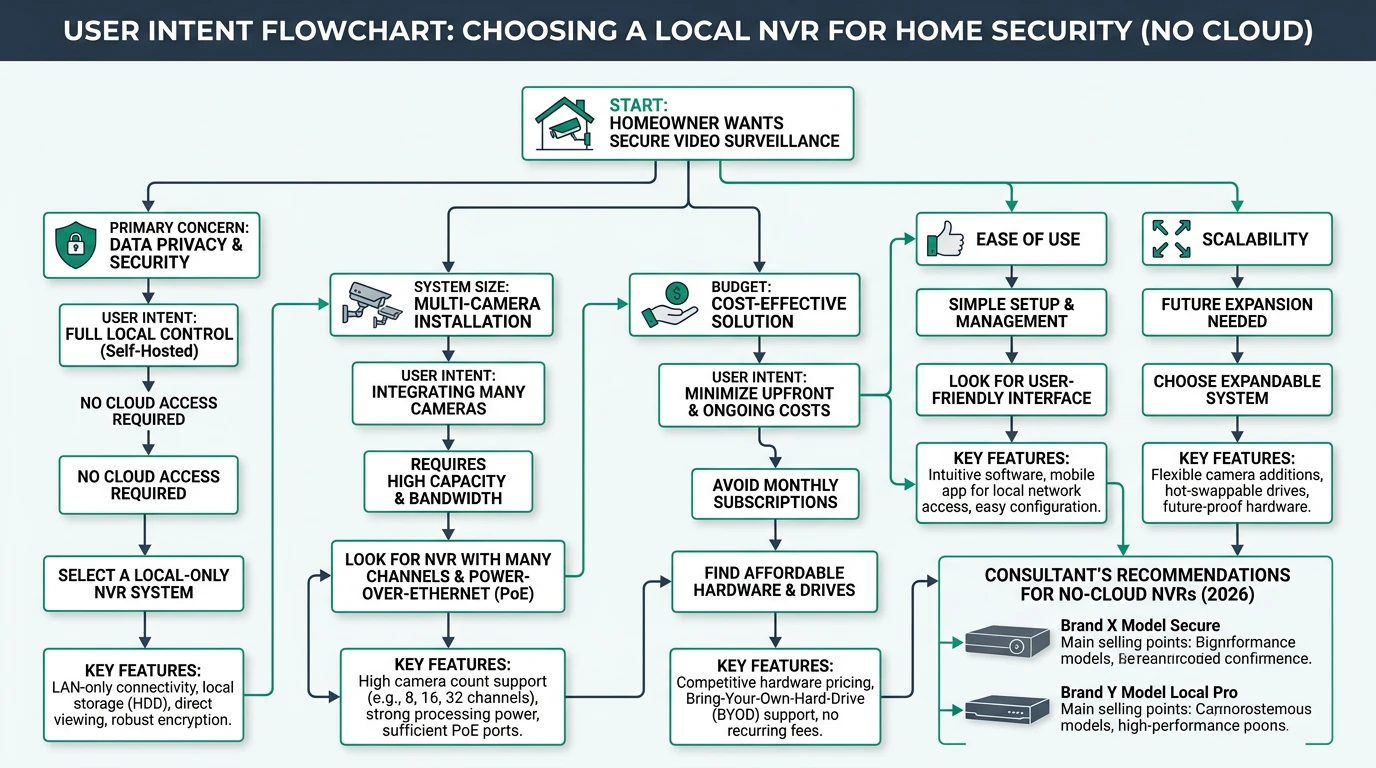
Selecting an NVR that fits the specific needs of your home is crucial for maximizing the effectiveness of your surveillance system. The Amcrest NV4108-A2, with its 8-channel capacity, is well-suited for medium-sized homes that require multiple cameras for comprehensive coverage. Its compatibility with ONVIF-compliant cameras ensures that users can integrate devices from various manufacturers, providing flexibility in camera selection.
For smaller homes or users seeking a straightforward setup, the TP-Link VIGI NVR1008H offers an 8-channel PoE system that is easy to install and manage. Its plug-and-play design simplifies the setup process, making it an excellent choice for users new to NVR systems. The Reolink RLK8-520D4, with its bundled cameras and local storage, provides a convenient all-in-one solution for users who prefer a ready-to-use kit.
Larger properties or users with extensive surveillance needs may benefit from the Lorex 4K+ or Camius 8/16-channel systems. These models offer higher channel capacities and greater storage options, making them ideal for users who require extensive coverage and detailed video archives. By selecting an NVR that aligns with the size and complexity of their home, users can ensure optimal performance and security.
Setup Complexity and Support
The ease of setup and ongoing support are important considerations for users selecting an NVR system. The TP-Link VIGI NVR1008H is renowned for its simplicity, offering a plug-and-play design that allows users to connect cameras with a single cable. This ease of installation makes it an ideal choice for users who prefer a hassle-free setup process.
Amcrest and Reolink systems, while slightly more complex, offer app-based management that simplifies camera integration and system configuration. Users can add cameras via QR code scanning, reducing the time and effort required for setup. The Reolink RLK8-520D4, with its bundled kit, provides a straightforward installation process that can be completed in under an hour, making it accessible for DIY enthusiasts.
Support options vary by manufacturer, with most offering warranties and online resources to assist users. Lorex, for example, is known for its reputable customer support and offers warranties of up to five years on hard drives. For users seeking community-driven support, online forums and user groups provide valuable insights and troubleshooting tips. By selecting an NVR with robust support options, users can ensure a smooth experience and minimize potential issues.
Security and Privacy Implications
Security and privacy are paramount when selecting an NVR system, as users need assurance that their footage remains secure and private. All top-rated NVRs in this guide prioritize local control, storing footage on hard drives rather than in the cloud. This approach eliminates the risk of data breaches associated with cloud storage and ensures that users maintain full control over their video data.
The use of ONVIF standards further enhances security by ensuring encrypted RTSP streams, preventing unauthorized access to video feeds. Models like the Amcrest NV4108-A2 and TP-Link VIGI NVR1008H adhere to these standards, providing peace of mind for users concerned about privacy. Additionally, many NVR systems offer IP67-rated cameras, which are resistant to tampering and environmental damage, further enhancing security.
However, users should be aware of potential risks, such as weak default passwords, which can compromise system security. It’s recommended to change default passwords and implement VLAN isolation to protect against unauthorized access. While enterprise models like Uniview offer additional security features, they may be overkill for typical home use. By selecting an NVR with robust security features and following best practices, users can ensure their systems remain secure and private.
Primary Sources Table
| Index | Title/Description | Direct URL |
|---|---|---|
| 1 | 6 Best ONVIF NVRs (2026) – Flexible Multi-Brand Camera Systems | https://thereviews.github.io/ONVIF-NVR |
| 2 | 2026 Guide to the Best NVR Camera System for Safety - eufy US | https://www.eufy.com/blogs/security-camera/best-nvr-camera-system |
| 3 | Best Rated Security Camera System 2026: Top Brands Reviewed | https://www.backstreet-surveillance.com/blog/post/best-rated-security-camera-system-2025-top%E2%80%91ranked-brands-reviewed |
| 4 | Best Cheap Home Security Cameras For 2026 | https://www.cctvcameraworld.com/security-camera-systems/best-cheap-home-security-cameras/ |
| 5 | 4K NVR Camera Systems - Plug-n-Play PoE Surveillance - Camius | https://www.camius.com/nvr-camera-kits/ |
| 6 | Best NVR Camera System in 2026 - Coram AI | https://www.coram.ai/post/best-nvr-camera-system |
| 7 | The Best PoE Security Camera Systems in 2026 - Security.org | https://www.security.org/security-cameras/best/poe/ |
| 8 | My Top 5! Which Security Brand Should You Buy in 2026? - YouTube | https://www.youtube.com/watch?v=EaV74R2rMwk |
Conclusion
In conclusion, selecting the right NVR for home use in 2026 requires careful consideration of privacy, reliability, cost, and compatibility. The Amcrest NV4108-A2 emerges as the best overall choice, offering a balance of these factors with its robust privacy features, reliable performance, and cost-effective pricing. For users with specific needs, alternatives like the TP-Link VIGI NVR1008H and Reolink RLK8-520D4 provide viable options that cater to different preferences and budgets.
For further insights into local storage security solutions, consider exploring our guides on Apple HomeKit Secure Video vs. Local NVR for Privacy, Best Local Storage Security Cameras Without Subscription 2026, and Best Open Source Smart Home Software for Privacy Advocates.