Smart Home Privacy
Ubiquiti UniFi vs TP-Link Omada: Smart Home Privacy 2026
UniFi vs Omada in 2026: VLANs, Protect NVR, cloud vs local OC200 controllers, and which stack segments IoT with fewer cloud dependencies.
Quick answer: UniFi or Omada for a privacy-minded home LAN?
UniFi Protect + local controllers align with on-prem video and tight VLAN policy. Omada wins on price and simpler Wi‑Fi rollouts—use a hardware controller (OC200/OC300) instead of cloud-only if you want fewer account hops.
Source: TP-Link Omada SDN
Executive Summary
In 2026, the choice between Ubiquiti UniFi and TP-Link Omada for smart home VLAN and local surveillance privacy hinges on balancing privacy needs, budget constraints, and technical capabilities. Compare against OpenWrt vs stock firmware, OPNsense vs pfSense, and VLAN for IoT before you buy a full stack. UniFi stands out for local Protect NVR paths; Omada is attractive when you want lower TCO and accept more vendor-app workflows.
UniFi’s ecosystem is well-suited for privacy-focused smart homes, offering local NVR options and comprehensive VLAN management. Its hardware-based controllers ensure offline reliability, a crucial factor for maintaining network integrity during internet outages. On the other hand, Omada’s free cloud controller and cost-effective hardware make it attractive for users looking to manage expenses while still achieving effective network segmentation.
Bottom line: Choose Ubiquiti UniFi for maximum privacy and local control, and TP-Link Omada for a budget-friendly, straightforward setup.
| Decision | Lean UniFi | Lean Omada |
|---|---|---|
| Local-only cameras + NVR | Protect ecosystem | Third-party NVR + Omada switching |
| Budget ceiling | Higher | Lower |
| Controller preference | Cloud Key / self-hosted | OC200 local vs cloud |
Privacy and Local Control: Key Considerations
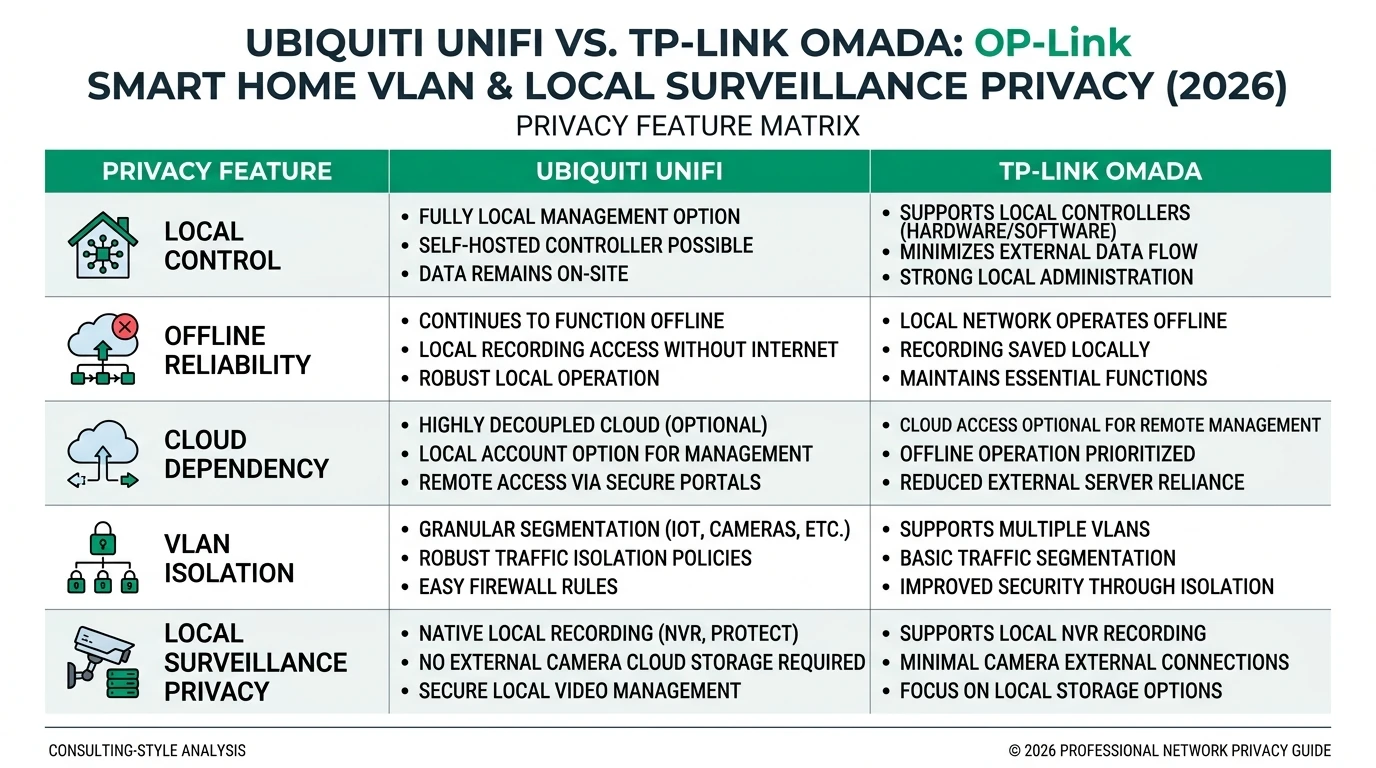
When evaluating Ubiquiti UniFi and TP-Link Omada for smart home privacy, the primary consideration is how each system handles local control and data privacy. UniFi excels in providing a self-hosted environment that minimizes cloud dependency, crucial for users concerned about data leaks. Its UniFi Protect NVR system allows for local storage of surveillance footage, ensuring that sensitive data remains within the confines of your home network1.
In contrast, TP-Link Omada offers a free cloud-based controller, which, while convenient, introduces potential privacy risks. Users must weigh the ease of cloud management against the possibility of data exposure. For those prioritizing privacy, opting for Omada’s local OC200 controller is advisable, as it mitigates cloud-related risks by keeping control within the local network2.
Both systems support VLAN segmentation, a critical feature for isolating IoT devices and enhancing network security. UniFi’s implementation is particularly robust, with native support for 802.1Q VLANs and local RADIUS authentication, providing an extra layer of security. Omada also supports VLANs, but its cloud-first design may not be ideal for users seeking maximum privacy3.
Offline Reliability and Network Integrity
Offline reliability is another crucial factor when choosing between UniFi and Omada. UniFi’s hardware controllers, such as the Cloud Key, ensure that network management and VLAN enforcement remain operational even during internet outages. This capability is vital for maintaining network integrity and preventing unauthorized access when the internet is down4.
Omada, while offering local hardware controllers, primarily promotes its cloud-based management, which can be a disadvantage if offline reliability is a priority. However, the OC200 controller provides a viable local management option, ensuring that network functions continue uninterrupted during connectivity issues5.
For smart homes heavily reliant on IoT devices, maintaining network segmentation and security during outages is essential. UniFi’s approach offers peace of mind with its robust offline capabilities, while Omada’s local controller option provides a cost-effective alternative for users willing to forego cloud management6.
Total Cost of Ownership: Budget vs. Features
The total cost of ownership (TCO) is a significant consideration for smart home deployments. Ubiquiti UniFi typically requires a higher initial investment, with costs for gateways, access points, and switches adding up. However, this investment is justified by the comprehensive features and long-term reliability it offers7.
TP-Link Omada, on the other hand, is known for its budget-friendly pricing, making it accessible for users with limited budgets. The absence of controller fees and the availability of cost-effective hardware options make Omada an attractive choice for those seeking to minimize expenses without compromising on essential functionalities8.
| Criteria | Ubiquiti UniFi | TP-Link Omada |
|---|---|---|
| Privacy Score | High | Medium |
| Offline Reliability | Excellent | Good |
| TCO (3 APs + Switch + Gateway) | ~$800-1000 | ~$600-800 |
While Omada’s upfront costs are lower, UniFi’s investment in privacy and local control features may offer better value over time, especially for users prioritizing privacy and network integrity9.
Ecosystem and Smart Home Integration
The ecosystem offered by each platform is a critical factor for users planning to expand their smart home setups. Ubiquiti UniFi provides a mature and comprehensive ecosystem, including a wide range of devices such as cameras, access points, and switches. This variety allows for seamless integration and expansion as smart home needs evolve10.
Omada’s ecosystem, while narrower, still covers essential components like gateways, switches, and access points. Its in-house manufacturing ensures compatibility and reliability, making it a solid choice for users who prefer a cohesive system without the need for extensive third-party integrations11.
For users planning to incorporate advanced smart home features, UniFi’s broader selection and support for higher-speed connections, such as 2.5G switches for WiFi 7, make it a future-proof choice. Omada, while more limited in high-end options, remains a viable choice for users with simpler needs12.
Security and Privacy Implications
Security and privacy are paramount when managing a smart home network. Ubiquiti UniFi’s commitment to privacy is evident in its local NVR options and proactive security measures, such as bug bounties and transparent firmware updates. These features ensure that users can trust their network’s integrity and data privacy13.
TP-Link Omada, while offering essential security features, lacks the same level of transparency and proactive measures. Its reliance on cloud-based management introduces potential vulnerabilities, making it less ideal for users with stringent privacy requirements. However, opting for local management options can mitigate some of these risks14.
For users concerned about regulatory compliance, such as GDPR or CCPA, UniFi’s approach to privacy and security makes it the preferred choice. Omada, while suitable for less stringent environments, may not meet the needs of users with high privacy demands15.
Setup Complexity and Support
The complexity of setting up and managing a smart home network can vary significantly between UniFi and Omada. UniFi’s interface, while powerful, can be daunting for beginners due to its extensive features and customization options. However, this complexity is offset by the long-term benefits of a robust and reliable network16.
Omada, in contrast, offers a more straightforward setup process, making it accessible for users with limited technical expertise. Its “set and forget” approach is appealing for those who prefer simplicity over extensive customization. However, this ease of use comes at the cost of some advanced features and control17.
Both platforms offer support options, but UniFi’s US-based support and proactive firmware updates provide a more reliable experience. Omada’s support, while adequate, is less consistent, which may be a consideration for users who anticipate needing assistance18.
Checklist
- Evaluate privacy needs and local control preferences
- Consider offline reliability and network integrity
- Assess total cost of ownership and budget constraints
- Explore ecosystem compatibility and expansion potential
- Review security and privacy implications
- Understand setup complexity and support requirements
FAQ
Frequently Asked Questions
Which system offers better privacy for local surveillance?
Ubiquiti UniFi provides better privacy for local surveillance due to its self-hosted NVR options and robust security measures.
Is TP-Link Omada suitable for budget-conscious users?
Yes, TP-Link Omada is cost-effective, offering budget-friendly pricing and a simpler setup process.
Can both systems handle VLAN segmentation?
Both UniFi and Omada support VLAN segmentation, essential for isolating IoT devices and enhancing network security.
What are the offline reliability features of UniFi?
UniFi’s hardware controllers ensure network management and VLAN enforcement remain operational during internet outages.
How does Omada's cloud-based controller affect privacy?
Omada’s cloud-based controller introduces potential privacy risks, but using a local OC200 controller can mitigate these concerns.
Primary Sources Table
| ID | Source | Direct URL |
|---|---|---|
| 1 | Ubiquiti vs TP-Link (2026) - YouTube | YouTube |
| 2 | TP-Link Omada Switches vs Ubiquiti UniFi Switches - Peerspot | Peerspot |
| 3 | Omada vs Unifi pricing - TP-Link Community | TP-Link |
| 4 | UniFi vs Omada WiFi 7 - iFeeltech | iFeeltech |
| 5 | Help choosing Omada vs Ubiquiti - TechEnclave | TechEnclave |
| 6 | Omada vs UniFi 2025 - Softech | Softech |
Conclusion
In conclusion, the decision between Ubiquiti UniFi and TP-Link Omada for smart home VLAN and local surveillance privacy in 2026 depends on your specific needs and priorities. UniFi offers superior privacy and local control, making it ideal for users who prioritize security and network integrity. Omada, with its budget-friendly pricing and simpler setup, is a practical choice for those seeking cost-effective solutions.
Explore more about smart home privacy solutions by checking our guides on Apple HomeKit Secure Video vs Local NVR for Privacy, Aqara vs Shelly vs Tuya Privacy 2026, Best Hardware for Local AI Smart Home 2026, and smart home mesh for privacy.
Footnotes
-
Ubiquiti vs TP-Link (2026) - YouTube ↩
-
TP-Link Omada Switches vs Ubiquiti UniFi Switches - Peerspot ↩
-
Omada vs Unifi pricing - TP-Link Community ↩
-
UniFi vs Omada WiFi 7 - iFeeltech ↩
-
Help choosing Omada vs Ubiquiti - TechEnclave ↩
-
Omada vs UniFi 2025 - Softech ↩
-
Ubiquiti vs TP-Link (2026) - YouTube ↩
-
TP-Link Omada Switches vs Ubiquiti UniFi Switches - Peerspot ↩
-
Omada vs Unifi pricing - TP-Link Community ↩
-
UniFi vs Omada WiFi 7 - iFeeltech ↩
-
Help choosing Omada vs Ubiquiti - TechEnclave ↩
-
Omada vs UniFi 2025 - Softech ↩
-
Ubiquiti vs TP-Link (2026) - YouTube ↩
-
TP-Link Omada Switches vs Ubiquiti UniFi Switches - Peerspot ↩
-
Omada vs Unifi pricing - TP-Link Community ↩
-
UniFi vs Omada WiFi 7 - iFeeltech ↩
-
Help choosing Omada vs Ubiquiti - TechEnclave ↩
-
Omada vs UniFi 2025 - Softech ↩