Smart Home Privacy
UniFi Protect vs Blue Iris vs Frigate NVR 2026
UniFi Protect vs Blue Iris vs Frigate in 2026 for local surveillance: vendor lock-in, ONVIF openness, AI on Coral, and which stack keeps footage off third-party clouds.
Quick answer: Which local NVR stack is best for privacy in 2026?
Frigate is the most auditable and self-hosted. Blue Iris wins on Windows + broad ONVIF camera mix. UniFi Protect is polished inside Ubiquiti hardware but ties you to their ecosystem for the best experience.
Source: Frigate documentation
Executive Summary
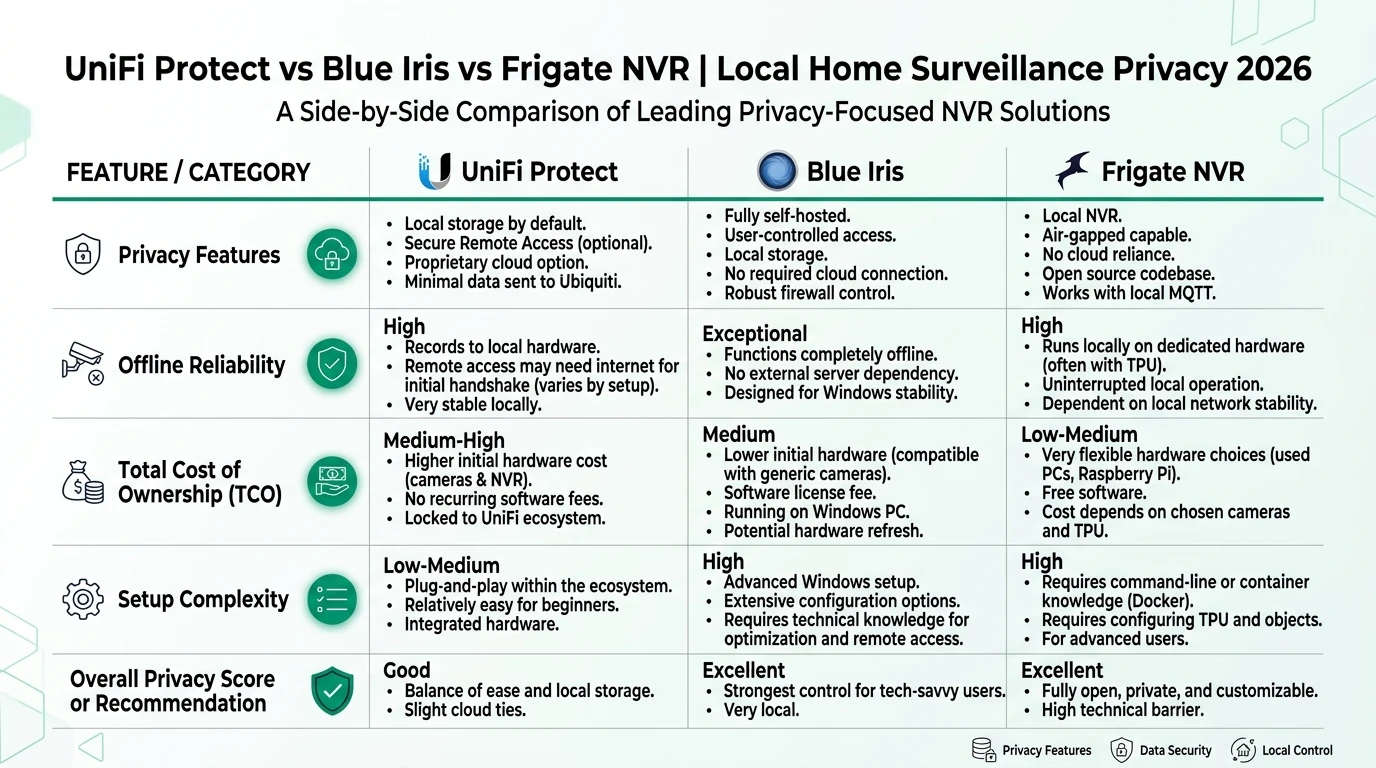
In 2026, choosing the right Network Video Recorder (NVR) for local home surveillance hinges on balancing privacy, offline reliability, and total cost of ownership (TCO). UniFi Protect, Blue Iris, and Frigate each offer distinct advantages and trade-offs. Cross-read Scrypted vs Frigate vs Blue Iris, ONVIF vs RTSP vs proprietary APIs, and Frigate vs Ring vs Arlo before you buy cameras.
Bottom line: Your choice should reflect your priorities: ease of use with UniFi Protect, flexibility with Blue Iris, or privacy and customization with Frigate.
| If you prioritize | Choose |
|---|---|
| Open code + Home Assistant | Frigate |
| Mixed ONVIF on Windows | Blue Iris |
| All-in-one Ubiquiti stack | UniFi Protect |
Privacy and Local Control
Privacy is a paramount concern for many users in 2026, especially with increasing awareness of data security. UniFi Protect offers a fully local setup, ensuring that video feeds do not rely on cloud services. However, its proprietary nature means users are somewhat locked into the Ubiquiti ecosystem, which can limit flexibility1. This is a significant consideration if you value control over your hardware and software choices.
Blue Iris, on the other hand, excels in offering local control without vendor lock-in. Its support for ONVIF-compliant cameras means you can integrate a wide range of devices, providing flexibility and control over your surveillance setup2. This makes it an attractive option for users who already have a diverse camera setup and want to avoid being tied to a single brand.
Frigate, being open-source, offers the highest level of privacy and control. Users can audit the code themselves, ensuring there are no hidden data collection practices. Running in containers like Docker or Proxmox, Frigate provides a robust environment that is isolated from the internet, further enhancing privacy3. This makes it ideal for privacy-conscious users who are comfortable with more technical setups.
Offline Reliability and System Performance
Offline reliability is crucial for ensuring that your surveillance system remains operational even without internet access. UniFi Protect is designed with this in mind, leveraging edge AI capabilities on its cameras and NVRs to function independently of the internet4. This ensures continuous operation and recording, making it a reliable choice for users who prioritize stability.
Blue Iris also offers high offline reliability, with its browser-based UI3 interface providing stable performance on Windows hardware5. This setup allows for continuous monitoring and recording without internet dependency, although it requires a dedicated PC to run efficiently.
Frigate’s containerized approach allows it to be highly tunable for low-resource environments, making it an excellent choice for offline use6. By utilizing a Coral NPU for AI processing, Frigate can efficiently handle video feeds without relying on cloud services. This makes it a compelling option for users who want a system that can operate independently and efficiently.
Total Cost of Ownership (TCO)
When evaluating the total cost of ownership, it’s essential to consider both upfront and ongoing expenses. UniFi Protect requires an investment in Ubiquiti hardware, with a typical setup costing around $1,500 for an NVR and four cameras7. While there are no subscription fees, the need for UniFi cameras to access full AI capabilities can increase costs.
Blue Iris offers a more budget-friendly option, with a one-time license fee of $70 and compatibility with any ONVIF hardware8. This flexibility allows users to leverage existing cameras, potentially reducing initial costs. However, the requirement for a dedicated Windows PC can add to the overall expense.
Frigate stands out for its low TCO, being free software that can run on existing hardware9. The primary costs involve purchasing a Coral NPU and any additional storage hardware, making it the most cost-effective option for users who already have compatible equipment.
| Criteria | UniFi Protect | Blue Iris | Frigate |
|---|---|---|---|
| Privacy (Local Control) | Fully local; no cloud required, but proprietary ecosystem limits export. | Fully local; ONVIF support for any cam, no vendor lock-in. | Open-source, fully local; runs in containers (e.g., Proxmox), no telemetry. |
| Offline Reliability | High; edge AI on cameras/NVR, works without internet. | High; browser-based UI3, stable on Windows hardware. | High; containerized, tunable for low-resource offline use. |
| TCO (4 cams, 1-year) | $500 NVR + $450 cam bundle; no sub, but UniFi cams needed for AI (~$1,500 total). | $70 license + any ONVIF hardware (~$800-1,200); one-time fee. | Free software + Coral NPU ( |
AI Detection Accuracy and Performance
AI detection accuracy is a critical factor for users who rely on their surveillance systems to identify and alert them to potential security threats. UniFi Protect offers a respectable 86.5% accuracy rate in tests, although its reliance on proprietary cameras for AI features can be a limitation10. This makes it a solid choice for users who prefer a plug-and-play solution within the Ubiquiti ecosystem.
Blue Iris, with its integration of DeepStack AI, achieves a higher accuracy rate of 91.5%11. This makes it an excellent option for users who prioritize detection accuracy and are willing to invest in additional AI hardware. Its flexibility in camera choice also allows users to optimize their setup for specific needs.
Frigate’s AI capabilities rely on the Coral NPU, which offers efficient local processing12. While specific accuracy metrics are not readily available, users can tune Frigate’s settings to optimize performance for their specific environment. This makes it a versatile choice for users who are comfortable with a more hands-on approach to system configuration.
Setup Complexity and User Support
The complexity of setting up and maintaining an NVR system can vary significantly between these options. UniFi Protect is designed for ease of use, with a straightforward setup process that integrates seamlessly with other Ubiquiti products13. This makes it an ideal choice for users who prefer a hassle-free experience with minimal technical involvement.
Blue Iris requires a bit more effort, particularly in configuring the software on a Windows PC and tuning ONVIF settings14. However, its comprehensive user forums and community support provide valuable resources for troubleshooting and optimization.
Frigate, being open-source, offers the most flexibility but also demands the most technical expertise15. Setting up Frigate involves configuring containers and tuning per-camera settings, which can be challenging for less tech-savvy users. However, its active open-source community provides robust support and frequent updates.
Checklist
- Consider your technical expertise before choosing a system.
- Evaluate existing hardware for compatibility.
- Determine your budget for initial setup and ongoing costs.
- Assess your privacy and control priorities.
- Test systems offline to ensure reliability.
FAQ
Frequently Asked Questions
What is the primary benefit of using UniFi Protect?
UniFi Protect offers seamless integration within the Ubiquiti ecosystem, providing a user-friendly experience with reliable offline capabilities.
How does Blue Iris handle camera compatibility?
Blue Iris supports ONVIF-compliant cameras, allowing for a wide range of device integration without vendor lock-in.
Why choose Frigate for home surveillance?
Frigate is open-source, offering high privacy and flexibility, ideal for tech-savvy users who prioritize control and customization.
What are the hidden costs associated with Blue Iris?
While the software license is affordable, users need a dedicated Windows PC and potentially additional AI hardware, which can increase costs.
Can these systems operate without internet access?
Yes, all three systems are designed to function offline, ensuring continuous operation and recording without internet dependency.
Primary Sources Table
| Index | Title/Description | Direct URL |
|---|---|---|
| 1 | UniFi Protect’s Most Underrated Feature (YouTube) | YouTube |
| 2 | From Blue Iris to UniFi Protect (IP Cam Talk) | IP Cam Talk |
| 3 | Ultimate Network Video Recorder Comparison (YouTube) | YouTube |
| 4 | UniFi Protect got Amazing (The Smart Home Hookup) | Smart Home Hookup |
| 5 | Ubiquiti vs Frigate (Lawrence Systems Forum) | Lawrence Systems |
| 6 | UniFi Protect vs Blue Iris vs Reolink (The Smart Home Hookup) | Smart Home Hookup |
| 7 | Disappointing UniFi Protect review (UI Community) | Community UI |
Conclusion
For further insights into smart home privacy, consider exploring our guides on Alexa, Google Home, Apple Home vs Home Assistant Privacy 2026, Apple HomeKit Secure Video vs Local NVR for Privacy, Aqara vs Shelly vs Tuya Privacy 2026, Ubiquiti UniFi vs TP-Link Omada, and Reolink vs Ubiquiti local privacy.
Footnotes
-
UniFi Protect’s Most Underrated Feature (YouTube) ↩
-
From Blue Iris to UniFi Protect (IP Cam Talk) ↩
-
Ultimate Network Video Recorder Comparison (YouTube) ↩
-
UniFi Protect got Amazing (The Smart Home Hookup) ↩
-
Ubiquiti vs Frigate (Lawrence Systems Forum) ↩
-
UniFi Protect vs Blue Iris vs Reolink (The Smart Home Hookup) ↩
-
Disappointing UniFi Protect review (UI Community) ↩
-
From Blue Iris to UniFi Protect (IP Cam Talk) ↩
-
Ubiquiti vs Frigate (Lawrence Systems Forum) ↩
-
UniFi Protect vs Blue Iris vs Reolink (The Smart Home Hookup) ↩
-
From Blue Iris to UniFi Protect (IP Cam Talk) ↩
-
Ubiquiti vs Frigate (Lawrence Systems Forum) ↩
-
UniFi Protect’s Most Underrated Feature (YouTube) ↩
-
From Blue Iris to UniFi Protect (IP Cam Talk) ↩
-
Ubiquiti vs Frigate (Lawrence Systems Forum) ↩