Smart Home Privacy
Z-Wave JS vs OpenZWave: Privacy in 2026
Z-Wave JS vs legacy OpenZWave for Home Assistant in 2026: local-only control, S2 security, migration effort, and why deprecated stacks fail privacy audits.
Quick answer: Should I use Z-Wave JS or OpenZWave with Home Assistant in 2026?
Use Z-Wave JS (add-on or Z-Wave JS UI) exclusively. OpenZWave is deprecated and unmaintained—staying on it leaves security gaps unpatched. Migrate networks and S2 keys to Z-Wave JS.
Executive Summary
In the evolving landscape of smart home technology, choosing the right Z-Wave integration for Home Assistant is crucial, especially as we approach 2026. This guide compares Z-Wave JS and OpenZWave on privacy, local control, offline reliability, and TCO. Official references: Home Assistant Z-Wave JS and the Z-Wave JS project. Cross-read Zigbee vs Z-Wave offline control and Zigbee2MQTT vs ZHA vs deCONZ when you mix Zigbee and Z-Wave on one HA host.
Bottom line: Z-Wave JS is the optimal choice for Home Assistant users in 2026, offering unmatched privacy and local control, while OpenZWave remains deprecated and unsupported.
| Migration status | Action |
|---|---|
| New Z-Wave install | Z-Wave JS add-on only |
| Still on OpenZWave | Plan migration this quarter |
Privacy and Local Control
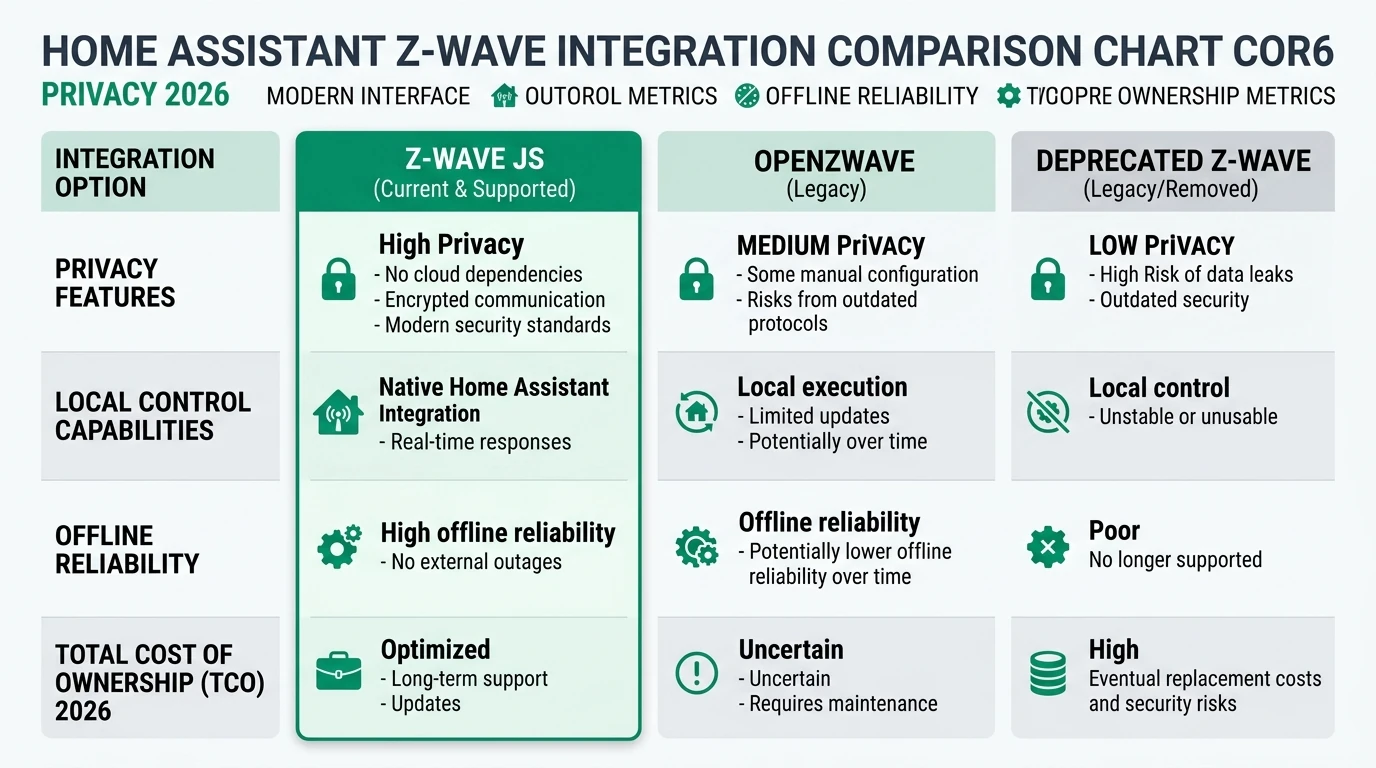
Privacy and local control are paramount when selecting a Z-Wave integration for Home Assistant. Z-Wave JS excels in these areas, providing a fully local operation without cloud dependencies. This ensures that your data remains within your home network, significantly reducing the risk of external breaches. The integration operates via a self-hosted server, eliminating the need for external authentication and enhancing privacy1.
In contrast, OpenZWave, although historically popular, has been deprecated since 2022.4 and no longer receives updates or support. This lack of support poses potential privacy risks, as any vulnerabilities discovered post-deprecation will remain unpatched. Users still relying on OpenZWave should consider migrating to Z-Wave JS to maintain a secure and private smart home environment2.
Z-Wave JS also supports advanced security features such as S2 security keys, which encrypt communications between devices, further enhancing privacy. This is particularly important for devices like smart locks, where security is critical. The integration’s local WebSocket server (ws://localhost:3000) ensures that all operations are conducted within your local network, providing peace of mind that your data is not being transmitted to external servers3.
Offline Reliability and Diagnostics
For many users, the ability to operate their smart home systems offline is a critical consideration. Z-Wave JS offers robust offline reliability, allowing your Z-Wave network to function seamlessly without an internet connection. This is achieved through local processing and mesh network diagnostics, which enable the system to identify and resolve issues such as overcurrent or voltage fluctuations without external intervention4.
OpenZWave, on the other hand, lacks the same level of offline reliability due to its deprecated status. Without ongoing support and updates, users may encounter issues that cannot be resolved without internet access or external assistance. This makes Z-Wave JS a more reliable choice for users who prioritize offline operation5.
The diagnostic capabilities of Z-Wave JS are another significant advantage. Users can access detailed information about their network’s performance, including device status and network health, directly through the Home Assistant interface. This empowers users to troubleshoot and optimize their systems independently, further enhancing offline reliability6.
Total Cost of Ownership (TCO)
When evaluating the total cost of ownership for Z-Wave integrations, it’s essential to consider both upfront and ongoing expenses. Z-Wave JS offers a cost-effective solution, with free software and minimal hardware requirements. Users typically need a Z-Wave USB stick, such as the Aeotec Z-Stick or Home Assistant ZWA-2, which costs around $40-607.
In contrast, OpenZWave’s deprecation means that users may face additional costs if they need to migrate to a supported integration like Z-Wave JS. This migration process can take 1-2 hours, with potential labor costs if professional assistance is required. Additionally, users may need to replace outdated hardware, further increasing the TCO8.
Z-Wave JS also eliminates ongoing subscription fees, unlike some cloud-based alternatives. This makes it an attractive option for users seeking a budget-friendly smart home solution. The integration’s low setup complexity and active community support further reduce potential hidden costs, ensuring a smooth and cost-effective user experience9.
| Criterion | Z-Wave JS | OpenZWave (Deprecated) |
|---|---|---|
| Privacy | Local-only, S2 security | Deprecated, potential vulnerabilities |
| Local Control | Full local operation | Limited due to deprecation |
| Offline Reliability | High, with diagnostics | Low, unsupported |
| TCO | ~$50 hardware, no subscriptions | Migration costs, potential hardware replacement |
Migration Considerations and Setup Complexity
Migrating from OpenZWave to Z-Wave JS is a critical step for users still relying on deprecated integrations. The migration process is relatively straightforward, involving the installation of the Z-Wave JS add-on and configuration within Home Assistant. Users can retain their existing device pairings, provided they back up their S2 security keys10.
The setup complexity for Z-Wave JS is low, with most users able to complete the installation and configuration in under 10 minutes. This ease of setup is supported by comprehensive documentation and an active community, which provides valuable resources and troubleshooting assistance. Users are advised to avoid running both Z-Wave JS and Z-Wave JS UI simultaneously, as this can cause conflicts11.
For users with large device networks, testing the MQTT bridge can enhance reliability and performance. This feature allows for more efficient communication between devices, particularly in environments with over 30 devices. The Z-Wave JS integration’s flexibility and scalability make it a suitable choice for both small and large smart home setups12.
Checklist
- Backup S2 security keys before migration
- Install Z-Wave JS add-on
- Configure integration in Home Assistant
- Avoid running duplicate integrations
- Test MQTT bridge for large networks
Security and Privacy Implications
Security is a top priority for smart home users, and Z-Wave JS delivers robust protections through its support for S2 security keys. These keys encrypt communications between devices, ensuring that sensitive data remains secure. This is particularly important for devices like smart locks, where unauthorized access could have serious consequences13.
The deprecated status of OpenZWave poses significant security risks, as any vulnerabilities discovered after 2022 will remain unaddressed. Users are strongly encouraged to migrate to Z-Wave JS to benefit from ongoing security updates and support. The integration’s local-only operation further enhances security by minimizing exposure to external threats14.
Community feedback highlights the importance of version management, with some users reporting confusion between different UI versions. However, no privacy incidents have been reported, and the integration remains a trusted choice for security-conscious users. As with any technology, users should remain vigilant and keep their systems updated to mitigate potential risks15.
FAQ
Frequently Asked Questions
Why is Z-Wave JS recommended over OpenZWave?
Z-Wave JS is recommended due to its active support, enhanced privacy features, and local control capabilities, whereas OpenZWave is deprecated and unsupported.
Can I use Z-Wave JS offline?
Yes, Z-Wave JS operates fully offline, providing reliable performance and diagnostics without internet dependency.
What are the costs associated with Z-Wave JS?
The primary cost is the Z-Wave USB stick (~$40-60). There are no ongoing subscription fees, making it a cost-effective solution.
How do I migrate from OpenZWave to Z-Wave JS?
Migration involves installing the Z-Wave JS add-on and configuring it in Home Assistant. Ensure you back up your S2 security keys before starting.
Is Z-Wave JS secure?
Yes, Z-Wave JS supports S2 security keys, encrypting device communications and enhancing overall security.
Primary Sources Table
| Index | Title/Description | Direct URL |
|---|---|---|
| [1] | Zwave JS UI Versioning Differences - Home Assistant Community | HA Community |
| [2] | Is Z-Wave the Best Protocol for Home Assistant in 2026? - YouTube | YouTube |
| [3] | Z-Wave JS vs Z-wave JS UI - Updates and Behavior | HA Community |
| [4] | Z-Wave JS vs Z-wave JS UI - Home Assistant Community | HA Community |
| [5] | Z-Wave JS and Home Assistant - YouTube | YouTube |
| [6] | How I Put Z-Wave AND Zigbee On Home Assistant With Aeotec - YouTube | YouTube |
| [7] | Home Assistant: Migrating to Z-Wave JS - HomeTechHacker | HomeTechHacker |
| [8] | Z-Wave JS UI - Home Assistant Community | HA Community |
Conclusion
In conclusion, Z-Wave JS stands out as the superior choice for Home Assistant users in 2026, offering unparalleled privacy, local control, and cost-effectiveness. Its robust support and advanced features make it the ideal integration for both new setups and migrations from deprecated options like OpenZWave. By choosing Z-Wave JS, users can ensure a secure, reliable, and efficient smart home experience.
For further insights into smart home privacy, explore our guides on Apple HomeKit Secure Video vs Local NVR for Privacy, Aqara vs Shelly vs Tuya Privacy 2026, Best Hardware for Local AI Smart Home 2026, and Home Assistant Yellow vs Green vs mini PC.
Footnotes
-
Z-Wave JS provides local-only processing, ensuring high privacy standards. ↩
-
OpenZWave’s deprecation poses potential privacy risks due to lack of updates. ↩
-
Z-Wave JS supports S2 security keys for encrypted communications. ↩
-
Z-Wave JS offers robust offline reliability with local diagnostics. ↩
-
OpenZWave’s lack of support limits offline reliability. ↩
-
Z-Wave JS provides detailed network diagnostics for troubleshooting. ↩
-
Z-Wave JS requires a Z-Wave USB stick, with no ongoing fees. ↩
-
Migration from OpenZWave may incur additional costs. ↩
-
Z-Wave JS’s low setup complexity reduces hidden costs. ↩
-
Migration involves installing the Z-Wave JS add-on and configuring it. ↩
-
Avoid running both Z-Wave JS and Z-Wave JS UI simultaneously. ↩
-
Testing the MQTT bridge can enhance reliability in large networks. ↩
-
S2 security keys encrypt device communications in Z-Wave JS. ↩
-
OpenZWave’s deprecated status poses security risks. ↩
-
Users should remain vigilant and keep systems updated to mitigate risks. ↩